Microsoft 365 is a cornerstone of modern business, offering a suite of applications designed to enhance productivity and collaboration. But are you truly maximising its potential? Many businesses struggle with managing the complexities of Microsoft 365, leading to inefficiencies and missed opportunities. This is where fixed price Microsoft 365 support and strategic integration with Azure can make all the difference.
Why choose Microsoft 365?
Organisations frequently choose Microsoft 365 due to its comprehensive and integrated suite of productivity and collaboration tools, which are indispensable for contemporary business environments. This all-in-one platform includes industry-standard applications such as Word, Excel, and PowerPoint, alongside powerful communication and collaboration hubs like Microsoft Teams and SharePoint. For example, the seamless integration of SharePoint for secure document management with Exchange Online for enterprise-grade email and calendaring allows businesses to significantly streamline workflows and enhance internal communication. This integrated approach not only boosts employee productivity by providing familiar, powerful tools but also simplifies IT management for Australian businesses by consolidating critical software services into a single, subscription-based solution, often leading to a reduction in overall operating costs by up to 15% within the first year compared to managing disparate systems.
- Word, Excel, PowerPoint: The familiar and powerful Office applications.
- Teams: A central hub for communication, collaboration, and meetings.
- SharePoint: A platform for document management and team collaboration.
- Exchange Online: Enterprise-grade email and calendaring.
- OneDrive: Secure cloud storage for individual and team files.
These tools, when properly implemented and managed, can significantly boost productivity, streamline workflows, and improve communication within your organisation. For example, SharePoint & Azure: Streamline Your Cloud Migration can greatly enhance document management.
What are the challenges of managing Microsoft 365 complexity?
Managing the complexity of Microsoft 365 presents significant hurdles for Australian businesses, primarily due to intricate configuration, stringent security demands, and the need for continuous support. Tailoring the suite to an organisation's specific operational needs, such as integrating with existing CRM or ERP systems, often requires specialised knowledge beyond basic IT administration. For example, configuring conditional access policies or advanced threat protection in Microsoft Defender for Endpoint can be exceptionally complex. Moreover, ensuring data security and compliance with Australian regulations, like the Privacy Act 1988, involves continuous monitoring and expert insight to prevent breaches, which approximately 62% of Australian businesses experienced in the last year. These challenges can significantly drain internal IT resources, decrease productivity, and escalate operational costs if not expertly managed, underscoring the value of dedicated, proactive support.
- Configuration and Customisation: Setting up and tailoring Microsoft 365 to meet specific business needs can be complex.
- Security and Compliance: Ensuring data security and compliance with industry regulations requires expertise and ongoing monitoring. Learn more about Modern Workplace Security: Intune & Defender.
- Troubleshooting and Support: Resolving technical issues and providing timely support to users can strain internal IT resources.
- Integration with other systems: Seamless integration with other business applications is crucial for a unified workflow.
These challenges can lead to decreased productivity, increased IT costs, and potential security vulnerabilities. This is where fixed price Microsoft 365 support becomes invaluable.
What is the solution for fixed-price Microsoft 365 support?
Fixed-price Microsoft 365 support offers a predictable and cost-effective solution for managing an organisation's Microsoft 365 environment, directly addressing the common challenges of unpredictable expenses associated with traditional hourly IT support. Instead of paying variable rates, businesses commit to a fixed monthly fee that covers a comprehensive range of services. This model provides substantial benefits, allowing Australian businesses, for instance, to accurately forecast their IT spending and potentially reduce overall support costs by 20-30% annually compared to a variable billing system. Such plans typically encompass proactive monitoring to prevent issues, readily available expert assistance from certified Microsoft 365 professionals, and seamless scalability to accommodate business expansion. By offloading day-to-day Microsoft 365 management, internal IT resources can be reallocated to strategic initiatives, optimising the business's operational efficiency and allowing for better long-term planning, exemplified by a typical mid-sized firm with 75 employees.
- Predictable Budgeting: Eliminate unexpected IT expenses and budget accurately for your Microsoft 365 support needs.
- Proactive Support: Benefit from proactive monitoring and maintenance to prevent issues before they arise.
- Expertise on Demand: Access a team of experienced Microsoft 365 experts who can provide timely and effective support.
- Scalability: Easily scale your support services as your business grows.
- Focus on Core Business: Free up internal IT resources to focus on strategic initiatives rather than day-to-day Microsoft 365 management. We can help you Optimise IT with Microsoft 365 & Expert Support.

How does Azure integration take Microsoft 365 to the next level?
Azure integration elevates Microsoft 365 capabilities by significantly enhancing its security, scalability, and disaster recovery features. By leveraging Azure, Microsoft's robust cloud platform, Australian businesses can seamlessly integrate advanced services to protect data and applications more effectively. For instance, organisations can utilise Azure Active Directory (now Entra ID) for sophisticated identity and access management, bolstering cybersecurity measures across their Microsoft 365 environment, potentially reducing identity-related breaches by up to 99.9%. This integration also allows for hosting Microsoft 365 within Azure's highly scalable and reliable infrastructure, ensuring consistent optimal performance and availability, crucial for businesses with fluctuating demands. Furthermore, Azure Backup and Azure Site Recovery provide robust disaster recovery solutions, safeguarding against data loss and ensuring business continuity, significantly improving recovery time objectives (RTO) for critical data to often under 15 minutes.
- Enhanced Security: Leverage Azure's advanced security features, such as Azure Active Directory (now Entra ID) and Azure Security Center, to protect your data and applications. Read more on Entra ID: Your Business Continuity Lifeline.
- Scalable Infrastructure: Host your Microsoft 365 environment in Azure's scalable and reliable infrastructure, ensuring optimal performance and availability. Learn how to Secure & Scale: Managed IT Services for Modern Businesses.
- Disaster Recovery: Implement robust disaster recovery solutions using Azure Backup and Azure Site Recovery to protect your data from loss or corruption. We can help you with Azure Backup & Helpdesk: Disaster Recovery for M365.
- Advanced Analytics: Use Azure's analytics services to gain insights into your Microsoft 365 usage and identify areas for improvement.
- Custom Application Development: Develop custom applications that integrate seamlessly with Microsoft 365 using Azure's development tools and services. We can help you Boost Efficiency with Managed IT & Cloud Migration.
For example, you can use Azure Virtual Desktop to deliver Microsoft 365 applications to users on any device, anywhere. See how to Modernise Your Workplace with Azure & Virtual Desktops.
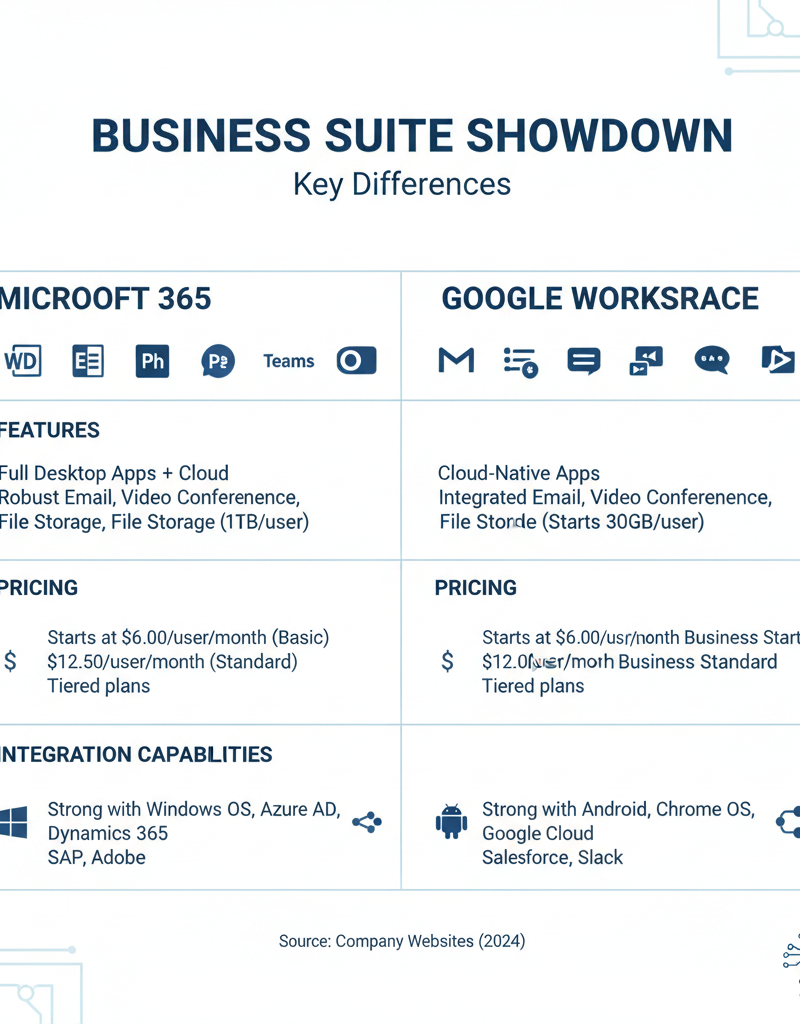
Which is right for your business: Microsoft 365 or Google Workspace?
For Australian businesses weighing their options, Microsoft 365 is generally best suited for organisations requiring a comprehensive, feature-rich productivity suite with robust security and seamless integration into existing Microsoft infrastructure, while Google Workspace excels in simplicity and real-time collaboration. Microsoft 365 offers more mature applications, particularly for desktop publishing with Word and advanced data analysis in Excel, which can be critical for tasks like financial modelling or detailed reporting. Its strong integration with Azure provides significant benefits in terms of security, scalability, and disaster recovery, a crucial consideration for businesses needing enterprise-grade reliability. For instance, organisations in regulated sectors such as finance or healthcare often find Microsoft’s advanced compliance features and data residency options within Azure vital for meeting Australian regulatory standards. This integrated ecosystem ensures superior offline access and advanced threat protection, safeguarding sensitive business data.
- Application Depth: Microsoft 365 offers a more mature and feature-rich suite of applications, particularly in areas like desktop publishing and data analysis.
- Integration with Existing Infrastructure: If your business already relies on Microsoft technologies, Microsoft 365 offers seamless integration.
- Security and Compliance: Microsoft 365 provides robust security and compliance features, particularly important for regulated industries. Fortify Your Business with Managed IT Services.
- Offline Access: Microsoft 365 offers better offline access to applications and data, which can be crucial for users who need to work without an internet connection.
- Azure Integration: The tight integration between Microsoft 365 and Azure provides significant advantages in terms of security, scalability, and disaster recovery.
While Google Workspace excels in real-time collaboration and simplicity, Microsoft 365 offers a more comprehensive and powerful solution, particularly when combined with Azure.
Why is cybersecurity with Microsoft Defender important?
Cybersecurity with Microsoft Defender is paramount because it offers Australian businesses a robust, integrated security posture essential for navigating today's complex digital landscape effectively. Microsoft Defender for Microsoft 365, specifically, provides advanced protection against a broad spectrum of sophisticated cyber threats, including evolving phishing campaigns, ransomware, and zero-day malware attacks, which continue to disproportionately target small and medium-sized enterprises. Key capabilities extend to real-time threat detection and prevention, ensuring immediate responses to emerging dangers. Furthermore, it incorporates strong data loss prevention (DLP) measures to safeguard sensitive information and offers comprehensive information governance tools, which are vital for managing data lifecycles securely. This holistic integration helps organisations not only maintain compliance with stringent Australian regulatory requirements but also actively protects their critical digital assets, a crucial factor given the escalating cost of data breaches, which averaged AUD $3.6 million for local businesses in 2023.
- Threat Protection: Real-time threat detection and prevention.
- Data Loss Prevention (DLP): Preventing sensitive data from leaving the organisation.
- Information Governance: Managing and protecting information throughout its lifecycle.
- Compliance: Meeting regulatory requirements with built-in compliance tools.
Microsoft Defender, combined with Intune for device management, creates a comprehensive security solution for your modern workplace. (https://learn.microsoft.com/en-us/mem/intune/fundamentals/what-is-intune)
How can I get started with fixed-price Microsoft 365 support and Azure?
Getting started with fixed-price Microsoft 365 support and Azure involves a structured approach, beginning with a thorough assessment of an organisation's current IT landscape and specific business objectives. Initially, businesses should identify their existing Microsoft 365 challenges and requirements before engaging a specialist. It is crucial to select a reputable Australian Managed IT Provider with proven expertise in both Microsoft 365 administration and Azure cloud solutions, capable of offering comprehensive services from planning through to implementation. Developing a detailed migration plan, implementing robust security measures such as Microsoft Defender and Intune, and providing adequate user training are critical subsequent steps. Many Australian businesses, for instance, have found that partnering with an experienced service provider can significantly streamline this transition, with some reporting a reduction in unexpected IT expenditure by up to 25% within the initial year due to predictable fixed-price structures.
- Assess Your Needs: Identify your current Microsoft 365 challenges and your business requirements.
- Choose a Managed IT Provider: Select a reputable Managed IT Provider with expertise in Microsoft 365 and Azure. Secure and Scale with Managed IT Services & Azure.
- Develop a Migration Plan: Create a detailed plan for migrating to Azure and implementing fixed price Microsoft 365 support.
- Implement Security Measures: Implement robust security measures, including Microsoft Defender and Intune.
- Provide User Training: Ensure your users are properly trained on Microsoft 365 and Azure to maximise their productivity.

How can Australian businesses embrace the power of Microsoft 365 and Azure?
Australian businesses can powerfully embrace Microsoft 365 and Azure by strategically combining them with fixed-price Microsoft 365 support, thereby ensuring efficient management and unlocking their full potential. This integrated approach directly addresses the inherent complexities of modern IT environments, allowing organisations to significantly enhance productivity, fortify security, and improve scalability without unexpected cost escalations. For instance, a small to medium-sized enterprise in Sydney that adopts this cohesive strategy might experience a reduction in IT overheads by up to 25% within the initial 18 months, alongside heightened data resilience. Leveraging Azure's robust cloud infrastructure with Microsoft 365's collaborative tools helps businesses remain competitive and secure, transforming their digital operations from a cost centre into a strategic asset. Considering a Seamless Cloud Migration to Microsoft 365 provides a clear pathway to beginning this journey effectively.
Further Reading:
- Microsoft 365 Documentation: https://www.microsoft.com/en-au/microsoft-365
- Azure Documentation: https://azure.microsoft.com/en-au/
- Australian Cyber Security Centre (ACSC): https://www.cyber.gov.au/
- Microsoft Security Blog: https://www.microsoft.com/en-us/security/blog/
- ZDNet: https://www.zdnet.com/
- TechRepublic: https://www.techrepublic.com/