Microsoft 365 (formerly Office 365) has become a cornerstone of modern business, offering a suite of tools designed to enhance productivity, collaboration, and communication. However, simply subscribing to Microsoft 365 isn't enough. To truly unlock its potential, businesses need expert guidance and support.
This guide explores how leveraging expert Microsoft 365 support can transform your business, improve security, and drive growth, particularly for businesses in Australia. We will also cover how an Azure MSP Sydney can help you integrate your Microsoft 365 environment with Azure.
What is the power of Microsoft 365 beyond just its applications?
Beyond its standard applications, the true power of Microsoft 365 lies in its integrated ecosystem, fostering enhanced collaboration, robust security, and scalable infrastructure designed to boost business efficiency. It delivers significant value by unifying critical business functions, linking communication platforms like Teams directly with document management in SharePoint Online and cloud storage via OneDrive for a seamless workflow. For example, businesses often see a 20-30% reduction in operational overhead by centralising these tools, which streamlines workflows and reduces the need for disparate software subscriptions. Furthermore, advanced cybersecurity features, such as Microsoft Defender for Endpoint, provide crucial protection, helping Australian businesses mitigate risks from sophisticated cyber threats that cost the national economy billions annually. This holistic approach simplifies IT management, promotes data-driven decision-making with Power BI, and enables secure remote work capabilities, ensuring business continuity and fostering agile growth.
- Microsoft Teams: For communication and collaboration.
- SharePoint Online: For document management and team sites.
- Exchange Online: For business-class email.
- OneDrive: For cloud storage and file sharing.
- Microsoft Defender: For advanced threat protection.
- Power BI: For data analytics and visualisation.
However, many businesses struggle to fully utilize these tools due to a lack of expertise or dedicated IT resources. This is where managed services and expert support come in.

Why do Australian businesses need expert Microsoft 365 support?
Australian businesses require expert Microsoft 365 support to ensure their digital operations are optimised, secure, and consistently available. Accessing specialist providers, such as those offering Microsoft 365 support in Brisbane, is crucial for seamless cloud migration, configuring security policies effectively, and managing user access efficiently. These experts are vital in implementing best practices to protect sensitive business data from cyber threats; for instance, Australian small-to-medium businesses alone faced an average cybersecurity incident cost of $33,000 in 2023. Furthermore, expert support provides proactive monitoring and maintenance, identifying and resolving potential issues before they impact productivity or lead to downtime. They also offer dedicated helpdesk assistance, ensuring immediate technical support and enabling the platform to scale flexibly alongside the business's evolving operational needs, thereby maximising ROI from Microsoft 365 investments.
- Optimised Configuration: Ensuring your Microsoft 365 environment is configured correctly for your specific business needs. This includes setting up security policies, managing user access, and optimising performance.
- Seamless Cloud Migration: Migrating to Microsoft 365 can be complex. Expert support ensures a smooth transition with minimal disruption to your business. Read more about Seamless Cloud Migration to Microsoft 365.
- Enhanced Security: Microsoft 365 offers robust security features, but they need to be properly configured and managed. Expert support helps you implement best practices and protect your data from cyber threats. Consider exploring Modern Workplace Security: Intune & Defender.
- Proactive Monitoring and Maintenance: Identifying and resolving issues before they impact your business. This includes monitoring system performance, patching vulnerabilities, and providing ongoing maintenance.
- Dedicated IT Helpdesk: Providing timely and effective support to your employees, resolving technical issues, and answering questions. Check out Optimise IT with Microsoft 365 & Expert Support for more info.
- Scalability and Flexibility: Adapting your Microsoft 365 environment to meet your evolving business needs. This includes adding or removing users, scaling resources, and integrating new applications.
How can Microsoft CSP Australia be a trusted partner?
A Microsoft Cloud Solution Provider (CSP) in Australia can be a trusted partner by offering comprehensive expertise and end-to-end support for Microsoft cloud technologies, acting as a crucial guide for businesses aiming to optimise their Microsoft 365 environment. These certified partners are responsible for a broad spectrum of services, ranging from initial licensing and deployment to ongoing maintenance and advanced integrations. For example, a reliable CSP will meticulously guide businesses through selecting the most appropriate Microsoft 365 plans, ensuring they procure the precise features required for their operational needs without incurring unnecessary expenses. This includes managing subscriptions efficiently and configuring systems for optimal performance and security. Furthermore, CSPs provide critical ongoing support, often delivering 24/7 technical assistance to Australian businesses, ensuring seamless operation, proactive problem resolution, and integrating services like Azure for enhanced capabilities, preventing downtime that could cost a small business upwards of $5,000 per hour.
- Licensing and Subscription Management: Helping you choose the right Microsoft 365 plan for your business and managing your subscriptions.
- Deployment and Configuration: Setting up and configuring your Microsoft 365 environment.
- Ongoing Support and Maintenance: Providing ongoing support and maintenance to ensure your Microsoft 365 environment runs smoothly.
- Azure Integration: Connecting your Microsoft 365 environment with Azure for enhanced capabilities. Read more about Microsoft 365 & Azure: Scaling Your Business in 2024.
How can you integrate Microsoft 365 with Azure?
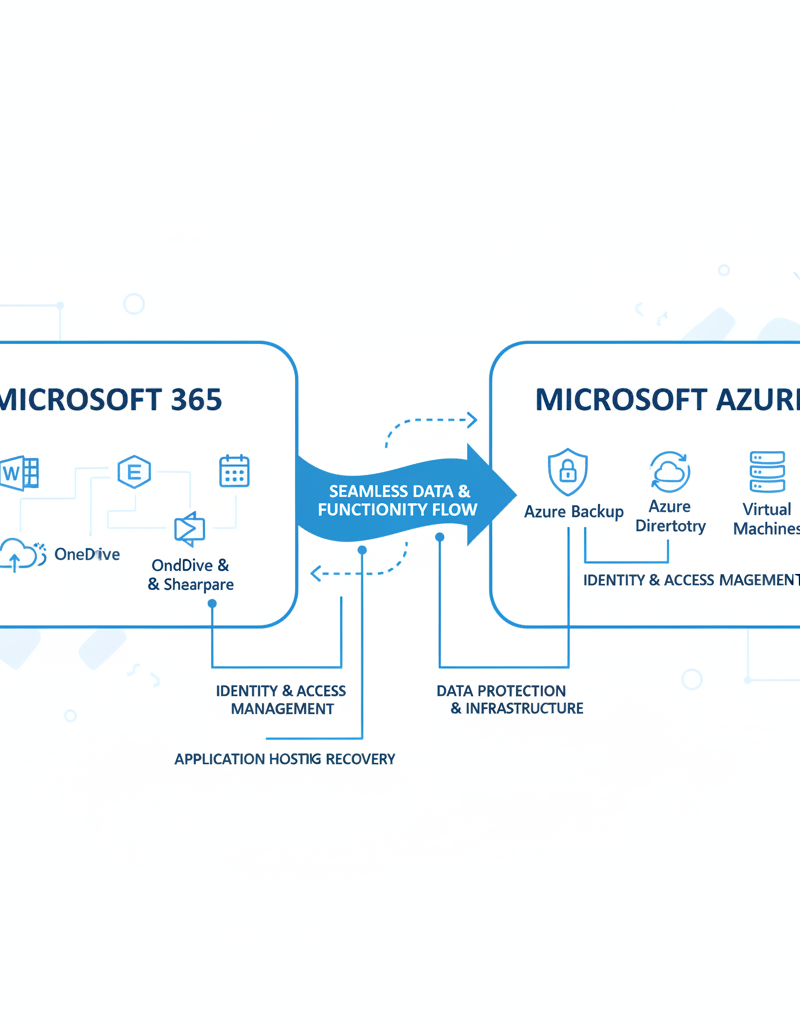
Integrating Microsoft 365 with Azure significantly enhances business operations by elevating security, disaster recovery, and infrastructure scalability, offering a robust platform for modern Australian businesses. By connecting these powerful Microsoft solutions, organisations can leverage Azure's advanced security features like Azure Active Directory (now Entra ID) to fortify Microsoft 365 data and applications, potentially reducing identity-related breaches by 75%. This synergy also enables superior disaster recovery, with services such as Azure Backup centralising the protection of critical Microsoft 365 data, ensuring rapid recovery times measured in minutes rather than hours in case of system failures. Furthermore, Azure's inherently scalable cloud infrastructure effortlessly accommodates expanding Microsoft 365 environments, allowing businesses to adapt to growth without needing substantial upfront hardware investments and supporting dynamic workloads efficiently. This integration is crucial for optimising performance and fortifying digital resilience.
- Enhanced Security: Leverage Azure's advanced security features to protect your Microsoft 365 data and applications. For example, using Azure Active Directory (now Entra ID) for identity management and access control. Learn more about Entra ID: Your Business Continuity Lifeline.
- Improved Disaster Recovery: Utilise Azure Backup to protect your Microsoft 365 data and ensure business continuity in the event of a disaster. See Azure Backup & Helpdesk: Disaster Recovery for M365.
- Scalable Infrastructure: Leverage Azure's scalable infrastructure to support your growing Microsoft 365 environment. Explore Secure & Scale: Managed IT Services for Modern Businesses.
- Advanced Analytics: Use Azure's data analytics tools to gain insights from your Microsoft 365 data and improve decision-making.
- Virtual Desktops: Deploy virtual desktops with Azure Virtual Desktop for secure remote access to Microsoft 365 applications. Learn more about Modernise Your Workplace with Azure & Virtual Desktops.
What are the key considerations when choosing a Microsoft 365 support provider?
Choosing a Microsoft 365 support provider in Australia fundamentally requires assessing their experience, certifications, and comprehensive service level agreements (SLAs). It is paramount to select a provider demonstrating a strong track record in managing diverse Microsoft 365 environments, substantiated by current Microsoft certifications like the Microsoft 365 Certified: Enterprise Administrator Expert, which confirms a deep level of technical expertise. Businesses should critically evaluate proposed SLAs to ensure they precisely match operational needs and uptime requirements; for instance, many leading Azure MSPs in Sydney and Brisbane guarantee response times significantly under 30 minutes for high-priority incidents, demonstrating genuine commitment. Additionally, transparent pricing structures and verifiable customer references from businesses comparable to your own, perhaps within the Australian SMB sector, are indispensable for a well-informed decision that secures your organisation’s digital future.
- Experience and Expertise: Ensure the provider has a proven track record of successfully supporting Microsoft 365 environments.
- Certifications: Look for providers with Microsoft certifications, such as Microsoft Certified Solutions Expert (MCSE) or Microsoft 365 Certified: Modern Desktop Administrator Associate.
- Service Level Agreements (SLAs): Understand the provider's SLAs and ensure they meet your business requirements.
- Pricing: Compare pricing models and ensure you understand the total cost of ownership.
- Customer References: Request customer references and speak to other businesses that have used the provider's services.
What is the future of Microsoft 365?
The future of Microsoft 365 is marked by ongoing innovation, primarily focusing on advanced artificial intelligence (AI) integration, robust security enhancements, and deeper synergy with other Microsoft services, such as Azure and Dynamics 365. Microsoft is continuously embedding AI capabilities into key applications like Teams and Outlook, aiming to significantly boost productivity and collaborative efforts, with major feature updates often released quarterly. For instance, the recent Copilot integration in Microsoft Word, Excel, and PowerPoint demonstrates this commitment to AI-driven assistance. Concurrently, the platform's security framework is perpetually strengthened to counter evolving cyber threats, protecting sensitive business data. Staying informed about these advancements is vital for Australian organisations, from Sydney to Perth, to fully capitalise on their investment, and a proficient support provider can ensure effective implementation and strategic utilisation of these cutting-edge features.
Some of the key trends to watch out for include:
- Artificial Intelligence (AI): Microsoft is integrating AI into many of its Microsoft 365 applications, such as Teams and Outlook, to improve productivity and collaboration. Microsoft AI is worth exploring.
- Security Enhancements: Microsoft is constantly improving the security of Microsoft 365 to protect against evolving cyber threats. Microsoft Security keeps you informed.
- Integration with Other Microsoft Services: Microsoft is further integrating Microsoft 365 with other Microsoft services, such as Azure and Dynamics 365, to provide a more seamless and integrated experience. Microsoft 365 and Dynamics 365 Integration provides further reading.

By partnering with a trusted Microsoft 365 support provider, you can unlock the full potential of Microsoft 365 and drive business success. Whether you're in Melbourne, Sydney, Perth, or Brisbane, expert support can help you optimise your Microsoft 365 environment, enhance security, and improve productivity. Don't hesitate to explore the offerings of an Azure MSP Sydney to integrate your Microsoft 365 environment effectively with Azure. Contact us today to learn more about how we can help your business thrive. Remember to explore the Australian Cyber Security Centre (ACSC) for the latest cybersecurity advice.
For further reading, consider these resources:
Partnering with Mycelium 365 provides your business with Fortify Your Business with Managed IT Services and peace of mind.