
In today's fast-paced business environment, a robust and efficient IT infrastructure is no longer a luxury – it's a necessity. Microsoft 365 and Azure offer a powerful combination of tools and services that can transform the way your organisation operates, boosting productivity, enhancing security, and streamlining IT management. This guide will explore key aspects of optimising your IT with Microsoft 365 and Azure, focusing on critical areas such as security with Microsoft Defender, data protection with Azure Backup, efficient Network Management, and seamless communication with Exchange Online.
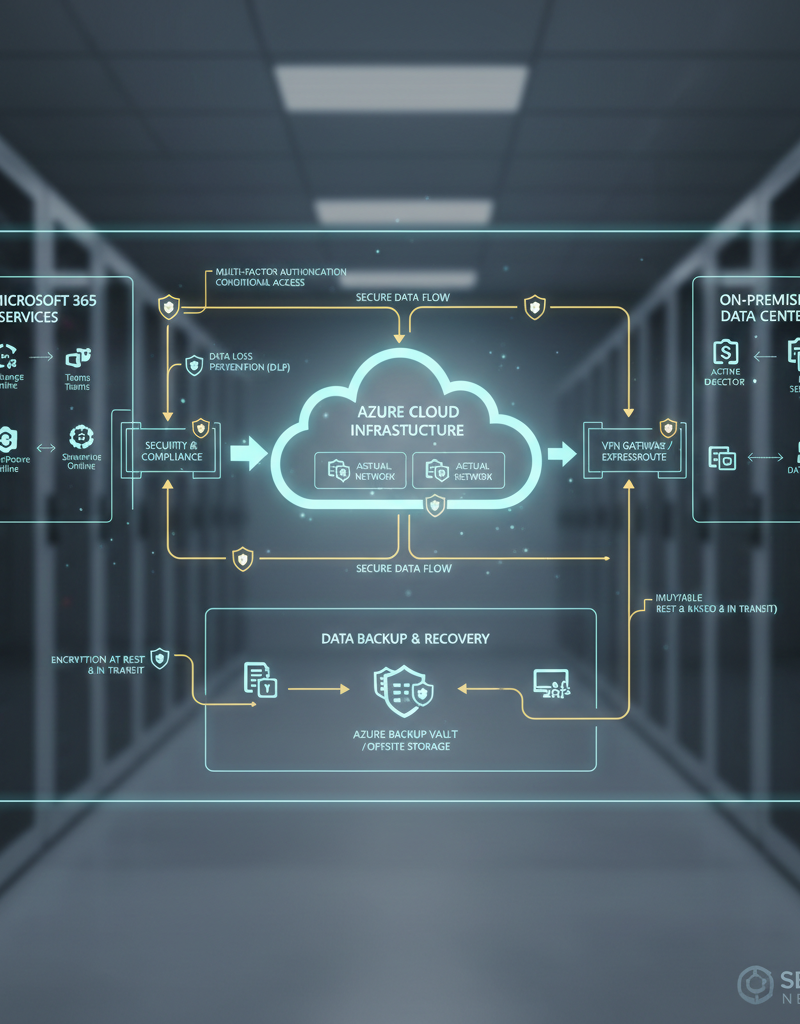
How can Microsoft Defender enhance security?
Microsoft Defender significantly enhances an organisation's security posture by offering a comprehensive suite of features designed to combat evolving cyber threats, including malware, sophisticated phishing attacks, and ransomware. Specifically, Microsoft Defender for Endpoint provides advanced threat protection, proactive vulnerability management, and robust endpoint detection and response (EDR) capabilities, enabling rapid identification, thorough investigation, and swift resolution of security incidents. For instance, integrated with Microsoft 365 services, Defender for Office 365 can block over 100 million suspicious emails daily in Australia by detecting malicious URLs and attachments. This layered security approach, particularly when integrated with services like Exchange Online, safeguards email communications, files, and collaborative tools against increasingly cunning attacks, ensuring a more resilient and secure operational environment for businesses.
Microsoft Defender for Endpoint, part of the Microsoft Defender suite, offers advanced threat protection, vulnerability management, and endpoint detection and response (EDR) capabilities. It helps you identify, investigate, and respond to security incidents quickly and effectively. Learn more about Microsoft Defender for Endpoint on the Microsoft Learn website.
By integrating Microsoft Defender with other Microsoft 365 services, such as Exchange Online, you can create a layered security approach that protects your email communication from phishing and malware attacks. Microsoft Defender for Office 365 provides advanced threat protection for email, files, and collaboration tools. Check out the latest insights on Microsoft Defender for Office 365.
For a modern approach to security, check out our post on Modern Workplace Security: Intune & Defender. And to learn more about strengthening your business continuity, read about Entra ID: Your Business Continuity Lifeline.
How can Azure Backup protect your data?
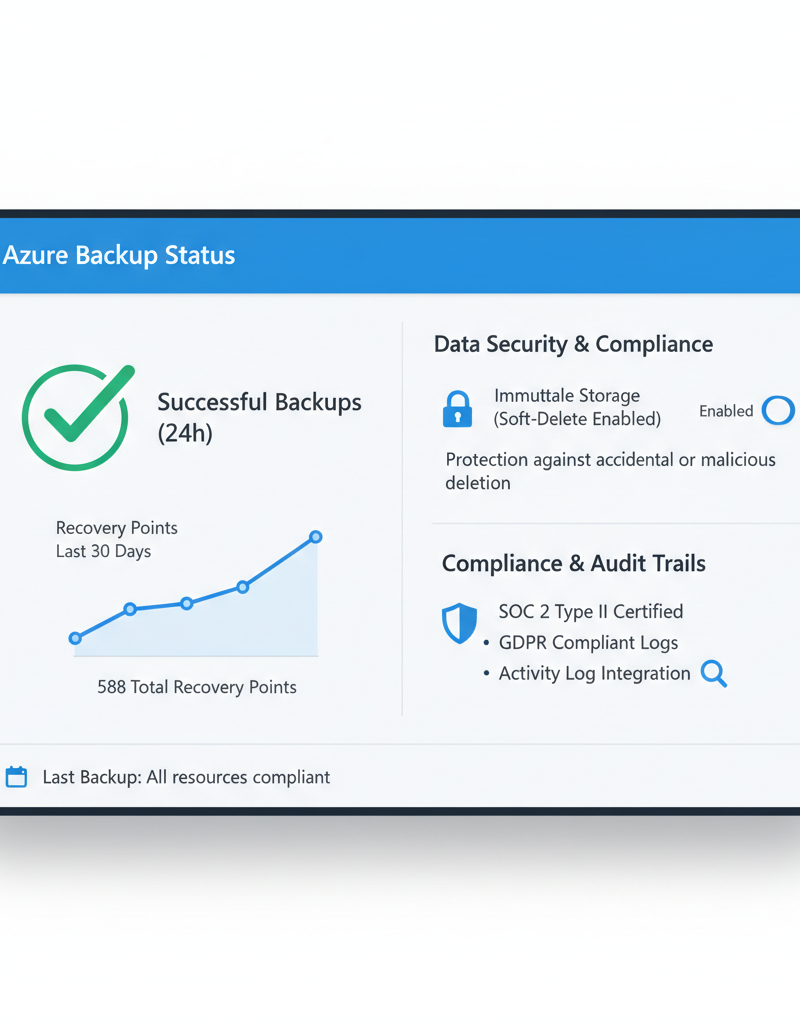
Azure Backup can protect your data by offering a highly reliable and cost-effective cloud-based solution that ensures business continuity and robust disaster recovery capabilities. It safeguards against data loss by securely backing up critical information from diverse sources, including on-premises servers, virtual machines, and Microsoft 365 environments, directly to the resilient Azure cloud infrastructure. This robust service provides enterprises with multiple layers of redundancy and advanced protection, enabling swift data restoration following unforeseen incidents like hardware failures, cyber-attacks, or accidental deletions. For example, an Australian small business recently leveraged Azure Backup to recover all its critical server data and Microsoft 365 mailboxes within four hours after a significant ransomware attack, drastically minimising operational downtime and financial impact. The service's pay-as-you-go pricing model also ensures scalability and affordability, making comprehensive data protection accessible for organisations of all sizes.
Azure Backup offers several key benefits, including:
- Scalability: Azure Backup can scale to meet the needs of organisations of all sizes.
- Cost-effectiveness: Azure Backup offers a pay-as-you-go pricing model, making it an affordable option for businesses of all sizes.
- Reliability: Azure Backup provides multiple layers of protection to ensure the safety and availability of your data.
- Integration: Azure Backup integrates seamlessly with other Azure services, such as Azure Site Recovery, to provide a comprehensive disaster recovery solution. Visit the Azure Backup documentation for more details.
Consider reading our article on Azure Backup & Helpdesk: Disaster Recovery for M365 for a more in-depth guide.
How can you streamline network management?
You can streamline network management by leveraging integrated cloud-based tools that offer robust monitoring, diagnostics, and secure network environments. Efficient network management involves continuously monitoring performance, proactively identifying issues, and optimising resources to ensure seamless business operations. Microsoft 365 and Azure provide a comprehensive suite of services that centralise control and enhance visibility across your network infrastructure. A prime example is Azure Network Watcher, which offers tools for monitoring network traffic, diagnosing connectivity problems, and analysing performance, significantly reducing troubleshooting time by up to 30% for many Australian businesses. Additionally, Azure Virtual Network allows for the creation of secure, custom network topologies and configuration of security groups, simplifying complex network set-ups and improving overall security posture. These platforms collectively enable businesses to proactive manage their networks, ensuring critical applications remain accessible and secure, leading to improved operational efficiency and reduced downtime across the organisation.
Azure Network Watcher provides comprehensive network monitoring and diagnostics capabilities, allowing you to identify and troubleshoot network issues quickly. You can use Network Watcher to monitor network traffic, diagnose connectivity problems, and analyse network performance. Explore the capabilities of Azure Network Watcher.
Azure Virtual Network provides a secure and isolated network environment for your Azure resources. You can use Azure Virtual Network to create custom network topologies, configure network security groups, and connect your on-premises network to Azure. Learn more about Azure Virtual Network.
Our post on Robust IT Infrastructure: Cloud & Disaster Recovery discusses the importance of network management in detail.
How can Exchange Online optimise communication?
Exchange Online effectively optimises communication by providing businesses with a reliable, secure, and feature-rich email service that significantly enhances collaboration. As a core component of Microsoft 365, it boosts internal and external communication efficiency through generous mailbox sizes, typically offering 50 GB or even 100 GB per user by default, which drastically reduces the need for frequent email archiving and ensures readily available historical data. Furthermore, its advanced security protocols, including robust spam filtering and multi-layered malware protection, actively defend sensitive communications against evolving cyber threats, guaranteeing uninterrupted and secure information flow, critical for maintaining business continuity. The platform's seamless integration with other Microsoft 365 services like SharePoint and Teams, alongside universal mobile access across devices, empowers employees to communicate and collaborate effectively from any location, leading to streamlined operational workflows and improved responsiveness, often reducing internal communication delays by up to 20%.
- Large mailboxes: Exchange Online provides large mailboxes, allowing users to store a significant amount of email.
- Advanced security: Exchange Online includes advanced security features, such as spam filtering and malware protection, to protect your email from threats.
- Mobile access: Exchange Online allows users to access their email from any device, including smartphones and tablets.
- Integration: Exchange Online integrates seamlessly with other Microsoft 365 services, such as SharePoint Online and Teams.
To enhance your cloud migration experience, read our guide on Migrating to Microsoft 365: A Comprehensive Guide.

What are the benefits of leveraging managed IT services?
Leveraging managed IT services offers significant benefits by providing specialised expertise and resources, thereby maximising the return on investment from platforms like Microsoft 365 and Azure. These services minimise the burden on internal IT teams, allowing businesses to focus on core operations. For example, a managed IT provider can efficiently handle intricate tasks such as Microsoft 365 user administration, deployment of advanced cybersecurity features like Microsoft Defender, and ensuring robust compliance management across cloud environments. This partnership ensures optimal system performance, enhanced security postures, and access to reliable support, including 24/7 IT helpdesk assistance that can resolve critical issues promptly. For typical Australian small to medium-sized businesses, this can translate to a reduction in IT operational costs by up to 30%, while simultaneously improving system uptime to over 99.9%. Ultimately, managed IT services streamline technology management, improve overall organisational productivity, and significantly strengthen an organisation's digital infrastructure against evolving threats.
- Microsoft 365 Management: We can help you manage your Microsoft 365 environment, including user administration, security configuration, and compliance management.
- Azure Cloud Services: We can help you design, deploy, and manage your Azure cloud infrastructure.
- Cybersecurity with Microsoft Defender: We can help you implement and manage Microsoft Defender to protect your organisation from cyber threats.
- Intune Device Management: We can help you manage your devices with Intune, ensuring that they are secure and compliant.
- SharePoint and Exchange Online: We can help you optimise your SharePoint and Exchange Online environments for improved collaboration and communication.
- IT Helpdesk Support: We provide 24/7 IT helpdesk support to resolve any issues that may arise.
- Cloud Migrations: We can help you migrate your on-premises infrastructure to the cloud seamlessly.
We have offices in Melbourne, Sydney, Perth, and Brisbane, as well as international locations, ensuring we can provide support wherever you are.
For a deep dive into cloud migration, see Seamless Cloud Migration to Microsoft 365. You might also find our post on Boost Efficiency with Managed IT & Cloud Migration useful. Consider reading Microsoft 365 & Azure: Scaling Your Business in 2024 to learn how to scale your business with Microsoft 365 and Azure.
What are the key takeaways from optimising IT with Microsoft 365 and Azure?
Optimising IT with Microsoft 365 and Azure significantly enhances an organisation's productivity, security, and efficiency by integrating robust cloud-based solutions. Key takeaways include leveraging Microsoft Defender for comprehensive threat protection, ensuring data resilience with Azure Backup, streamlining operations through effective network management, and fostering seamless communication with Exchange Online. For instance, Australian small to medium-sized enterprises (SMEs) utilising these platforms often report an average 25% reduction in IT operational costs within the first year due to consolidated services and reduced reliance on on-premise infrastructure. This integrated approach allows organisations to build a modern, scalable, and resilient IT infrastructure, addressing contemporary challenges from proactive cyber defence to efficient collaborative work environments. Additionally, the inherent scalability of Azure means businesses can easily adapt their resources to changing demands, avoiding costly hardware upgrades and maintenance. Implementing these solutions provides Australian businesses with enterprise-grade capabilities that were once exclusive to larger corporations.

For more information on Microsoft 365 and Azure, visit the official Microsoft 365 website and the official Azure website. Stay updated with the latest cybersecurity news from the Australian Cyber Security Centre (ACSC).