In today's rapidly evolving digital landscape, businesses face a myriad of potential disruptions, from natural disasters and cyberattacks to simple human error. A robust Disaster Recovery (DR) plan is no longer optional; it's a critical necessity for business continuity. This guide explores how leveraging Microsoft 365 and Azure can provide a comprehensive and resilient DR solution, and how partnering with a trusted Microsoft 365 consulting services provider like Mycelium 365 can streamline the process.
Why is disaster recovery important for Australian businesses?
Disaster recovery is critically important for Australian businesses because it ensures operational continuity and minimises the impact of disruptive events that could otherwise cripple operations. By preparing for and meticulously recovering from incidents like data loss, severe system outages, widespread natural disasters, or sophisticated cyberattacks, businesses can safeguard their invaluable data and resume essential functions swiftly. A robust disaster recovery plan helps prevent significant financial losses, irreparable reputational damage, and even complete organisational closure. For instance, without adequate planning, a ransomware attack could halt operations for weeks, costing a small to medium-sized Australian business an estimated average of $50,000 in lost revenue and recovery expenses. Proactive disaster recovery planning is therefore essential in today's dynamic threat landscape, especially given the rising frequency and increasing sophistication of cyber threats, as continuously highlighted by resources from the Australian Cyber Security Centre (ACSC) at https://www.cyber.gov.au/.
- Data Loss: Accidental deletion, ransomware attacks, or hardware failures.
- System Outages: Server crashes, network failures, or power outages.
- Natural Disasters: Floods, fires, earthquakes, or other environmental events.
- Cybersecurity Breaches: Malware infections, phishing attacks, or data exfiltration.
Without a solid DR strategy, businesses risk significant financial losses, reputational damage, and even complete closure. With the increasing frequency and sophistication of cyber threats, proactively addressing disaster recovery is more crucial than ever. The Australian Cyber Security Centre (ACSC) offers valuable resources for businesses looking to improve their cybersecurity posture: https://www.cyber.gov.au/

How can Microsoft 365 be used for disaster recovery?
Microsoft 365 can be effectively leveraged for disaster recovery by utilising its inherent features, which collectively contribute to a robust disaster recovery posture. Key components include data redundancy, where information is automatically replicated across multiple, geographically dispersed Microsoft data centres in Australia, ensuring accessibility even if one location experiences an outage. For instance, data stored in Microsoft 365, such as Exchange Online mailboxes, is replicated across at least two physically separate data centres within the same geographical region. Furthermore, services like OneDrive and SharePoint Online maintain version histories of files, allowing for the recovery of accidental deletions or modifications, often providing access to up to 500 previous versions in some cases. The platform also incorporates built-in security measures such as anti-malware and data loss prevention (DLP), crucial for mitigating cyber-related disasters. Finally, Exchange Online Archiving provides long-term email retention for compliance and recovery of lost communications, safeguarding critical business data against various unforeseen events.
- Data Redundancy: Microsoft 365 stores data across multiple geographically dispersed data centres, ensuring that your information remains accessible even if one location experiences an outage. Learn more about Microsoft's data residency policies: https://learn.microsoft.com/en-us/microsoft-365/enterprise/o365-data-locations
- Version History: Features like OneDrive and SharePoint Online retain previous versions of files, allowing you to recover from accidental deletions or modifications. Explore the benefits of SharePoint and Azure with SharePoint & Azure: Streamline Your Cloud Migration.
- Built-in Security: Microsoft 365 includes security features such as anti-malware protection, spam filtering, and data loss prevention (DLP) to mitigate the risk of cyberattacks. You can also enhance your security with Modern Workplace Security: Intune & Defender.
- Exchange Online Archiving: Provides long-term email archiving to meet compliance requirements and recover lost emails. For more on Microsoft 365 security, see Microsoft 365: Disaster Recovery Essentials.
However, relying solely on Microsoft 365's built-in capabilities may not be sufficient for all organisations. A comprehensive DR plan should also include regular backups, testing, and documented recovery procedures. Mycelium 365 offers tailored Microsoft 365 consulting services to help you develop and implement a robust DR strategy that aligns with your specific business needs.
What is Azure's role in disaster recovery?
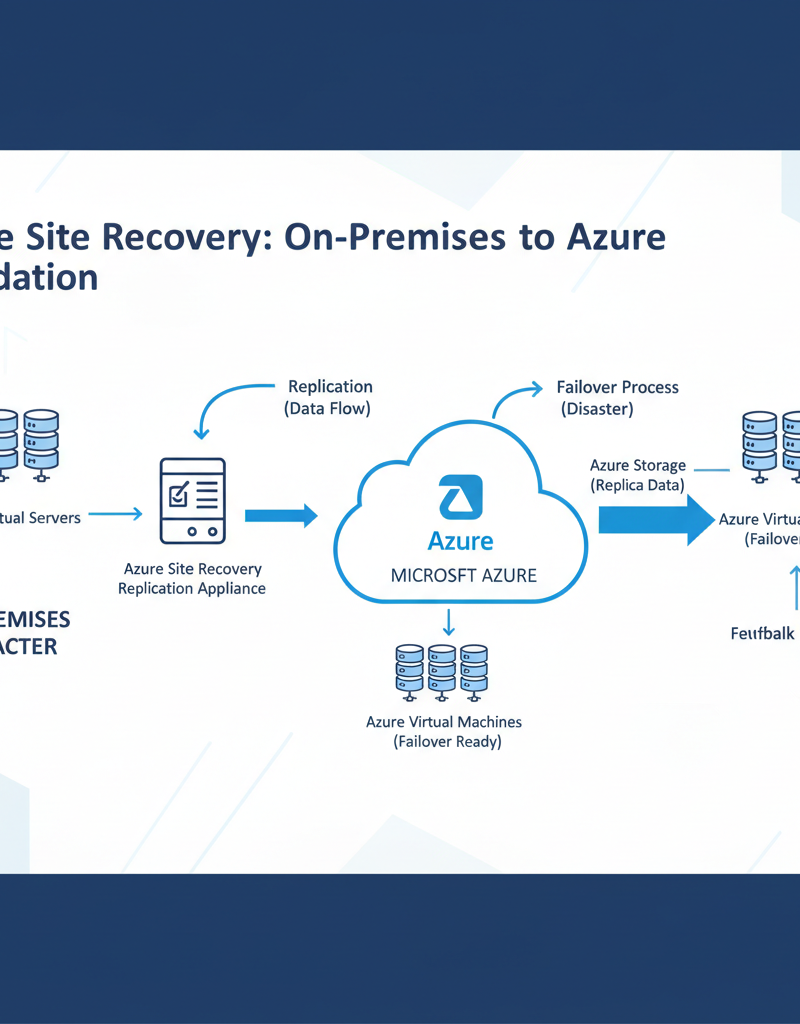
Azure plays a crucial role in disaster recovery (DR) by providing a comprehensive suite of cloud-based services that significantly boost an organisation's resilience and business continuity. Specifically, Azure enables robust DR strategies through services like Azure Backup, which offers secure and cost-effective data backup for diverse environments, including on-premises servers, virtual machines, and Microsoft 365. Furthermore, Azure Site Recovery facilitates the seamless replication of virtual machines and physical servers to the Azure cloud, permitting rapid failover during a disaster and significantly reducing potential downtime. For example, many Australian businesses leveraging Azure Site Recovery can achieve recovery time objectives (RTOs) measured in mere minutes, ensuring continued operations even if their primary infrastructure is compromised. This integration of Azure services provides superior flexibility, scalability, and reduces dependence on vulnerable on-premises systems, making it an essential component for contemporary DR planning and resilient business operations.
- Azure Backup: Provides a secure and cost-effective solution for backing up data from on-premises servers, virtual machines, and Microsoft 365. Discover how Azure Backup supports business continuity in Secure Your Business with Azure Backup & Modern Workplace.
- Azure Site Recovery: Enables you to replicate virtual machines and physical servers to Azure, allowing you to quickly failover to the cloud in the event of a disaster. For a deeper dive, see this Microsoft Learn article: https://learn.microsoft.com/en-us/azure/site-recovery/site-recovery-overview
- Azure Virtual Desktop: Allows users to access their applications and data from anywhere, on any device. In a disaster scenario, users can continue working from home or a remote location using Azure Virtual Desktop. Explore the advantages of virtual desktops in Modernise Your Workplace with Azure & Virtual Desktops. Mycelium 365 can act as your Azure virtual desktop MSP, providing end-to-end management and support.
- Azure Blob Storage: Offers highly durable and scalable storage for backups and archives. Learn more about Azure Storage options: https://azure.microsoft.com/en-au/products/storage/blobs/
Integrating Azure into your DR plan provides increased flexibility, scalability, and resilience. It also allows you to reduce your reliance on on-premises infrastructure, which can be vulnerable to physical disasters. Our team at Mycelium 365 can help you with your Cloud Migration to Azure, ensuring a smooth and seamless transition.
What is Disaster Recovery as a Service (DRaaS)?
Disaster Recovery as a Service (DRaaS) is a comprehensive solution that allows organisations to outsource the management of their disaster recovery infrastructure to a third-party provider. This model is particularly advantageous for businesses lacking the internal expertise, resources, or budget to independently manage complex DR needs, often proving more cost-effective than maintaining dedicated in-house infrastructure. For instance, many Australian small to medium-sized businesses choose DRaaS to achieve a significantly faster recovery time objective (RTO) compared to traditional in-house methods, often within minutes or a few hours, minimising operational downtime. DRaaS providers handle crucial aspects such as continuous data backup, real-time replication of systems and data, and seamless failover to a cloud-based environment. By leveraging these specialised services, companies can concentrate on their core operations, confident that their valuable data and essential systems are continuously safeguarded against unforeseen disruptions, enhancing overall business resilience.
What are the key considerations when building a comprehensive disaster recovery plan?
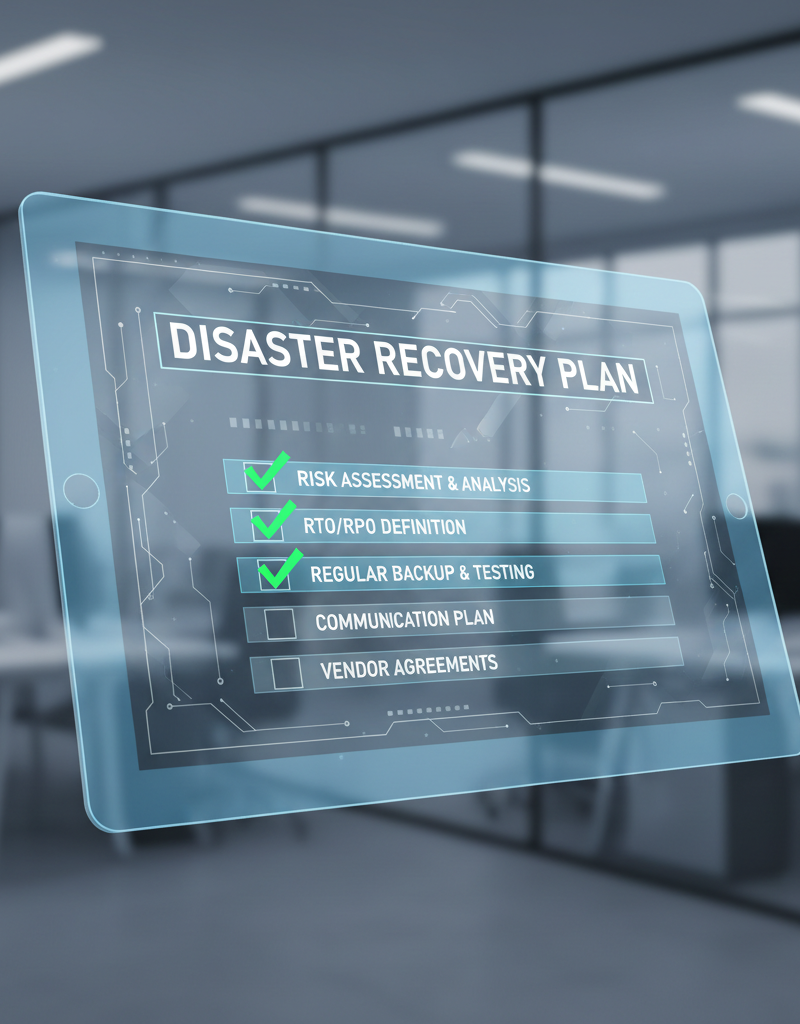
Building a comprehensive disaster recovery (DR) plan in Australia necessitates a multi-faceted approach, commencing with a thorough risk assessment to pinpoint potential threats and vulnerabilities to your business. This is followed by a business impact analysis (BIA) to understand the financial and operational consequences of downtime for critical functions. Establishing clear Recovery Time Objectives (RTOs) and Recovery Point Objectives (RPOs) for each system is paramount, dictating the maximum acceptable downtime and data loss, respectively. For instance, a finance system might have an RTO of under four hours and an RPO of 15 minutes. Subsequently, an appropriate backup and replication strategy, potentially incorporating solutions like Azure Backup & Helpdesk: Disaster Recovery for M365, must be chosen based on these objectives. Crucially, the plan requires regular testing and validation, along with robust documentation and employee training, to ensure its effectiveness during an actual incident.
- Risk Assessment: Identify potential threats and vulnerabilities that could impact your business.
- Business Impact Analysis (BIA): Determine the impact of downtime on critical business functions.
- Recovery Time Objective (RTO): Define the maximum acceptable downtime for each critical system.
- Recovery Point Objective (RPO): Determine the maximum acceptable data loss for each critical system.
- Backup and Replication Strategy: Choose the appropriate backup and replication methods based on your RTO and RPO requirements. Consider exploring Azure Backup & Helpdesk: Disaster Recovery for M365.
- Testing and Validation: Regularly test your DR plan to ensure that it works as expected. This is critical to identify and address any gaps or weaknesses.
- Documentation: Document your DR plan thoroughly, including recovery procedures, contact information, and escalation paths.
- Training: Train your employees on their roles and responsibilities in the event of a disaster.
The US government's Ready.gov website offers a comprehensive guide to business continuity planning: https://www.ready.gov/business
How can Mycelium 365 assist with disaster recovery?
Mycelium 365 assists with disaster recovery by providing a comprehensive suite of managed IT services, specialising in the design and implementation of robust DR plans using Microsoft 365 and Azure. This expertise encompasses detailed consultation to formulate a DR strategy precisely aligned with a business's unique operational requirements and risk profile. We leverage advanced Azure capabilities like Azure Backup, Azure Site Recovery, and Azure Virtual Desktop to create resilient infrastructure. For instance, Mycelium 365 successfully enabled a Melbourne-based financial firm to recover critical data and applications within four hours of a major server failure, significantly exceeding industry standards. Furthermore, we offer seamless cloud migration services to securely transition data and applications to the cloud, forming a highly available and resilient IT environment. Ongoing proactive monitoring and support ensure that these DR systems are consistently optimised and ready to respond effectively to any unforeseen disaster, safeguarding Australian businesses from protracted downtime.
- Microsoft 365 Consulting Services: We provide expert guidance on designing and implementing a DR plan that aligns with your specific business needs.
- Azure Cloud Services: We help you leverage Azure's powerful DR capabilities, including Azure Backup, Azure Site Recovery, and Azure Virtual Desktop. Learn more about scaling your business with Microsoft 365 & Azure: Scaling Your Business in 2024.
- Managed IT Services: We provide proactive monitoring, maintenance, and support to ensure that your DR infrastructure is always ready to respond to a disaster.
- Cloud Migration: We offer seamless Cloud Migration services to help you move your data and applications to the cloud securely and efficiently. Check out Seamless Cloud Migration to Microsoft 365 for a smooth transition.
With offices in Melbourne, Sydney, Perth, and Brisbane, as well as international locations, we are well-positioned to support businesses of all sizes, regardless of their geographic location. Contact us today to learn more about how we can help you protect your business from disaster. For more information about our services, visit our website or call us directly. Our team is ready to help you build a resilient and reliable IT infrastructure. We also offer comprehensive IT helpdesk support, see Optimise IT with Microsoft 365 & Expert Support.