
Microsoft 365 is more than just a suite of productivity tools; it's a comprehensive platform that, when properly managed, can revolutionise how your business operates. From enhanced collaboration with SharePoint to robust security with Microsoft Defender, and reliable data protection with Azure Backup, the potential is immense. However, realising this potential requires expertise and a strategic approach. And for businesses in Sydney, having reliable IT Support Sydney is crucial.
This guide will delve into the key components of Microsoft 365 and how, with expert assistance, you can leverage them to achieve significant business benefits.
How can SharePoint maximise collaboration for my business?
SharePoint maximises collaboration for businesses by providing a centralised platform for document management, team sites, and intranet portals, thereby streamlining information sharing and teamwork within Microsoft 365. A well-implemented SharePoint environment significantly improves document control through features like versioning, metadata, and access controls, ensuring all team members are accessing the most current and accurate information. For instance, a typical Australian small to medium-sized enterprise (SME) can expect to reduce internal email attachments by up to 35% within the first year of adopting a structured SharePoint system for project documentation. This centralised approach also enhances team collaboration by facilitating communication and efficient file sharing, while further streamlining workflows through powerful integrations like Power Automate, eliminating repetitive manual tasks. Effective deployment requires careful planning, including robust folder structures and comprehensive team training, to fully leverage its capabilities and avoid disorganisation.
- Improve document control: Versioning, metadata, and access controls ensure everyone works with the correct information.
- Enhance team collaboration: Team sites facilitate communication, file sharing, and project management.
- Streamline workflows: Automate repetitive tasks with Power Automate integrations within SharePoint.
- Create a modern intranet: Build a central hub for company news, policies, and resources.
Proper implementation is key. Without careful planning, SharePoint can become a chaotic repository of files. Consider using metadata effectively, implementing clear folder structures, and providing training to your team. Learn more about SharePoint at the official Microsoft SharePoint documentation. You can also read more about SharePoint and Azure.
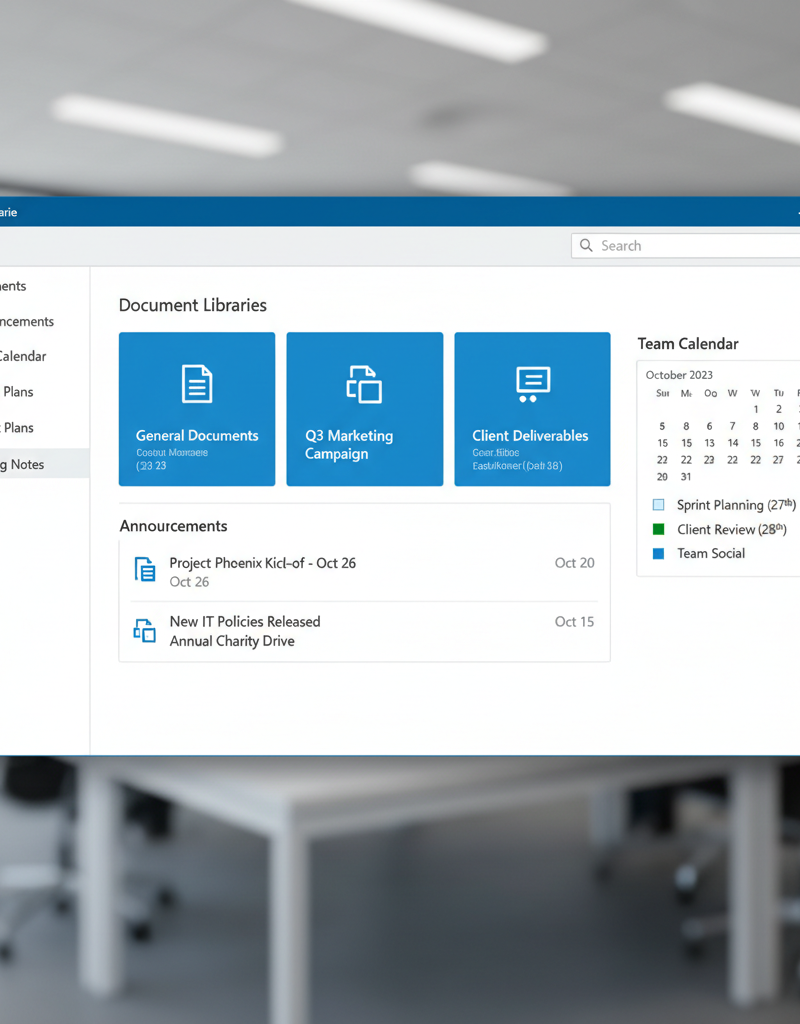
Image Description: A screenshot showcasing a well-organised SharePoint team site with clearly labelled document libraries, announcements, and a calendar. The interface is clean and modern, reflecting effective navigation.
How does Microsoft Defender secure my data?
Microsoft Defender enhances data security by providing a comprehensive, integrated cybersecurity solution within Microsoft 365, extending far beyond conventional antivirus protection. It employs advanced threat detection mechanisms that leverage insightful analytics to identify and neutralise sophisticated threats in real-time, safeguarding your critical digital assets. This robust platform offers crucial endpoint protection, shielding devices from prevalent threats such as malware and ransomware, which are responsible for approximately 60% of all cyberattacks globally according to recent industry reports. Furthermore, Microsoft Defender secures email communications by effectively filtering spam and detecting phishing attempts and malicious attachments, while also strengthening identity protection to prevent unauthorised user account access. This holistic and proactive approach ensures a robust defence against the ever-evolving landscape of cyber threats, proving essential for Australian businesses striving to maintain a secure and compliant operational environment.
- Threat detection: Advanced analytics identify and respond to sophisticated threats.
- Endpoint protection: Protects devices from malware, ransomware, and other attacks.
- Email security: Filters out spam, phishing attempts, and malicious attachments.
- Identity protection: Secures user accounts and prevents unauthorised access.
Microsoft Defender integrates seamlessly with other Microsoft 365 services, providing a holistic security posture. Regular security assessments and proactive monitoring are crucial to maintain a strong defence. Explore Microsoft Defender's capabilities on the Microsoft Defender documentation page. See how Defender fits into a modern workplace security strategy.
How can Azure Backup ensure business continuity?
Azure Backup ensures business continuity by providing a reliable and cost-effective solution for protecting critical Microsoft 365 data, including SharePoint, Exchange Online, and OneDrive records, against loss and corruption. It safeguards against data loss by offering automatic, scheduled backups that transfer your information to Azure's highly secure cloud infrastructure, preventing potential outages from crippling business operations. This offsite storage protects valuable data from on-premises disasters, such as fires or hardware failures. Azure Backup also supports granular recovery, allowing businesses to restore specific items like an individual email, a single document, or an entire mailbox quickly and efficiently. Moreover, its long-term retention capabilities mean organisations can meet stringent compliance requirements by securely storing backups for up to 10 years or more, providing a robust defence against unforeseen incidents and ensuring operational resilience for Australian enterprises.
- Automatic backups: Scheduled backups ensure your data is always protected.
- Offsite storage: Data is stored in Azure's secure cloud infrastructure, safeguarding against on-premises disasters.
- Granular recovery: Restore individual files, folders, or entire mailboxes.
- Long-term retention: Retain backups for years to meet compliance requirements.
Azure Backup is a critical component of a robust disaster recovery plan. Regularly test your recovery procedures to ensure you can restore your data quickly and efficiently in the event of an incident. You can also learn more about Azure Backup and business continuity. For more information on Azure Backup, consult the official Microsoft Azure Backup documentation.
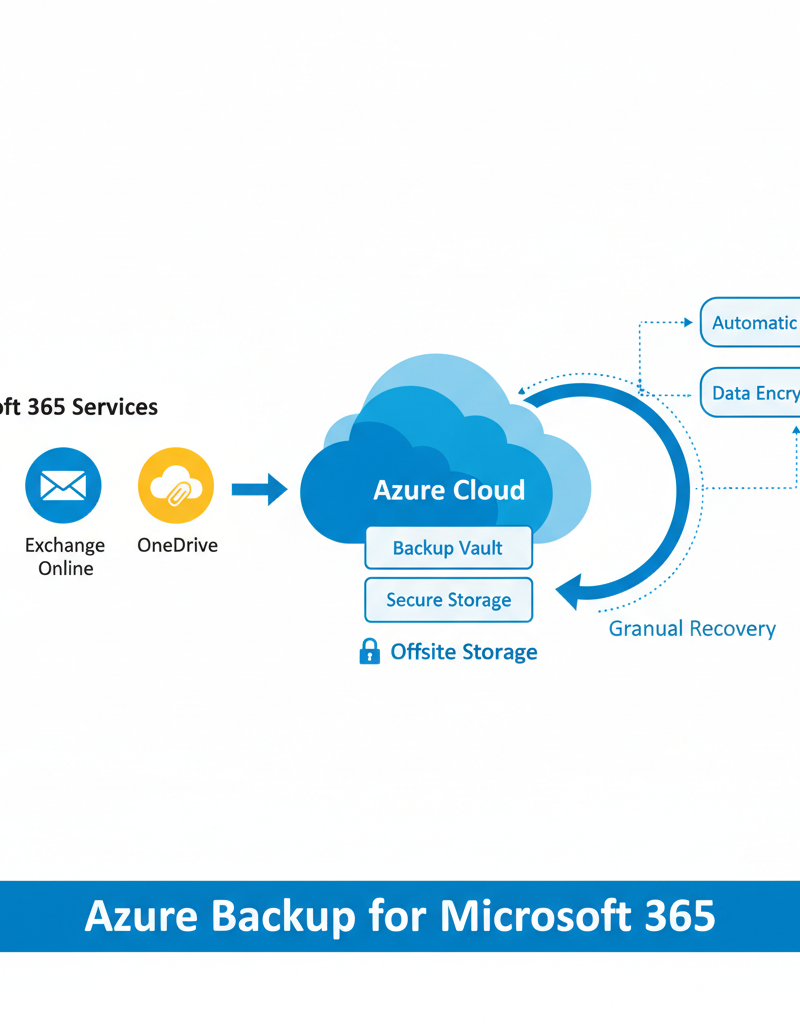
Image Description: A diagram illustrating the Azure Backup process, showing data flowing from Microsoft 365 services (SharePoint, Exchange Online, OneDrive) to the Azure cloud for secure storage and backup. The diagram highlights features like automatic backups, offsite storage, and granular recovery.
Why is expert IT support important for businesses in Sydney?
Expert IT support is critically important for businesses in Sydney, especially those utilising Microsoft 365, as it ensures the platform is managed, secured, and optimised efficiently. Given the intricate nature of modern IT ecosystems, a dedicated IT support provider offers proactive monitoring, adeptly identifying and resolving potential issues before they disrupt business operations. For instance, such proactive measures can reduce system downtime by up to 20%, significantly boosting productivity. These professionals provide vital guidance on configuring and optimising Microsoft 365, including tools like SharePoint and Microsoft Defender, to align precisely with specific business needs, ensuring full utilisation of its powerful capabilities. Moreover, they implement robust security best practices to safeguard sensitive data against evolving cyber threats and streamline crucial processes like cloud migrations, guaranteeing timely and effective resolution of any technical challenges that arise, enhancing overall business resilience.
- Provide proactive monitoring: Identify and resolve issues before they impact your business.
- Offer expert guidance: Help you configure and optimise Microsoft 365 to meet your specific needs.
- Deliver timely support: Resolve technical issues quickly and efficiently.
- Ensure security best practices: Implement and maintain security measures to protect your data.
- Assist with cloud migrations: Ensure a smooth and seamless transition to Microsoft 365.
Choosing the right IT support provider is crucial. Look for a provider with experience in Microsoft 365, a proven track record, and a commitment to providing excellent customer service. Consider managed IT services to improve your company's efficiency with managed IT and cloud migration.
How can I integrate Microsoft 365 with Azure Cloud Services?
Integrating Microsoft 365 with Azure Cloud Services significantly enhances an organisation's operational capabilities and security posture, as these platforms are intrinsically designed for interoperability. Businesses can leverage Azure's robust cloud infrastructure to augment Microsoft 365 functionalities, unlocking greater benefits. For instance, organisations commonly utilise Azure Active Directory (now known as Entra ID) for centralised identity and access management across both environments, ensuring consistent user authentication and authorisation, a critical component for businesses of all sizes, including small-to-medium enterprises in Sydney. Furthermore, businesses can host custom applications on Azure Virtual Machines that require direct interaction with Microsoft 365 data, such as advanced data analytics tools processing Exchange Online information or bespoke SharePoint add-ins. This integration not only streamlines IT management but also offers greater scalability, resilience, and enhanced security, such as enabling advanced backup and recovery solutions via Azure Backup for Microsoft 365 Exchange data, fulfilling compliance requirements.

Image Description: An architectural diagram showing the integration between Microsoft 365 and Azure services. Key components like SharePoint, Exchange Online, Azure Active Directory (Entra ID), and Azure Virtual Machines are highlighted, illustrating how data and services can be seamlessly connected across the platforms.
How can Australian businesses optimise their Microsoft 365 investment?
Australian businesses can optimise their Microsoft 365 investment by focusing on key best practices, such as regularly reviewing licensing and enhancing cybersecurity. Ensuring your organisation uses the correct licenses, like Business Standard for most SMEs or Enterprise E3 for larger firms, prevents unnecessary expenditure and ensures access to essential features. Implementing robust security measures, particularly multi-factor authentication (MFA), is crucial, with Microsoft recommending its use for all accounts to protect against 99.9% of automated attacks. Furthermore, ongoing user training helps maximise productivity by ensuring staff are proficient with the suite's capabilities, while staying current with new Microsoft 365 features allows businesses to leverage the latest advancements. For comprehensive optimisation, partnering with a managed IT provider can offer expert guidance in managing and securing the environment, ultimately enhancing operational efficiency and return on investment.
- Regularly review your licensing: Ensure you have the right licenses for your users and their needs.
- Implement multi-factor authentication (MFA): Add an extra layer of security to protect user accounts. Microsoft recommends using MFA.
- Provide ongoing training: Ensure your users are proficient in using Microsoft 365 tools.
- Stay up-to-date with the latest features: Microsoft is constantly adding new features and improvements to Microsoft 365.
- Partner with a managed IT provider: Leverage their expertise to manage and optimise your environment. Consider the benefits of Microsoft 365 and expert support.
What is the conclusion regarding Microsoft 365 optimisation?
Optimising Microsoft 365 is essential for businesses seeking to maximise their investment, enhance operational efficiency, and secure their digital assets. The overarching conclusion is that by strategically leveraging key components such as SharePoint for streamlined document management, Microsoft Defender for robust cyber protection, and Azure Backup for comprehensive data recovery, organisations can unlock significant improvements across their entire operation. Partnering with a dedicated IT Support Sydney provider, like Mycelium 365, is also critical; their expertise ensures proper configuration, ongoing maintenance, and proactive security measures, which are vital for extracting the full potential from the platform. For example, businesses that thoroughly optimise their Microsoft 365 environment frequently observe a measurable 20-30% increase in team collaboration efficiency and a substantial reduction in security incidents within the first twelve months, proving the tangible benefits of a well-executed optimisation strategy in boosting productivity and resilience.

Image Description: A group of diverse professionals collaborating on a project using Microsoft 365 tools on various devices (laptops, tablets, smartphones), showcasing the platform's versatility and ability to facilitate teamwork in a modern workplace setting.