
In today's fast-paced digital landscape, businesses need to leverage technology to its fullest potential. Microsoft 365 offers a comprehensive suite of tools designed to enhance productivity, collaboration, and security. However, simply adopting Microsoft 365 isn't enough. Effective management is crucial to unlock its full value and avoid potential pitfalls. At Mycelium 365, we specialise in providing comprehensive Microsoft 365 management services to businesses across Australia, including Melbourne, Sydney, Perth, and Brisbane.
What is the power of proactive Microsoft 365 management?
Proactive Microsoft 365 management is crucial as it ensures your online environment is consistently optimised for specific business needs, robustly secured against cyber threats, and continually updated, thereby significantly boosting operational efficiency and reducing potential vulnerabilities. This comprehensive approach involves meticulous configuration of settings, diligent management of user access permissions using tools like Entra ID, continuous performance monitoring, and providing responsive ongoing helpdesk support. For example, proactive management protects sensitive data by implementing multi-factor authentication and advanced threat detection via Microsoft Defender, an essential measure given that 60% of small businesses struggle to recover financially after a significant cyber attack. By systematically addressing potential issues before they escalate, businesses can minimise costly downtime and avoid expensive reactive fixes, ensuring seamless operation and adherence to Australian compliance standards.
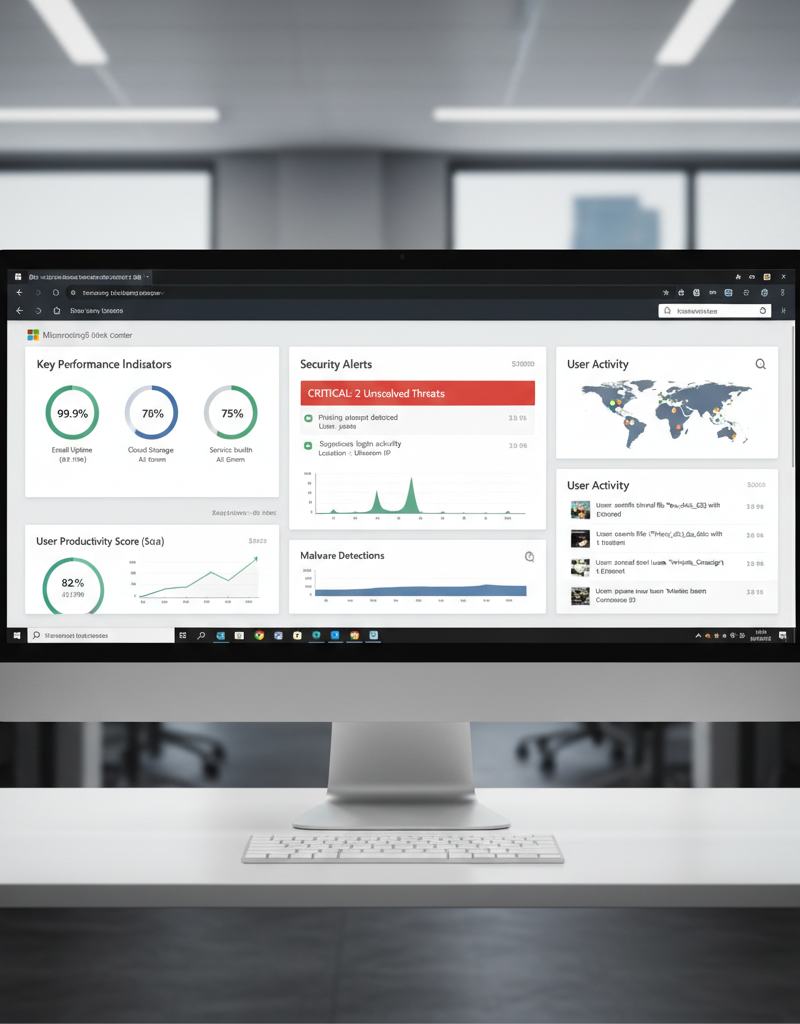
Key benefits of proactive Microsoft 365 management include:
- Increased Productivity: Optimised workflows and streamlined collaboration tools empower your employees to work more efficiently. Tools like SharePoint and Teams become intuitive extensions of their daily tasks.
- Enhanced Security: Robust security measures, including multi-factor authentication and threat detection, protect your sensitive data from cyber threats. We leverage Microsoft Defender to continuously monitor and respond to potential risks.
- Reduced IT Costs: By proactively addressing potential issues and optimising resource allocation, you can minimise downtime and avoid costly reactive fixes. [Secure & Scale: Managed IT Services for Modern Businesses](slug: managed-it-services-azure-backup-virtual-desktop) can help optimise costs.
- Improved Compliance: Ensure your organisation adheres to relevant regulations and industry standards with proper data governance and security controls. Australian Cyber Security Centre (ACSC) provides excellent guidelines.
- Scalability and Flexibility: Microsoft 365 is designed to scale with your business. Effective management ensures you can easily adapt to changing needs and onboard new users seamlessly. [Microsoft 365 & Azure: Scaling Your Business in 2024](slug: microsoft-365-azure-cloud-migration-guide) details the benefits of scaling with Microsoft.
What are the key components of Microsoft 365 management?
Effective Microsoft 365 management encompasses several crucial components to ensure optimal performance, security, and compliance for Australian businesses. This includes robust SharePoint management, which involves structuring sites, managing permissions, and implementing document policies to prevent clutter, ensuring employees can easily find information. Strategic Entra ID (formerly Azure Active Directory) management is also key for secure identity and access control, with proper configuration, user account oversight, and enforcement of security policies like multi-factor authentication. Furthermore, proactive Intune device management secures both company and employee-owned devices through policy configuration and application deployment. Comprehensive Exchange Online management is vital for reliable email services, involving anti-spam, anti-malware filters, and data loss prevention policies for effective mailbox oversight. Finally, robust security management with Microsoft Defender is indispensable, protecting against evolving cyber threats and ensuring data integrity across the entire Microsoft 365 ecosystem; for example, implementing advanced threat protection has been shown to reduce successful phishing attacks by up to 90% for managed organisations.
- SharePoint Management: SharePoint is a powerful collaboration platform, but it can quickly become cluttered and disorganized without proper management. We help you structure your SharePoint sites, manage permissions, and implement effective document management policies. This ensures that your employees can easily find the information they need, when they need it. [SharePoint & Azure: Streamline Your Cloud Migration](slug: sharepoint-azure-cloud-migration) explains this in more detail.
- Entra ID Management: Entra ID (formerly Azure Active Directory) is the foundation of identity and access management in Microsoft 365. We ensure that your Entra ID is properly configured, user accounts are managed effectively, and security policies are enforced. This includes implementing multi-factor authentication, conditional access policies, and privileged access management. [Entra ID: Your Business Continuity Lifeline](slug: entra-id-business-continuity-cybersecurity) is a great resource.
- Intune Device Management: Intune allows you to manage and secure your organisation's devices, whether they are company-owned or employee-owned. We help you configure Intune policies, deploy applications, and enforce security settings to protect your data on all devices. [Modern Workplace Security: Intune & Defender](slug: secure-modern-workplace-microsoft-defender-intune) is essential for security.
- Exchange Online Management: Exchange Online provides enterprise-grade email and calendaring capabilities. We ensure that your Exchange Online environment is properly configured, mailboxes are managed effectively, and security policies are enforced. This includes implementing anti-spam and anti-malware filters, configuring data loss prevention (DLP) policies, and managing email retention policies. [Migrating to Microsoft 365: A Comprehensive Guide](slug: migrating-to-microsoft-365-exchange-online) offers a full guide.
- Security Management with Microsoft Defender: We leverage Microsoft Defender for Microsoft 365 to proactively detect and respond to security threats. This includes configuring threat protection policies, monitoring security alerts, and investigating potential security incidents. Our team of security experts is always on the lookout for new threats and vulnerabilities.
- Helpdesk Support: Our dedicated [Helpdesk Support](slug: azure-backup-helpdesk-support-disaster-recovery) team is available to provide timely and effective support to your employees. We can assist with a wide range of issues, from password resets to complex technical problems. We offer various support channels, including phone, email, and chat. [Microsoft 365: Disaster Recovery & IT Support](slug: microsoft-365-disaster-recovery-it-support-melbourne) is a good source for more information.
How can cloud migration ensure a smooth transition to Microsoft 365?
Cloud migration ensures a smooth transition to Microsoft 365 by providing a structured approach that minimises disruption and optimises system integration, carefully managing the transfer of data and user adoption. Expert teams can meticulously plan and execute the migration process, handling everything from initial infrastructure assessment to the secure transfer of critical data. For example, a well-managed migration for an Australian small business might include a detailed roadmap covering a 4- to 8-week period, ensuring that existing business applications and 1-2TB of user data are seamlessly integrated into the new cloud environment with minimal downtime. This comprehensive service also extends to thorough user training, empowering employees to effectively leverage Microsoft 365's features from day one, thereby avoiding common pitfalls and productivity lags often associated with adopting new technological platforms. This proactive approach helps businesses maximise their investment in Microsoft 365, leading to enhanced efficiency and collaboration.
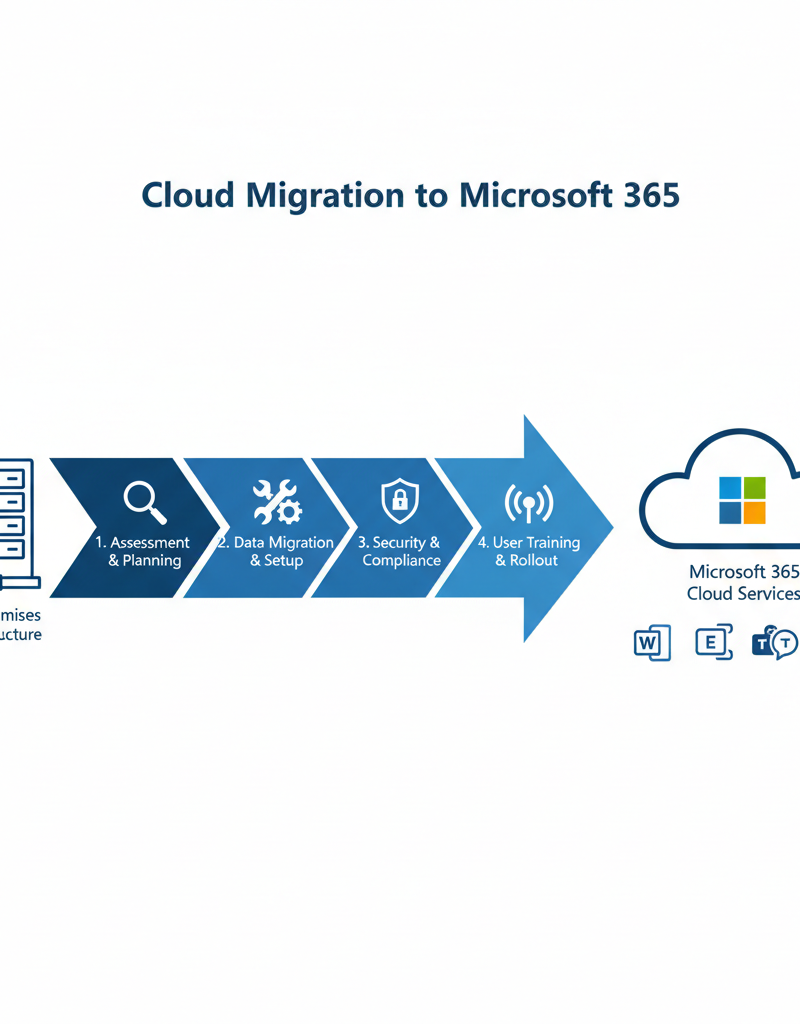
Our cloud migration services include:
- Assessment and Planning: We assess your current IT infrastructure and develop a detailed migration plan tailored to your specific needs.
- Data Migration: We securely migrate your data to Microsoft 365, ensuring data integrity and minimising downtime.
- User Training: We provide comprehensive training to your employees to ensure they can effectively use Microsoft 365.
- Ongoing Support: We provide ongoing support to ensure your Microsoft 365 environment is running smoothly.
How do I choose the right Microsoft 365 management partner?
To choose the right Microsoft 365 management partner, prioritise providers with a proven track record, experienced professionals, and a strong commitment to exceptional service. It is essential to look for a partner that demonstrates deep expertise across the entire Microsoft 365 ecosystem, including components like SharePoint, Entra ID, and nuanced cloud migration strategies. For instance, an ideal partner should be able to showcase successful case studies where they have helped various Australian businesses, such as a Brisbane-based manufacturing firm, achieve at least a 25% improvement in collaboration efficiency within 6 months through optimised Microsoft 365 utilisation. Moreover, confirm that they offer a comprehensive suite of services encompassing responsive helpdesk support, proactive cybersecurity measures, and robust compliance adherence, ensuring your investment is not only maximised but also securely managed according to local regulations.

When choosing a partner, consider the following:
- Experience and Expertise: Does the provider have extensive experience managing Microsoft 365 environments?
- Service Offerings: Does the provider offer a comprehensive range of services to meet your specific needs?
- Customer Support: Does the provider offer responsive and reliable customer support?
- Security Focus: Does the provider have a strong focus on security and compliance?
- Pricing: Is the provider's pricing transparent and competitive?
How can Microsoft 365 secure your business?
Microsoft 365 can significantly secure your business by offering a comprehensive suite of integrated features designed to protect data from evolving cyber threats. While robust, these tools necessitate proper configuration and ongoing management to be truly effective. Expert assistance can facilitate the implementation of critical best practices, such as multi-factor authentication (MFA), which is proven to block over 99.9% of automated cyberattacks according to Microsoft's research, alongside conditional access policies that rigorously control who can access resources. Additionally, advanced threat protection policies expertly detect and neutralise sophisticated attacks, including phishing and malware. Properly leveraging these capabilities helps Australian businesses, from small startups in Perth to large enterprises in Sydney, safeguard sensitive information, maintain compliance, and ensure operational continuity against a growing landscape of cyber risks, thereby strengthening their overall digital resilience.
We also offer ongoing security monitoring and incident response services to ensure that your business is protected from the latest threats. The Microsoft Trust Center is a great resource to learn more about Microsoft's security commitment.

By partnering with Mycelium 365, you can rest assured that your Microsoft 365 environment is in good hands. We are committed to providing exceptional service and helping you achieve your business goals.
For more information on how we can help you manage your Microsoft 365 environment, contact us today. We serve businesses across Australia, including Melbourne, Sydney, Perth, and Brisbane. We also have international offices and can offer services globally.
Learn more about Microsoft 365. Explore Azure Cloud Services. Read the latest TechRepublic articles.