Is your medium-sized business ready to unlock its full potential? In today's dynamic business landscape, having the right technology infrastructure is crucial for success. Microsoft 365 for medium business offers a powerful suite of tools and services designed to enhance productivity, improve collaboration, and strengthen security. But navigating the complexities of Microsoft 365 can be challenging. That's where a trusted Microsoft cloud partner Brisbane or Melbourne can make all the difference.
Why is Microsoft 365 ideal for medium businesses?
Microsoft 365 is ideal for medium businesses because it directly addresses common operational challenges, such as scaling operations, managing a growing workforce, and protecting sensitive data, through a comprehensive and seamlessly integrated platform. For instance, it significantly enhances productivity with universally recognised applications like Word, Excel, and Outlook, bolstering daily efficiency. Moreover, it includes robust security features such as advanced threat protection and identity management, which are crucial for safeguarding sensitive business data from an ever-increasing array of cyber threats; Australian businesses, in particular, saw a 15% increase in cybercrime reports last year. Its inherent scalability and flexibility also mean businesses can effortlessly add or remove users and services, adapting to growth without significant IT overheads. This integrated environment streamlines operations, fosters collaboration via tools like Teams, and ensures cost-effectiveness through its subscription model, supporting sustainable growth.
- Enhanced Productivity: Microsoft 365 includes essential applications like Word, Excel, PowerPoint, and Outlook, enabling your team to work efficiently and effectively. Cloud-based storage through OneDrive ensures that files are always accessible and backed up.
- Improved Collaboration: Teams, SharePoint, and Exchange Online facilitate seamless communication and collaboration, regardless of location. This is especially important for businesses with remote or hybrid work models.
- Robust Security: Microsoft 365 offers advanced security features, including threat protection, data loss prevention, and identity management, helping to safeguard your business from cyber threats. Learn more about modern workplace security with [Intune & Defender](slug: secure-modern-workplace-microsoft-defender-intune).
- Scalability and Flexibility: As your business grows, Microsoft 365 can easily scale to meet your evolving needs. You can add or remove users and services as required, ensuring that you're only paying for what you need.
- Cost-Effectiveness: Microsoft 365 offers a subscription-based pricing model, which can be more cost-effective than purchasing and maintaining individual software licenses. This allows you to better manage your IT budget and allocate resources to other critical areas of your business.

What are the key components of Microsoft 365 for medium businesses?
Microsoft 365 for medium businesses is a comprehensive platform integrating several services to create a unified and productive work environment, moving beyond just a collection of applications. Key components typically include Microsoft Teams for communication and real-time collaboration, SharePoint Online for robust document management and internal platforms, and Exchange Online for secure cloud-based email and calendaring services. Additionally, OneDrive for Business provides essential cloud storage and file synchronisation across all devices, ensuring accessibility and backup. Critically, Microsoft Intune offers comprehensive endpoint management for securing devices and applications, enabling businesses to enforce security policies and deploy apps seamlessly across company-owned and personal devices. For instance, an Australian accounting firm with 100 employees might use Intune to ensure all staff laptops are encrypted and comply with data handling regulations, protecting sensitive client information. This suite also incorporates Microsoft Defender for Business, a comprehensive security solution designed to protect against evolving cyber threats, bringing advanced threat protection to medium-sized enterprises.
- Microsoft Teams: A central hub for communication, collaboration, and teamwork. Teams allows you to chat, meet, share files, and collaborate on projects in real-time. Learn more about Microsoft Teams.
- SharePoint Online: A powerful platform for document management, team collaboration, and intranet development. SharePoint allows you to create and manage websites, store and share files, and automate workflows. Learn more about SharePoint.
- Exchange Online: A cloud-based email and calendar service that provides reliable and secure communication for your business. Exchange Online offers advanced features like shared calendars, contact management, and email archiving. Learn more about Exchange Online.
- OneDrive for Business: A cloud storage service that allows you to store, share, and sync your files across all your devices. OneDrive for Business ensures that your files are always accessible and backed up. Consider Azure Backup for additional data security, as described in [Secure Your Business with Azure Backup & Modern Workplace](slug: azure-backup-modern-workplace-business-continuity).
- Microsoft Intune: A cloud-based endpoint management Microsoft Intune solution that allows you to manage and secure your company's devices and applications. Intune enables you to enforce security policies, deploy applications, and protect sensitive data on both company-owned and personal devices. Learn more about Microsoft Intune.
- Microsoft Defender for Business: A comprehensive security solution designed to protect your business from cyber threats. Defender for Business offers advanced threat protection, vulnerability management, and endpoint detection and response capabilities. Fortify your business with [Managed IT Services](slug: managed-it-services-microsoft-defender-it-support).
How can I implement Microsoft 365 for my business step-by-step?
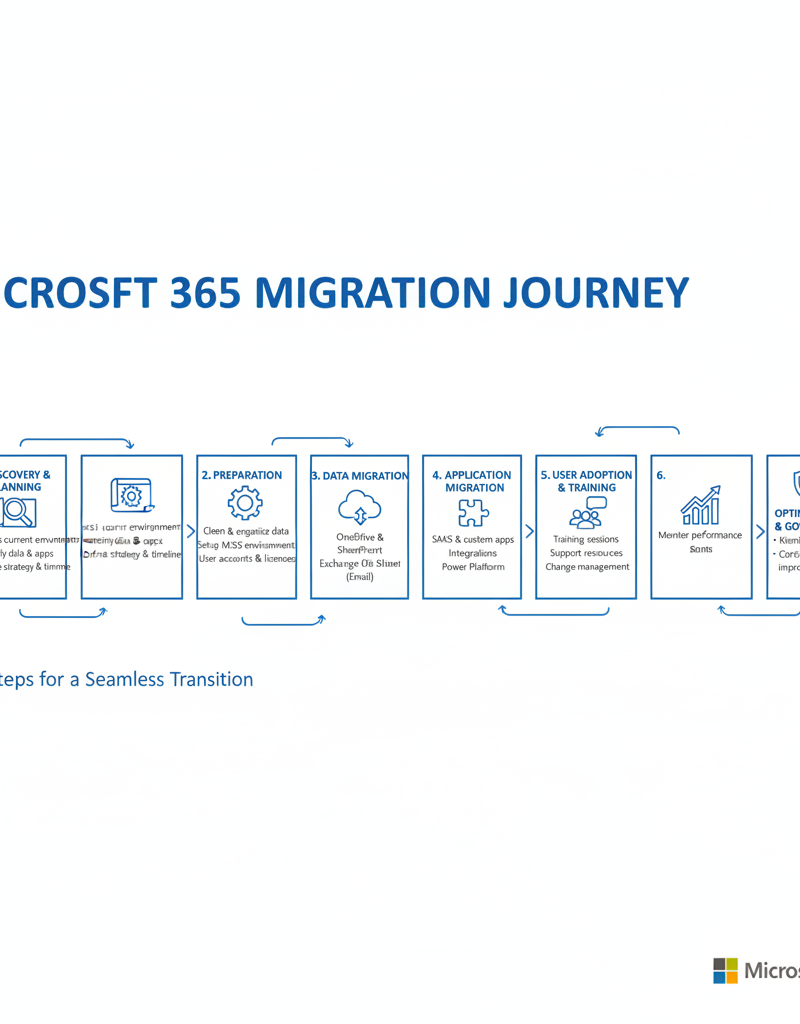
Implementing Microsoft 365 for a business typically involves a structured, step-by-step approach to ensure a smooth transition and optimal functionality. This process begins with a comprehensive needs assessment to identify suitable Microsoft 365 plans based on user count, storage, and security requirements. Subsequently, a detailed migration plan is developed, often employing a phased approach to minimise business disruption, followed by configuring the core Microsoft 365 environment with user accounts, security policies, and network settings. Once infrastructure is ready, data migration is a critical phase, moving elements like emails and files to services such as Exchange Online or SharePoint Online. For instance, an Australian Managed IT provider recently reported that businesses undertaking a phased migration achieved approximately 15% fewer support tickets in the first month post-implementation compared to full-cutover migrations. Concluding the rollout, comprehensive user training and continuous monitoring and optimisation are essential to maximise platform utilisation and maintain robust security against evolving cyber threats.
- Assess Your Needs: Identify your business requirements and determine which Microsoft 365 plans and services are the best fit for your needs. Consider factors such as the number of users, storage requirements, and security needs.
- Plan Your Migration: Develop a detailed migration plan that outlines the steps involved in moving your data and applications to Microsoft 365. Consider using a phased approach to minimize disruption to your business. Read our guide on [Seamless Cloud Migration to Microsoft 365](slug: seamless-cloud-migration-microsoft-365).
- Configure Your Environment: Set up your Microsoft 365 environment, including user accounts, security policies, and network settings. Ensure that your environment is properly configured before migrating your data.
- Migrate Your Data: Migrate your data from your existing systems to Microsoft 365. This may involve moving email, files, and other data to Exchange Online, SharePoint Online, and OneDrive for Business. [SharePoint & Azure](slug: sharepoint-azure-cloud-migration) can streamline your cloud migration.
- Train Your Users: Provide training to your users on how to use Microsoft 365. This will help them to get the most out of the platform and ensure a smooth transition. Microsoft Learn offers a wealth of resources.
- Monitor and Optimize: Continuously monitor your Microsoft 365 environment and optimize your settings to ensure that it is performing optimally. Regularly review your security policies and update them as needed to protect your business from evolving threats. Consider [Managed IT Services](slug: managed-it-services-azure-backup-virtual-desktop) for ongoing support and maintenance.
What is the role of a Microsoft cloud partner for Australian businesses?
For Australian businesses, especially those in major hubs like Melbourne or Brisbane, a Microsoft cloud partner is essential for effectively implementing and managing Microsoft 365. Rather than attempting a complex self-implementation, engaging a qualified partner offers significant advantages across the entire lifecycle, encompassing everything from initial strategic planning and seamless data migration to user training and continuous technical support. For example, an Australian medium-sized business partnering with a certified Microsoft expert can typically accelerate their Microsoft 365 deployment by up to 50% compared to an in-house effort, drastically reducing time-to-value and minimizing disruption. These partners ensure the environment is securely configured, optimised for specific business needs, and aligned with local compliance standards, ultimately leading to greater operational efficiency and a stronger return on investment from the Microsoft 365 suite.
Here are some of the benefits of working with a Microsoft cloud partner:
- Expertise and Experience: Microsoft cloud partners have extensive knowledge and experience with Microsoft 365. They can help you to choose the right plans and services, configure your environment, and migrate your data.
- Customized Solutions: A partner can tailor Microsoft 365 to meet your specific business needs. They can develop custom solutions and integrations to help you get the most out of the platform. Explore [Microsoft 365 & Azure: Scaling Your Business in 2024](slug: microsoft-365-azure-cloud-migration-guide).
- Ongoing Support: A partner can provide ongoing support and maintenance for your Microsoft 365 environment. They can help you to troubleshoot issues, optimize your settings, and keep your environment secure. For disaster recovery, see [Microsoft 365: Disaster Recovery Essentials](slug: microsoft-365-disaster-recovery-plan).
- Cost Savings: While there is an upfront cost to engaging a partner, the long-term benefits can outweigh the initial investment. A partner can help you to optimize your Microsoft 365 subscription, reduce IT costs, and improve productivity.
What are the security considerations for Microsoft 365?
Security for Microsoft 365 is a shared responsibility, where Microsoft provides the platform and security tools, but businesses are accountable for their effective configuration and ongoing management. Key security considerations include promptly enabling Multi-Factor Authentication (MFA) for all user accounts, which significantly reduces unauthorised access attempts; for instance, Microsoft reports MFA blocks over 99.9% of automated attacks. Utilising Conditional Access policies is crucial for controlling data and application access based on factors like user location or device, ensuring access only from secure environments. Furthermore, Data Loss Prevention (DLP) policies are essential to prevent sensitive information from inadvertently leaving your organisation, and leveraging Microsoft Defender for Business provides advanced threat protection, vulnerability management, and endpoint detection and response capabilities. The Australian Cyber Security Centre (ACSC) also provides valuable resources to guide security best practices for Australian businesses.
Here are some key security considerations for Microsoft 365:
- Multi-Factor Authentication (MFA): Enable MFA for all user accounts to prevent unauthorized access. MFA adds an extra layer of security by requiring users to verify their identity using a second factor, such as a code sent to their mobile device.
- Conditional Access: Use conditional access policies to control access to your data and applications based on factors such as location, device, and user risk. Conditional access can help you to prevent unauthorized access from risky devices or locations. Explore [Entra ID](slug: entra-id-business-continuity-cybersecurity) for enhanced security.
- Data Loss Prevention (DLP): Implement DLP policies to prevent sensitive data from leaving your organization. DLP policies can help you to identify and protect sensitive data, such as credit card numbers and social security numbers.
- Threat Protection: Use Microsoft Defender for Business to protect your business from cyber threats. Defender for Business offers advanced threat protection, vulnerability management, and endpoint detection and response capabilities. [Fortify Your Business with Managed IT Services](slug: managed-it-services-microsoft-defender-it-support).

What is the conclusion regarding Microsoft 365 for medium businesses?
Microsoft 365 stands out as a powerful and highly recommended platform for medium-sized businesses aiming to enhance productivity, improve internal collaboration, and significantly strengthen their cybersecurity defences. To fully leverage its capabilities, businesses should focus on meticulous implementation planning, collaborate with a qualified Microsoft cloud partner, and consistently prioritise security measures. For example, businesses effectively utilising Microsoft 365 often experience a tangible 15-20% boost in cross-departmental communication efficiency within the first six months. By strategically deploying integrated features like Microsoft Teams for seamless collaboration and Microsoft Intune for robust endpoint management, organisations can unlock the platform's complete potential. Partnering with a dedicated Microsoft cloud partner in Brisbane or Melbourne, such as Mycelium 365, is crucial for receiving tailored guidance and comprehensive support throughout the integration process and ongoing system management, ultimately driving business forward effectively.