
In today's digital landscape, Disaster Recovery (DR) is no longer optional – it's a critical necessity for every business, regardless of size. For Australian organisations leveraging the power of Microsoft 365, a robust DR plan is paramount. This guide explores how to ensure your business remains resilient in the face of unforeseen events, leveraging the capabilities of Microsoft 365 and supporting services. We'll also touch on finding a suitable Microsoft cloud partner Melbourne or elsewhere in Australia.
Why does disaster recovery matter for Microsoft 365 users?
Disaster recovery (DR) is critical for Microsoft 365 users because various unforeseen events, such as natural calamities frequently encountered in Australia like floods and bushfires, cyberattacks, hardware malfunctions, or human error, can severely interrupt business operations. Without a robust DR strategy, businesses risk significant data loss, prolonged downtime, damage to their reputation, and substantial financial setbacks. For organisations relying heavily on Microsoft 365 for essential services like email, collaboration, and productivity, the absence of an effective DR plan can result in an average of $8,000 per hour in downtime costs, potentially leading to millions in annual losses for larger enterprises. A well-defined DR plan, specifically tailored for the Microsoft 365 ecosystem, demonstrably mitigates these risks, protects crucial data, and ensures uninterrupted business continuity even when facing disruptive events. Further guidance on crafting such plans is available on Microsoft Learn.
 Image description: A graphical representation of data flowing from a local business network to the Microsoft 365 cloud, with arrows indicating backup and recovery processes in case of a disaster. The visual emphasises data resilience and business continuity.
What are the key components of a Microsoft 365 disaster recovery plan?
A robust Microsoft 365 disaster recovery (DR) plan in Australia is built upon several critical components designed to ensure business resilience and data integrity. Key elements include comprehensive data backup and recovery strategies, which encompass regular backups of vital data across Exchange Online, SharePoint Online, OneDrive for Business, and Microsoft Teams, often utilising scalable solutions like Azure Backup. Additionally, it requires meticulous business continuity planning to define operational procedures and establish recovery time objectives (RTOs) and recovery point objectives (RPOs), ensuring essential processes can quickly resume. Crucially, a DR plan must integrate a clear communication strategy for employees and stakeholders, regular testing and drills to validate effectiveness, and strong security measures—like multi-factor authentication (MFA)—to prevent and mitigate cyber threats, which cause over 60% of all data breaches in Australian SMBs.
- Data Backup and Recovery: Protecting your data is fundamental. This involves regularly backing up critical Microsoft 365 data, including Exchange Online mailboxes, SharePoint Online sites, OneDrive for Business files, and Teams data. Solutions like Azure Backup offer robust and scalable backup capabilities. Learn more about securing your business with Azure Backup & Modern Workplace.
- Business Continuity Planning: Defining how your organisation will continue operating during and after a disaster. This includes identifying critical business processes, establishing recovery time objectives (RTOs) and recovery point objectives (RPOs), and documenting procedures for employees to follow. See also: M365: Your Business Continuity Lifeline.
- Communication Strategy: Establishing clear communication channels to keep employees, customers, and stakeholders informed during a disaster. This includes having alternative communication methods available in case primary systems are unavailable.
- Testing and Drills: Regularly testing your DR plan to identify weaknesses and ensure it works effectively. This involves simulating disaster scenarios and practicing recovery procedures. This should be a formal process, and the results documented.
- Security Measures: Implementing robust security measures to protect your Microsoft 365 environment from cyberattacks, which can trigger a disaster. This includes using multi-factor authentication (MFA), implementing strong password policies, and deploying threat detection and prevention solutions. Modern Workplace Security: Intune & Defender provides more information on this topic.
How can Microsoft 365 features be leveraged for disaster recovery?
Microsoft 365 offers numerous integrated features that are crucial for a robust disaster recovery (DR) strategy, significantly boosting an organisation's resilience against data loss and service interruptions. Key among these is geo-redundancy, where Microsoft replicates data across multiple geographically dispersed data centres in Australia and globally, ensuring high availability even if one region experiences an outage. For instance, data stored in an Australian data centre might have a redundant copy in another Australian region. Furthermore, features like retention policies within the Microsoft Purview compliance portal allow businesses to set rules for automatic data preservation, while SharePoint Online and OneDrive for Business provide version history, enabling restoration of files to previous states. These capabilities collectively minimise downtime and data loss during unforeseen events, making Microsoft 365 a foundational element for business continuity.
- Geo-Redundancy: Microsoft 365 data is replicated across multiple data centres in different geographic locations, providing inherent redundancy and resilience. You can read more about Microsoft's global datacenter footprint on the Microsoft Trust Center.
- Retention Policies: Configure retention policies to automatically preserve data for a specified period, ensuring that data is available for recovery even if it's accidentally deleted. You can set these policies in the Microsoft Purview compliance portal.
- Version History: SharePoint Online and OneDrive for Business maintain version history for files, allowing you to revert to previous versions in case of data corruption or accidental changes.
- Azure Active Directory (Azure AD) / Entra ID: Azure AD (now Microsoft Entra ID) provides identity and access management capabilities, ensuring that only authorised users can access your Microsoft 365 data. It is a critical component of disaster recovery, see: Entra ID: Your Business Continuity Lifeline.
How does endpoint management with Microsoft Intune enhance resilience?
Endpoint management with Microsoft Intune significantly enhances an organisation's resilience by ensuring that all devices accessing Microsoft 365 are secure and compliant, which is a cornerstone of effective disaster recovery in Australia. Intune empowers businesses to enforce robust security policies, mandating, for instance, multi-factor authentication and encryption on corporate devices, thereby protecting sensitive data from unauthorised access. It facilitates the automatic deployment of critical software updates and security patches to all endpoints, proactively addressing vulnerabilities before they can be exploited. This capability is vital for mitigating cyber threats, which cost Australian businesses an average of $33,000 per incident in 2023. Furthermore, in cases of device loss or theft, Intune allows for the immediate remote wiping of corporate data, effectively preventing data breaches and maintaining business continuity by safeguarding intellectual property and customer information.
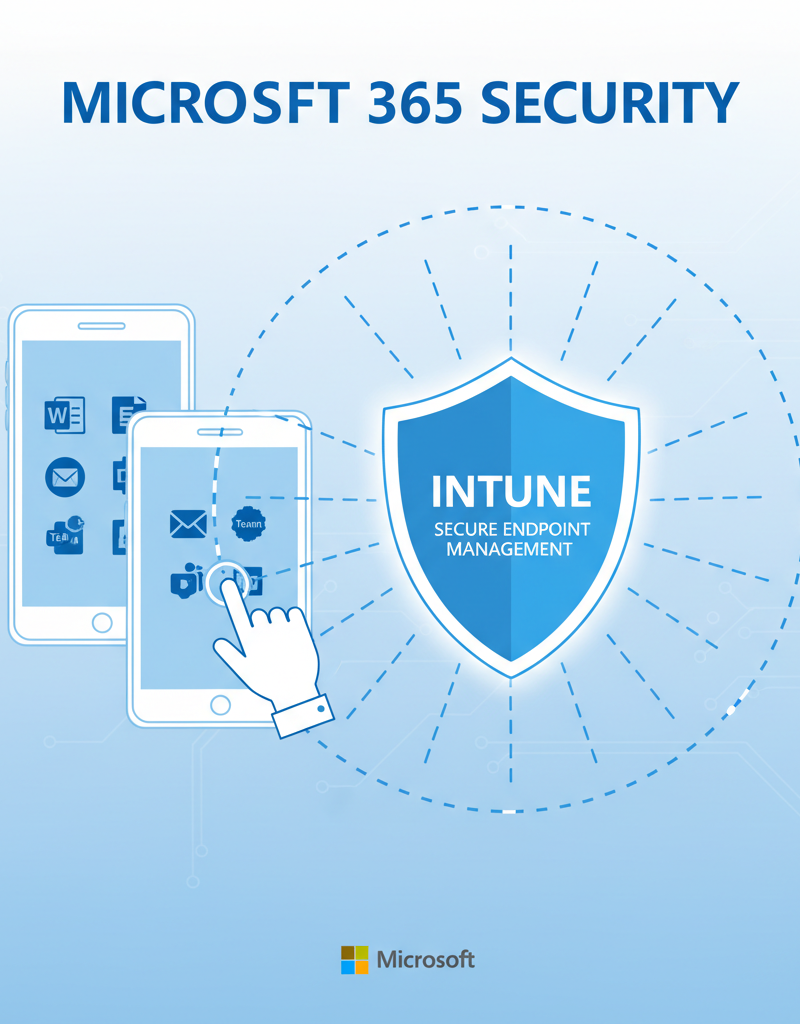 Image description: A user accessing Microsoft 365 applications on a mobile device (phone or tablet). Intune is depicted as a shield protecting the device and the data accessed through it, highlighting secure endpoint management.
How does an Office 365 migration in Australia lay the foundation for disaster recovery?
An Office 365 migration in Australia profoundly strengthens disaster recovery (DR) capabilities by ensuring a secure and efficient transfer of data to the cloud, thereby establishing a robust foundation for a comprehensive DR strategy. This migration phase is an excellent opportunity to significantly enhance an organisation's resilience and readiness for unforeseen events, guaranteeing business continuity. Key steps during this process, such as data cleansing and deduplication, ensure only vital and clean data resides in the new environment. Additionally, the meticulous configuration of security settings, like implementing multi-factor authentication (MFA) for all user accounts, can dramatically reduce the risk of data breaches, often by over 99%. Thorough testing and validation of the migrated systems — including simulating data recovery scenarios — further confirm that all data and applications operate as anticipated, providing a reliable safety net against potential disruptions or data loss.
Key considerations during migration:
- Data cleansing and deduplication: Ensure that only clean and relevant data is migrated to Microsoft 365.
- Proper configuration of security settings: Implement strong security policies during the migration process.
- Testing and validation: Thoroughly test the migrated environment to ensure that everything is working as expected.
Why do Australian businesses need Microsoft 365 support?
Australian businesses require dedicated Microsoft 365 support to ensure the ongoing effectiveness of their disaster recovery (DR) plans and maintain operational resilience. A local support partner offers invaluable expert guidance, proactive monitoring, and troubleshooting assistance specifically tailored to the regional business landscape. For instance, an Australian provider typically delivers faster response times, often guaranteeing an initial response within 15-30 minutes for critical incidents during business hours, significantly minimising potential costly downtime. They also possess expert knowledge of the Australian regulatory and compliance requirements, such as those stipulated by the Privacy Act 1988 and the Australian Cyber Security Centre (ACSC) guidelines, ensuring that your Microsoft 365 environment adheres to local standards. This personalised service ensures businesses receive support that aligns precisely with their unique operational demands and sector-specific needs, bolstering their security posture and business continuity.
Benefits of local support include:
- Faster response times: Local support providers can respond quickly to your needs, minimising downtime.
- Expert knowledge of the Australian regulatory landscape: Local providers understand the specific compliance requirements of Australian businesses.
- Personalised service: Local providers can offer tailored support solutions that meet your specific needs.
How do I choose the right Microsoft cloud partner in Melbourne (and beyond)?
Choosing the right Microsoft cloud partner in Melbourne or across Australia is a critical decision that significantly impacts your business's disaster recovery capabilities and overall IT efficiency. To make an informed choice, prioritise partners with a demonstrably strong track record of success, deep expertise in the full Microsoft 365 ecosystem, and an unwavering commitment to excellent customer service. For instance, a reputable partner should showcase relevant certifications, such as Microsoft Certified: Azure Solutions Architect Expert or Microsoft 365 Certified: Enterprise Administrator Expert, ensuring their technical proficiency. Additionally, evaluate prospective partners based on their experience in complex migrations, their service level agreements (SLAs) guaranteeing rapid response times — aiming for 99.9% uptime or better — and transparent pricing structures, ensuring they can reliably secure and scale your operations while boosting efficiency through managed IT and cloud migration solutions, such as those provided for businesses managing over 200 endpoints.
Consider these factors when selecting a partner:
- Experience and expertise: Does the partner have extensive experience in migrating, managing, and supporting Microsoft 365 environments?
- Certifications and qualifications: Does the partner hold relevant Microsoft certifications?
- Customer testimonials and references: What do other customers say about the partner's services?
- Service level agreements (SLAs): Does the partner offer SLAs that guarantee uptime and response times?
- Pricing and transparency: Is the partner's pricing clear and transparent? Are there any hidden fees?
 Image description: A team of IT professionals collaborating on a network diagram displayed on a large screen, showcasing expertise in Microsoft 365 and cloud solutions. The scene conveys trust, teamwork and a focus on client solutions.
How can Microsoft 365 ensure business continuity?
Microsoft 365 ensures business continuity for Australian organisations by integrating robust features like geo-redundant data storage, automatic failovers, and comprehensive backup solutions, which collectively safeguard data and minimise service disruptions. Its globally distributed data centres are designed so that if an isolated regional outage occurs—for example, due to a power failure impacting a specific Sydney data centre—services can seamlessly transition to another operational facility without user intervention. Microsoft offers financially backed service level agreements, guaranteeing 99.9% uptime for core services. This commitment means Australian businesses can rely on features like Microsoft Teams and Exchange Online remaining available during critical periods. Furthermore, tools like version history in SharePoint and granular restore options facilitate rapid recovery from data loss, demonstrating how proactive planning with Microsoft 365 significantly enhances resilience against unforeseen events.
To learn more about Microsoft's commitment to business continuity, you can visit their Microsoft 365 Backup documentation. Furthermore, the Australian Cyber Security Centre (ACSC) offers valuable resources and guidance on cybersecurity and disaster recovery for Australian businesses. Visit the ACSC Essential Eight.
Remember to routinely update your DR plan as your business and technology evolve. Regular testing and employee training are also crucial for maintaining a strong DR posture. Consider also Secure and Scale with Managed IT Services & Azure.