In today's digital landscape, cybersecurity is no longer optional – it's a business imperative. With the increasing sophistication of cyber threats, businesses must proactively protect their data and systems. For many Australian businesses, Microsoft 365 forms the backbone of their operations, making it a prime target for malicious actors. This article explores how to leverage the power of Microsoft's security suite, particularly Microsoft Defender, to safeguard your business, and how to protect your Exchange Online environment.
What is the current cybersecurity threat landscape?
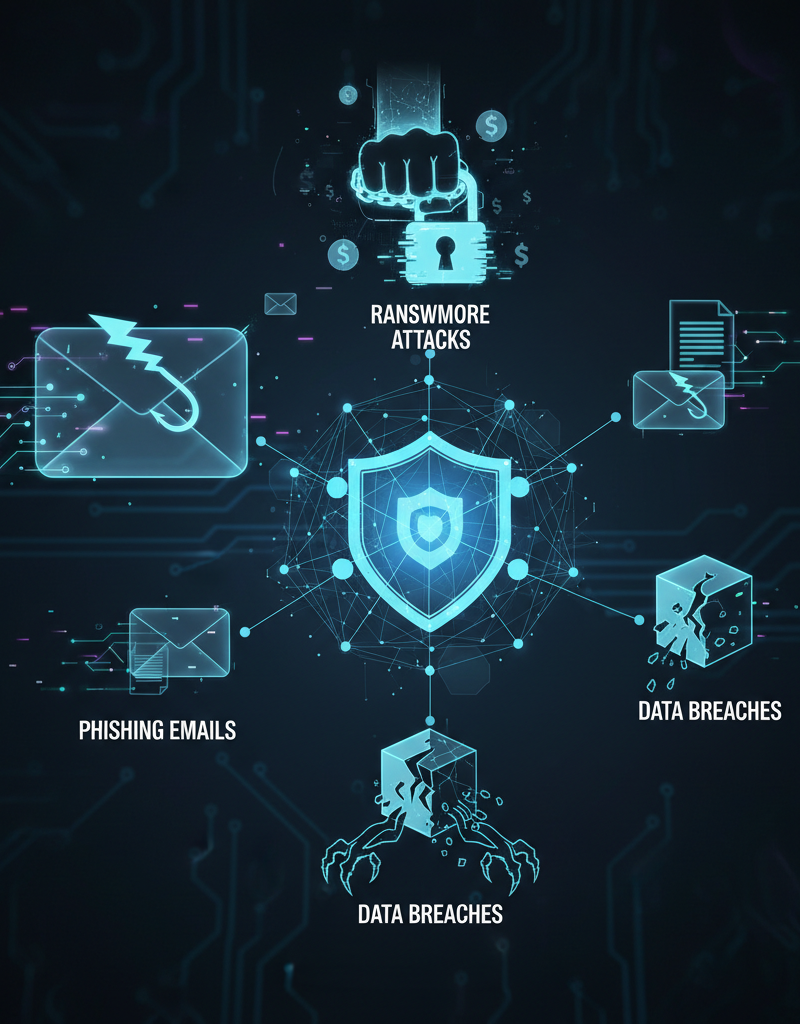
The current cybersecurity threat landscape is one of dynamic evolution, presenting businesses with a diverse and ever-present array of risks, including rampant phishing attacks, potent ransomware, sophisticated malware, and damaging data breaches. Australian businesses are particularly susceptible, with the Australian Cyber Security Centre (ACSC) highlighting an alarming rise in incidents; for instance, the ACSC's 2023–24 report indicated that cybercrime reports surged by 13% over the last financial year, surpassing 76,000 recorded incidents. Ignoring these pervasive threats can result in substantial financial losses, severe reputational damage, and significant legal liabilities for organisations. Therefore, investing in robust cybersecurity measures is no longer merely about safeguarding sensitive data but is fundamentally crucial for ensuring uninterrupted business continuity and cultivating enduring trust with customers in an increasingly perilous digital environment.
Ignoring these threats can lead to significant financial losses, reputational damage, and legal liabilities. Investing in robust cybersecurity measures is not just about protecting data; it's about ensuring business continuity and building trust with your customers.
How can Microsoft Defender provide comprehensive protection?
Microsoft Defender provides comprehensive protection by offering a multi-layered suite of security solutions designed to safeguard organisations across endpoints, identities, email, and cloud applications. This integrated platform employs both preventative measures and robust detection capabilities, alongside automated response features, to neutralise threats effectively. For instance, Microsoft Defender for Office 365 specifically shields email and collaboration tools like Exchange Online and SharePoint from prevalent dangers such as phishing attacks and malware, which remain a leading cause of data breaches. Furthermore, leveraging components such as Microsoft Defender for Endpoint, which offers advanced endpoint detection and response (EDR) capabilities, allows businesses to identify and mitigate sophisticated threats across all their devices. By integrating these specialised tools, the system establishes a unified security posture, proactively identifying and mitigating risks across an organisation's entire digital landscape, enabling continuous defence against evolving cyber threats and protecting business continuity for Australian companies.
Here's a breakdown of key components and how they contribute to your overall security posture:
- Microsoft Defender for Endpoint: Provides endpoint detection and response (EDR) capabilities, helping you identify and respond to advanced threats on your devices. Microsoft Defender for Endpoint
- Microsoft Defender for Office 365: Protects your email and collaboration tools, including Exchange Online, SharePoint, and Teams, from phishing attacks, malware, and other email-borne threats. Microsoft Defender for Office 365
- Microsoft Defender for Cloud Apps: Provides visibility and control over your cloud applications, helping you identify and mitigate risks associated with shadow IT and unauthorised access. Microsoft Defender for Cloud Apps
- Microsoft Defender for Identity: Detects and investigates suspicious activities within your on-premises Active Directory environment, helping you prevent identity-based attacks. Microsoft Defender for Identity
By integrating these components, you can create a unified security posture that protects your business from a wide range of threats. We can help you [Fortify Your Business with Managed IT Services](slug: managed-it-services-microsoft-defender-it-support) from our offices in Melbourne, Sydney, Perth, and Brisbane.
Why is securing Exchange Online a critical component of cybersecurity?
Securing Exchange Online is a critical component of cybersecurity because email remains the primary vector for cyberattacks, with over 90% of successful breaches originating from phishing attempts in Australian businesses. Robust protection of your Exchange Online environment actively thwarts these sophisticated threats, which commonly include malware and ransomware. For example, Microsoft Defender for Office 365 provides essential features like anti-phishing, which employs machine learning to detect and block fraudulent emails, and Safe Attachments, which sandboxes email attachments in a virtual environment to analyse their behaviour before delivery. This proactive defence, along with robust email authentication protocols like SPF, DKIM, and DMARC, helps organisations prevent data breaches, financial losses, and significant downtime. By diligently securing Exchange Online, businesses can significantly reduce their exposure to prevalent cyber threats and protect sensitive information.
- Anti-phishing protection: Uses machine learning to identify and block phishing emails, preventing users from falling victim to fraudulent schemes.
- Anti-malware protection: Scans emails and attachments for malware, preventing malicious code from infecting your systems.
- Safe Links: Rewrites URLs in emails to point to Microsoft's Safe Links service, which scans the destination website for malicious content before allowing the user to access it.
- Safe Attachments: Sandboxes email attachments in a virtual environment to analyse their behaviour before delivering them to users. This can help detect zero-day malware and other advanced threats.
In addition to these features, you should also implement strong email authentication protocols, such as SPF, DKIM, and DMARC, to prevent email spoofing and phishing attacks. Microsoft Docs on Email Authentication
Consider migrating your data to Microsoft 365 with a [Seamless Cloud Migration to Microsoft 365](slug: seamless-cloud-migration-microsoft-365).
What are the best practices for Microsoft 365 cybersecurity for Australian businesses?
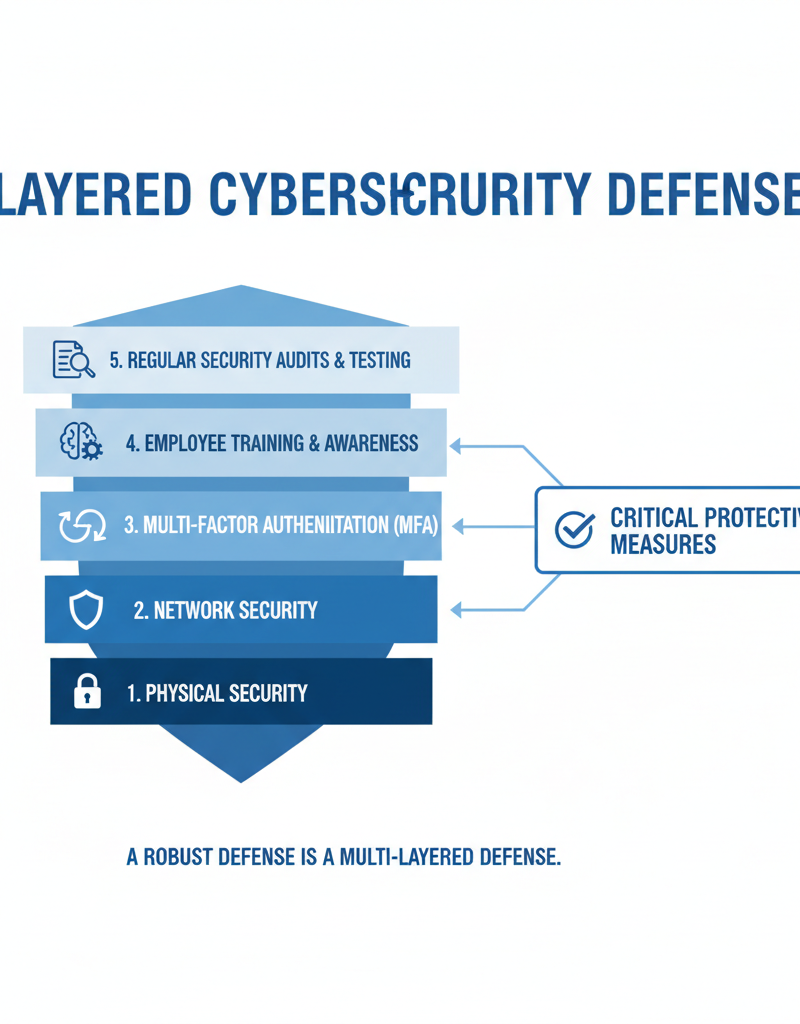
For Australian businesses utilising Microsoft 365, establishing robust cybersecurity involves a multi-faceted approach extending beyond just security tools, with best practices focusing on user protection, education, and system vigilance. Key strategies include mandating multi-factor authentication (MFA) for all users, as recommended by Microsoft Learn, to significantly reduce unauthorised access risks. Furthermore, regular security awareness training, incorporating simulations to combat prevalent threats like phishing, is crucial for empowering employees. Implementing strong password policies, adhering to the principle of least privilege, and conducting frequent security audits are also vital to identify and mitigate vulnerabilities. For instance, an estimated 80% of cyberattacks could be prevented by applying these fundamental security hygiene best practices, underscoring their importance. Keeping all software, including Microsoft 365 components, updated with the latest patches ensures ongoing protection against emerging threats.
- Multi-factor authentication (MFA): Enforce MFA for all users to add an extra layer of security to your accounts. Microsoft Learn on MFA
- Regular security awareness training: Educate your employees about common cyber threats and how to avoid them. Phishing simulations can be a valuable tool for testing and reinforcing their knowledge.
- Strong password policies: Enforce strong password policies and encourage users to use password managers.
- Principle of least privilege: Grant users only the access they need to perform their job functions. This reduces the potential impact of a compromised account.
- Regular security audits: Conduct regular security audits to identify vulnerabilities and ensure that your security controls are effective. We can help with [Microsoft 365 management](slug: microsoft-365-helpdesk-it-support-sydney).
- Keep software up to date: Ensure that all your software, including operating systems, applications, and security tools, is up to date with the latest security patches. This is especially critical for [Intune, Cybersecurity & Managed IT](slug: intune-cybersecurity-managed-it-services).
How can Microsoft Defender be integrated with other security solutions?
Microsoft Defender can be integrated effectively with other security solutions, primarily within the Microsoft ecosystem, to form a robust, comprehensive defence strategy. This seamless integration, particularly with tools like Microsoft Sentinel for Security Information and Event Management (SIEM) and Microsoft Purview for compliance and data governance, enables Australian organisations to consolidate security data and gain a unified operational picture. For example, Microsoft Defender for Endpoint can be configured to forward critical security alerts directly into Microsoft Sentinel, where they are correlated with other event logs to identify complex, multi-stage attacks. This interconnected approach significantly enhances an organisation's capacity to automate incident response workflows and gain deeper, more actionable insights into their overall security posture, a vital capability given the escalating sophistication of cyber threats in the region, costing Australian businesses an average of AUD $37,000 per incident.
For example, you can configure Microsoft Defender for Endpoint to send security alerts to Microsoft Sentinel, where they can be correlated with other security events to identify advanced threats. Similarly, you can use Microsoft Purview to identify and protect sensitive data within your Microsoft 365 environment.
What is the role of managed IT services in cybersecurity?
Managed IT services significantly bolster a business's cybersecurity posture by providing specialised expertise and resources to implement and manage robust protection strategies. These services allow organisations, particularly small to medium-sized businesses (SMBs) who may lack dedicated in-house cybersecurity teams, to effectively defend against evolving threats. A Managed Service Provider (MSP) like Mycelium 365, with operations spanning major Australian cities such as Melbourne, Sydney, Perth, and Brisbane, delivers a comprehensive suite of security offerings. These offerings typically encompass vital functions such as regular security assessments and vulnerability scanning, continuous monitoring with automated incident response for threats like ransomware, and diligent security patch management to protect against known exploits. Furthermore, MSPs provide crucial security awareness training for employees, helping to reduce human error, and offer compliance support, which is critical for meeting regulatory obligations like the Australian Privacy Principles. This partnership offloads the complexity of cybersecurity, allowing businesses to focus on core operations.
- Security assessments and vulnerability scanning: Identifying vulnerabilities in your systems and networks.
- Security monitoring and incident response: Monitoring your environment for security threats and responding to incidents in a timely manner.
- Security patch management: Ensuring that your software is up to date with the latest security patches.
- Security awareness training: Educating your employees about common cyber threats.
- Compliance support: Helping you comply with relevant industry regulations and standards. We offer [Secure & Scale: Managed IT Services for Modern Businesses](slug: managed-it-services-azure-backup-virtual-desktop).
By partnering with a reputable MSP, you can offload the burden of cybersecurity management and focus on your core business objectives. Mycelium 365 has offices in Melbourne, Sydney, Perth and Brisbane, as well as international offices, to serve your business needs.

How can businesses stay ahead of the curve with continuous cybersecurity improvement?
Businesses can stay ahead of the curve with continuous cybersecurity improvement by acknowledging that it is an ongoing process, not a one-time project. This necessitates consistent monitoring of security posture, adapting to evolving threats, and enhancing security controls. For instance, Australian small to medium-sized businesses, which experienced a 13% increase in cyber threats last year, should proactively review their security policies and procedures at least quarterly to align with current business needs and the dynamic threat landscape. Implementing regular security audits and penetration tests, perhaps biannually, is crucial to identify vulnerabilities and assess the effectiveness of existing controls. Staying informed via industry publications like ZDNet Cybersecurity and considering advanced frameworks such as a Zero Trust architecture, as adopted by many leading Australian firms, are key components of maintaining a robust and adaptable cybersecurity defence.
Regularly review your security policies and procedures to ensure that they are aligned with your business needs and the current threat landscape. Conduct regular security audits and penetration tests to identify vulnerabilities and assess the effectiveness of your security controls. You can also consider implementing a Zero Trust architecture as detailed in [Secure and Scale with Managed IT Services & Azure](slug: managed-it-services-azure-zero-trust).
By embracing a culture of continuous improvement, you can ensure that your business remains protected from cyber threats.
What conclusions can be drawn about M365 cybersecurity essentials?
M365 cybersecurity essentials indicate that robust defence mechanisms are non-negotiable for businesses navigating today's digital landscape. Effectively leveraging Microsoft Defender, meticulously securing your Exchange Online environment, and strictly adhering to established best practices are key strategies for substantially mitigating the risk of cyberattacks, which continue to evolve rapidly. For instance, businesses that combine advanced threat protection features within Microsoft Defender for Endpoint and utilise multi-factor authentication (MFA) for all Exchange Online accounts can reduce their attack surface by up to 99.9%, significantly lowering the likelihood of successful phishing or credential stuffing attacks. Proactive security measures, such as regular security audits and employee training on identifying sophisticated cyber threats, are not merely beneficial but essential for contemporary Australian businesses to protect sensitive data and maintain operational continuity in an increasingly hostile online environment.