Microsoft 365 offers a comprehensive suite of tools designed to enhance productivity, collaboration, and communication within your organisation. However, simply subscribing to Microsoft 365 is not enough. To truly leverage its power and ensure a seamless, secure, and efficient digital workplace, partnering with a Managed IT Services provider is essential. This is especially true for businesses in competitive markets like Sydney, where optimised IT infrastructure is critical for success. Let's explore how Managed IT Services can help you maximise your Microsoft 365 investment.
How can managed IT services amplify Microsoft 365's advantages?
Managed IT services can significantly amplify Microsoft 365’s advantages by providing expert oversight and strategic management, ensuring businesses fully leverage its extensive features. While Microsoft 365 offers a comprehensive suite of tools like Word, Excel, Teams, and robust security features such as Microsoft Defender for Office 365 and Entra ID, many businesses, especially small to medium enterprises (SMEs), often lack the internal expertise to optimise these. A dedicated managed IT provider acts as an external IT department, offering proactive support, managing updates, and configuring settings to maximise efficiency and security. For instance, an Australian managed IT provider could enhance your Microsoft 365 security posture by implementing multi-factor authentication across all user accounts within a week, substantially reducing cyberattack risks. This professional management ensures that your investment in Microsoft 365 delivers its maximum potential value to your organisation.
- Office Applications: Word, Excel, PowerPoint, Outlook.
- Collaboration Tools: Teams, SharePoint, OneDrive.
- Communication Platforms: Exchange Online, Teams.
- Security Features: Microsoft Defender for Office 365, Entra ID (formerly Azure Active Directory).
While these tools offer significant benefits, managing them effectively requires expertise and resources that many businesses, particularly SMEs, may lack. This is where Managed IT Services come into play.

A Managed IT Services provider acts as an extension of your internal team, offering proactive management, comprehensive support, and strategic guidance to ensure your Microsoft 365 environment is optimised for your specific business needs. For example, if you're a business needing IT Support Sydney, working with a local provider means quick response times and a better understanding of the regional business environment.
What are the key benefits of managed IT services for Microsoft 365?
- Proactive Monitoring and Maintenance: Managed IT providers continuously monitor your Microsoft 365 environment for potential issues, addressing them proactively before they impact your business. This includes performance monitoring, security threat detection, and regular updates and patching.
- Enhanced Security: Cybersecurity threats are constantly evolving. Managed IT Services leverage Microsoft's security tools, like Microsoft Defender, alongside other security measures, to protect your data and systems from cyberattacks. They can also help you implement and manage multi-factor authentication (MFA) using Entra ID, adding an extra layer of security to your user accounts. This ties in closely with the guidance from the Australian Cyber Security Centre (ACSC). Check out our post on [Modern Workplace Security: Intune & Defender](slug: secure-modern-workplace-microsoft-defender-intune).
- Expert Support: A dedicated IT helpdesk provides timely and effective support for your employees, resolving technical issues quickly and efficiently. This minimises downtime and ensures your team can focus on their core responsibilities. [Optimise IT with Microsoft 365 & Expert Support](slug: microsoft-365-helpdesk-it-support-sydney) to learn more.
- Strategic Guidance and Consulting: Managed IT providers offer strategic guidance on how to best leverage Microsoft 365 to achieve your business goals. They can help you plan and execute cloud migrations, optimise your SharePoint environment, and implement new features and functionalities.
- Cost Optimisation: While there is a cost associated with Managed IT Services, the benefits often outweigh the expenses. By proactively managing your Microsoft 365 environment, you can reduce downtime, improve productivity, and avoid costly security breaches.
- Streamlined Intune Device Management: Managed IT services allow you to effectively manage your mobile devices and applications with Intune.
Why is Entra ID the foundation of secure access?
Entra ID (formerly Azure Active Directory) is the foundational element for secure access, especially within the Microsoft 365 environment, because it provides robust, centralised identity and access management capabilities. It meticulously controls who can access an organisation’s resources and precisely dictates their authorised actions, effectively preventing unauthorised entry. For example, Entra ID enables granular conditional access policies that can restrict access to sensitive financial data, allowing it only from registered company devices within the corporate network during business hours. Managed IT service providers in Sydney, like IT Consulting's IT Support Sydney, specialise in configuring and continuously optimising Entra ID environments to ensure a fortified security posture. They ensure all users have secure, appropriate access to applications and data while proactively defending the organisation against potential breaches, thereby establishing a critical digital perimeter for all resources and maintaining business continuity.
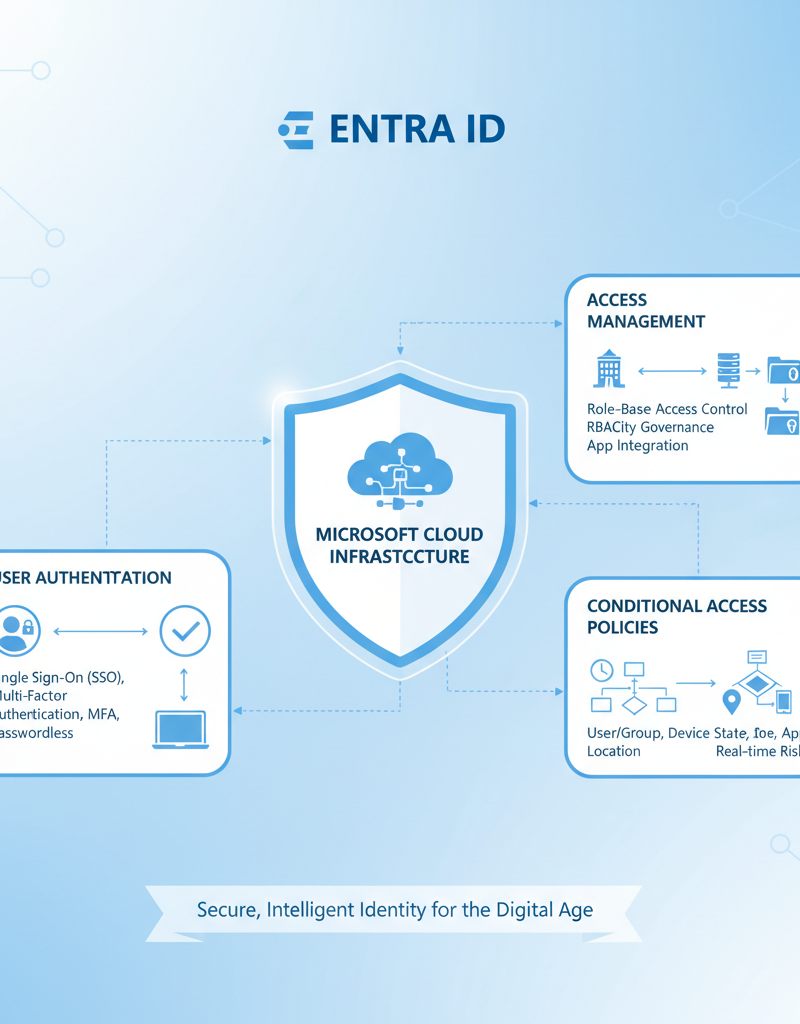
For more information on Entra ID, visit the Microsoft Learn documentation.
How do I choose the right managed IT services provider for Microsoft 365?
To choose the right managed IT services provider for Microsoft 365, it's crucial to assess their experience with the platform, their service level agreements (SLAs), and their proactive approach. A qualified provider will demonstrate extensive expertise in Microsoft 365 features and security best practices, such as implementing Conditional Access policies and seamless Entra ID management. Reviewing their SLAs is vital to understand guaranteed response times and uptime, which can significantly impact your business continuity; for instance, a 99.9% uptime guarantee ensures minimal disruption and swift resolution of issues within an agreed timeframe, perhaps just minutes for critical incidents. Opt for a provider that proactively monitors your environment, identifying and resolving potential issues before they escalate, rather than simply reacting to problems after they occur, thereby preventing costly downtime. Additionally, consider their customer support responsiveness and industry reputation, potentially through client testimonials showcasing successful Microsoft 365 deployments for businesses similar to yours in the Sydney market over several years.
- Experience and Expertise: Look for a provider with extensive experience in managing Microsoft 365 environments. They should have a deep understanding of the platform's features and functionalities, as well as the latest security best practices.
- Service Level Agreements (SLAs): Ensure the provider offers clear SLAs that define response times, uptime guarantees, and other key performance indicators.
- Proactive Approach: Choose a provider that takes a proactive approach to IT management, continuously monitoring your environment and addressing potential issues before they impact your business.
- Customer Support: Look for a provider with a responsive and knowledgeable customer support team.
- Industry Reputation: Check online reviews and ask for references to gauge the provider's reputation and customer satisfaction.
What are some real-world examples of managed IT for Microsoft 365?
Managed IT for Microsoft 365 offers tangible benefits by enhancing security and optimising operational efficiency for businesses. For example, a Sydney-based law firm handling sensitive client data can rely on a Managed IT provider to implement robust security measures within their Microsoft 365 environment, including multi-factor authentication (MFA) and data loss prevention (DLP) policies. This approach is crucial for ensuring compliance with industry regulations, such as the Privacy Act 1988, and for protecting the firm's reputation in the competitive legal landscape. Furthermore, a manufacturing company using SharePoint for document management can leverage a Managed IT provider to optimise their environment, leading to streamlined workflows and improved collaboration. This optimisation might involve customising SharePoint sites or integrating third-party apps, potentially reducing document retrieval times by up to 30%, thereby boosting overall productivity and achieving significant cost savings through more efficient processes.
Another example is a manufacturing company using SharePoint for document management. A Managed IT provider could optimise their SharePoint environment, streamlining workflows, improving collaboration, and ensuring efficient access to critical documents. This could result in significant productivity gains and cost savings.

How can managed IT services for Microsoft 365 future-proof Australian businesses?
Managed IT services for Microsoft 365 can future-proof Australian businesses by proactively ensuring they leverage the platform's continuous evolution and scale effectively to meet future demands. These services help organisations stay abreast of new features, security updates, and compliance regulations, optimising their M365 environment for sustained operational efficiency and competitive advantage. For instance, a managed services provider might implement advanced threat protection features such as Microsoft Defender for Office 365, significantly reducing the risk of cyberattacks, which, according to the Australian Cyber Security Centre (ACSC), reported over 76,000 incidents in the last financial year. This proactive approach ensures that as a business grows or its operational needs change, its Microsoft 365 setup can seamlessly adapt, preventing technological obsolescence, maintaining robust data security, and ensuring business continuity for years to come.
What is the conclusion regarding managed IT and Microsoft 365?
Managed IT services are essential for businesses to fully leverage their Microsoft 365 investment, ensuring a secure, efficient, and productive digital workplace. While Microsoft 365 offers a powerful suite of tools, a managed IT provider enhances its value through proactive monitoring, advanced security measures, expert support, and strategic guidance, transforming a raw software suite into a tailored business solution. For example, an Australian business partnering with managed IT can reduce their cybersecurity risk exposure by up to 40% compared to self-managed solutions, by implementing continuous threat detection and data backup protocols that proactively safeguard data. This comprehensive partnership helps organisations in places like Sydney navigate complex features such as Entra ID for identity management, optimise their various Microsoft 365 license types, and stay updated with the latest advancements seamlessly, ultimately allowing them to focus on their core business operations rather than IT management.