Simplify IT with Managed Services & Cloud Migration
· By Paul Harvey
Are you spending too much time wrestling with IT challenges instead of focusing on your core business? Many businesses find themselves bogged down by the complexities of managing their IT infrastructure, especially with the ever-evolving landscape of cloud technology. This is where Managed IT Services come in, offering a streamlined and cost-effective solution to your IT woes.
This article explores how Managed IT Services, particularly those focused on the Microsoft ecosystem, can simplify your IT operations, enhance security, and drive business growth. We'll delve into key areas like Cloud Migration, Azure Backup, SharePoint optimisation, and the importance of reliable IT Support Sydney.

What is the power of managed IT services?
Managed IT services wield significant power by delivering proactive and comprehensive IT management, effectively enabling businesses to outsource daily IT operations to specialists. This strategic delegation frees internal teams to concentrate on core business initiatives that directly drive revenue and growth. For instance, businesses leveraging managed services often report a 25-40% reduction in overall IT operational outlays due to predictable monthly fees and the minimisation of costly downtime. With managed IT, you gain access to a dedicated team of experts skilled across various domains, including continuous network monitoring, robust cybersecurity solutions like Microsoft Defender, and efficient help desk support. This holistic support model ensures your IT infrastructure remains optimised, secure, and perfectly aligned with your business goals, enhancing operational efficiency and providing crucial peace of mind, particularly for small to medium-sized Australian enterprises.
- Reduced Costs: Predictable monthly fees eliminate unexpected IT expenses. You only pay for the services you need, avoiding costly downtime and reactive repairs.
- Enhanced Security: Proactive monitoring and threat detection minimise the risk of cyberattacks. Managed services often include security solutions like Microsoft Defender.
- Improved Efficiency: Streamlined IT processes and optimised infrastructure boost productivity and reduce operational bottlenecks. Learn more about how to Secure and Scale with Managed IT Services & Azure.
- Expertise and Support: Access to a team of experienced IT professionals with diverse skill sets ensures you have the support you need, when you need it. Consider Optimise IT with Microsoft 365 & Expert Support for ongoing assistance.
- Scalability: Easily scale your IT resources up or down as your business needs change, without the hassle of hiring and training new staff. This is especially relevant when considering Microsoft 365 & Azure: Scaling Your Business in 2024.
How can cloud migration ensure a smooth transition for businesses?
Cloud migration significantly ensures a smooth transition for businesses by modernising IT infrastructure and offering substantial advantages, provided it's executed with meticulous planning and expertise. A well-managed migration strategy safeguards against common pitfalls such as data loss, prolonged downtime, and security vulnerabilities that can severely disrupt operations. For example, an Australian small business transitioning its critical financial planning software and customer relationship management (CRM) systems to a robust cloud platform like Microsoft Azure can realistically expect a 25% improvement in system uptime and data accessibility within the first six months, assuming the migration is expertly managed. This comprehensive process typically involves a thorough assessment of existing infrastructure, secure data and application transfer, rigorous testing and validation of the new environment, and ongoing management to maintain optimal performance and security post-migration.
A successful Cloud Migration strategy involves:
- Assessment and Planning: Thoroughly assessing your existing IT infrastructure and developing a detailed migration plan.
- Data Migration: Securely transferring your data to the cloud, ensuring data integrity and minimising downtime.
- Application Migration: Migrating your applications to the cloud, optimising them for performance and scalability.
- Testing and Validation: Rigorously testing the migrated environment to ensure everything is working as expected.
- Ongoing Management: Providing ongoing support and maintenance to ensure the cloud environment remains secure and optimised. Discover the process of a Seamless Cloud Migration to Microsoft 365.
Microsoft Azure is a leading cloud platform that offers a wide range of services for businesses of all sizes. From virtual machines and storage to databases and analytics, Azure provides the tools you need to build and deploy modern applications. Learn more about Azure's capabilities on the Microsoft Azure website.
How does Azure Backup protect critical data?
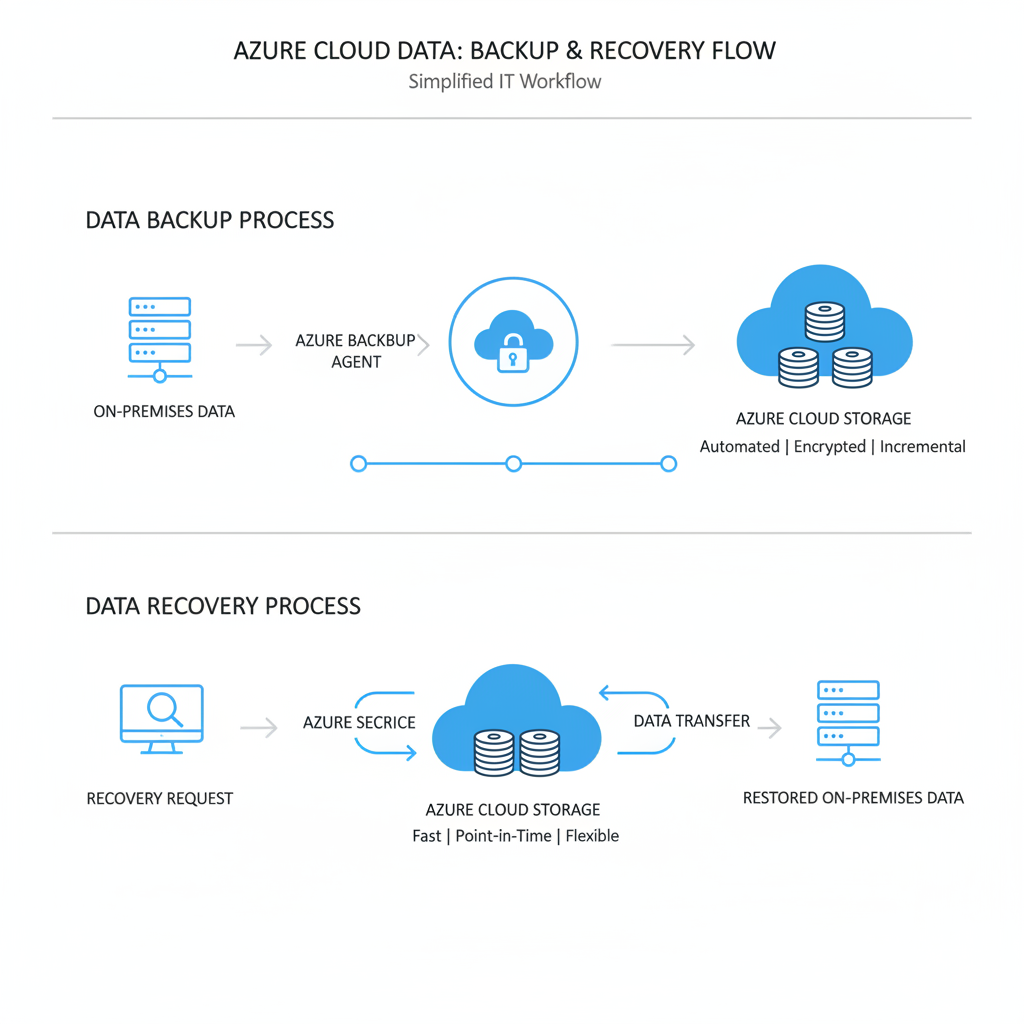
Azure Backup protects critical data by offering a robust and reliable cloud-based solution that significantly mitigates the devastating impact of data loss resulting from cyberattacks, hardware failures, or human error. This service provides automated backups, ensuring data is continuously protected without manual intervention, which is crucial for maintaining business continuity in an increasingly digital landscape. Backups are stored in Azure's highly secure and resilient cloud infrastructure, assuring data integrity and availability with an industry-leading 99.9% uptime guarantee. Furthermore, it facilitates fast recovery processes, enabling organisations to quickly restore data following a disaster or incident, often within minutes, thereby significantly reducing costly downtime. Its compliance features also assist Australian businesses in meeting stringent regulatory requirements, such as those related to data sovereignty under the Privacy Act 1988, making it an essential tool for comprehensive data protection and disaster recovery strategies.
- Automated Backups: Schedule automatic backups of your data to ensure it's always protected.
- Secure Storage: Store your backups in Azure's secure and resilient cloud storage.
- Fast Recovery: Quickly recover your data in the event of a disaster or data loss incident.
- Compliance: Meet regulatory compliance requirements with Azure Backup's built-in security and compliance features. Explore the benefits of Azure Backup & Helpdesk: Disaster Recovery for M365.
Azure Backup integrates seamlessly with other Microsoft services, such as Microsoft 365 and Azure Virtual Machines. This makes it easy to protect your entire IT environment with a single, unified solution. For details, see the Microsoft Learn documentation on Azure Backup.
How does SharePoint facilitate collaboration and document management?
SharePoint significantly facilitates collaboration and document management by providing a centralised platform for teams to store, share, and manage digital assets efficiently. This robust Microsoft 365 application centralises document repositories, allowing multiple users to co-author in real-time, which dramatically reduces version control issues and enhances team productivity. For instance, a recent study indicated that organisations leveraging SharePoint for document management can experience up to a 25% reduction in time spent searching for information. It natively integrates with other Microsoft 365 services like Microsoft Teams and OneDrive, ensuring a seamless user experience where documents can be accessed and edited directly within familiar daily workflows. Effective implementation and tailored customisation, often managed by a qualified IT services provider, can streamline operations and improve communication across an entire organisation by fostering a single source of truth for critical business documents and projects, making it an indispensable tool for modern workplaces in Australia.
A Managed IT Services provider can help you with:
- SharePoint Implementation: Setting up and configuring SharePoint to meet your specific business needs.
- SharePoint Customisation: Customising SharePoint to improve user experience and streamline workflows.
- SharePoint Migration: Migrating your existing documents and data to SharePoint.
- SharePoint Training: Providing training to your employees on how to use SharePoint effectively. Consider how SharePoint & Azure: Streamline Your Cloud Migration can simplify your transition.
SharePoint integrates seamlessly with other Microsoft 365 applications, such as Teams and OneDrive. This allows you to access and share documents directly from within your everyday workflow. Get started with Microsoft SharePoint.
Why choose IT support in Sydney with local expertise and global reach?
Businesses benefit significantly from choosing IT support in Sydney that offers both local expertise and global reach, as this combination ensures robust, responsive, and strategically aligned technology management. A local Managed IT Services provider offers invaluable on-site support, enabling quick resolution of IT issues and minimising business disruption; for example, many Sydney-based providers guarantee a critical response time of under 30 minutes for urgent IT outages. This local presence also means they comprehend the nuances of the Australian business environment, providing tailored advice to optimise IT infrastructure for specific needs, such as adherence to local data sovereignty laws. Furthermore, providers with global reach, like Mycelium 365 serving major Australian cities and international locations, bring a broader perspective on best practices and emerging technologies, ensuring scalability and advanced solutions while retaining the agile, personal touch of a local team.
When choosing an IT Support Sydney provider, consider the following:
- Response Time: How quickly do they respond to support requests?
- Expertise: Do they have the skills and experience to handle your IT needs?
- Proactive Monitoring: Do they proactively monitor your IT infrastructure to prevent problems before they occur?
- Communication: Do they communicate clearly and effectively?
- Pricing: Is their pricing transparent and competitive?
Mycelium 365 provides Managed IT Services across Australia, including Sydney, Melbourne, Perth, and Brisbane, as well as international locations.

How does Microsoft Defender enhance cybersecurity?
Microsoft Defender enhances cybersecurity by offering robust, multi-layered protection against a wide range of sophisticated digital threats, including malware, phishing attempts, and ransomware attacks. This integrated security solution safeguards devices and sensitive data by employing advanced real-time threat detection, automated investigation capabilities, and proactive preventative measures. For Australian businesses, leveraging Microsoft Defender, particularly when expertly managed by a dedicated IT services provider, ensures a significantly fortified digital perimeter in an increasingly complex and evolving threat landscape. Its comprehensive suite of tools, spanning from next-generation antivirus to endpoint detection and response, demonstrably reduces the attack surface for organisations. For instance, some Australian businesses have reported up to a 90% reduction in successful phishing attempts after integrating Defender, aligning well with guidelines from the Australian Cyber Security Centre (ACSC) for bolstered cyber resilience.
The Australian Cyber Security Centre (ACSC) provides valuable resources and advice on cybersecurity best practices. Visit the ACSC website for more information.
What is the conclusion?
The primary conclusion is that engaging with Managed IT Services offers a strategic advantage for Australian businesses aiming to streamline their IT operations, fortify cyber security postures, and stimulate growth. By entrusting day-to-day IT management to a specialised provider, businesses can significantly reduce the operational burden and redirect internal resources towards core business objectives, leading to demonstrable improvements. For instance, businesses employing managed IT in Sydney often report a 25% reduction in IT-related downtime within the first year, directly impacting productivity. These comprehensive services encompass crucial areas such as secure Cloud Migration, robust Azure Backup, and efficient SharePoint optimisation, ensuring tailored IT support. The overarching benefit is that outsourcing IT management allows businesses to achieve their technological goals more effectively, improve resilience, and operate with greater peace of mind.