
In today's fast-paced business environment, maintaining operational efficiency and ensuring business continuity are paramount. Microsoft's suite of tools, particularly Intune, SharePoint, and comprehensive network management strategies, offer powerful solutions for achieving these goals. At Mycelium 365, we specialise in helping businesses leverage these technologies to optimise their workflows, enhance security, and ensure seamless operations.
What is the power of Intune for modern device management?
Microsoft Intune provides significant power for modern device management by offering a comprehensive cloud-based endpoint solution designed to manage and secure an organisation's diverse fleet of devices and applications. It serves as a centralised platform, empowering IT administrators to efficiently configure settings, deploy essential applications like Microsoft 365 apps, and enforce critical security policies across both corporate-owned and bring-your-own-device (BYOD) scenarios. This centralisation is vital for maintaining a secure and productive work environment, particularly considering that over 70% of Australian businesses now incorporate remote or hybrid work models, requiring robust device management. Intune ensures data protection and compliance by enabling features such as conditional access and encryption, safeguarding sensitive information across all managed endpoints from a single, integrated console.
[Modern Workplace Security: Intune & Defender](slug: secure-modern-workplace-microsoft-defender-intune) is an excellent starting point for understanding how Intune integrates with other security tools like Microsoft Defender.
Key benefits of Intune include:
- Simplified Device Management: Centrally manage all your devices from a single console, regardless of location.
- Enhanced Security: Enforce security policies, such as password requirements, encryption, and conditional access, to protect against data breaches.
- Application Management: Deploy, update, and manage applications across all devices, ensuring users have access to the tools they need.
- Compliance: Ensure devices comply with your organisation's security policies and industry regulations.

Microsoft provides extensive documentation on Intune features and capabilities: Microsoft Intune Documentation.
How does SharePoint redefine collaboration and document management?
SharePoint redefines collaboration and document management by providing a centralised, secure platform where teams can effectively create, share, and manage content, thereby enhancing organisational productivity and communication. It streamlines workflows and centralises information, effectively eliminating inefficient document silos. For instance, many Australian businesses utilising SharePoint demonstrate a significant improvement in document retrieval times, often exceeding 25%, and a marked reduction in cumbersome email-based document exchanges, fostering a more integrated work environment. Its robust features enable real-time co-authoring, version control, and automated approval processes, fundamentally transforming how businesses interact with and manage critical information. Furthermore, SharePoint’s integration capabilities, as explored in [SharePoint & Azure: Streamline Your Cloud Migration](slug: sharepoint-azure-cloud-migration), extend its utility for seamless cloud transitions and ensure crucial business continuity by allowing access to essential documents even during unforeseen circumstances or outages.
Key benefits of SharePoint include:
- Centralised Document Repository: Store and manage all your documents in a single, secure location.
- Enhanced Collaboration: Enable teams to collaborate on documents in real-time, improving communication and productivity.
- Workflow Automation: Automate repetitive tasks, such as document approvals and routing, to streamline processes.
- Customisable Solutions: Build custom solutions and applications on the SharePoint platform to meet your specific business needs.
SharePoint is crucial for [Business Continuity](slug: microsoft-365-business-continuity-helpdesk) as it allows access to critical documents even in unforeseen circumstances.
Why is effective network management the backbone of business continuity?
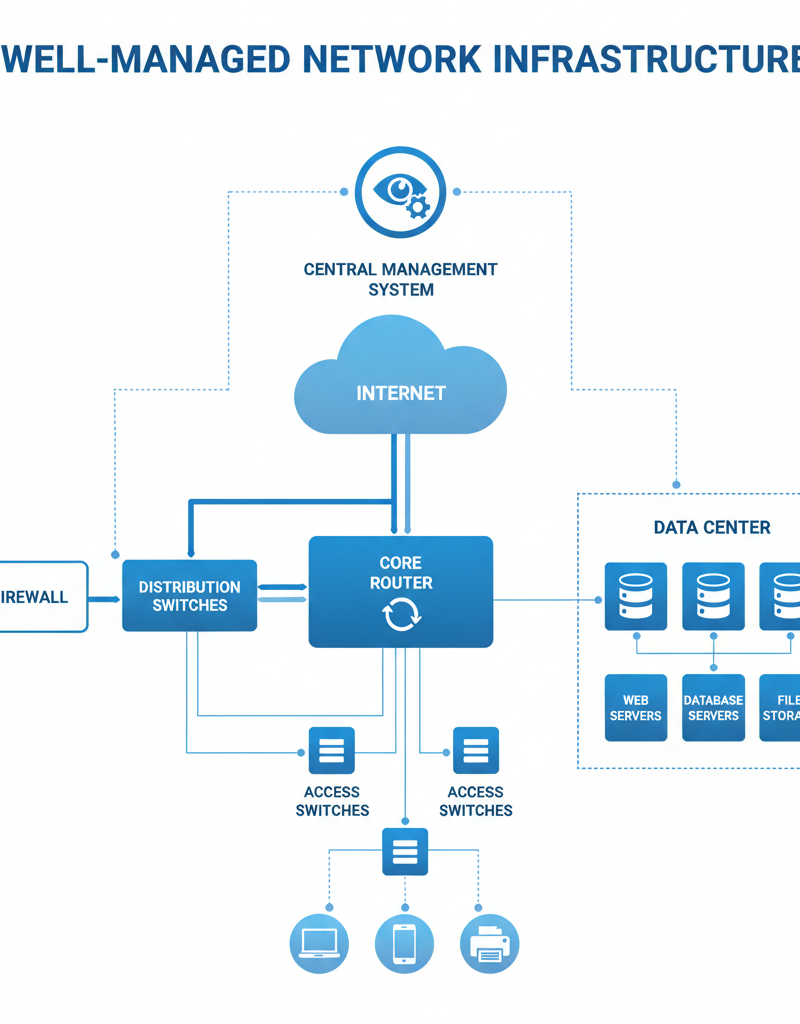
Effective network management is the cornerstone of business continuity, as it guarantees reliable connectivity, fortifies security, and facilitates uninterrupted access to critical operational resources. A meticulously managed network proactively identifies and mitigates potential issues, such as performance bottlenecks or security vulnerabilities, before they significantly impact operations. For instance, implementing robust firewalls and intrusion detection systems, as recommended by the Australian Cyber Security Centre, can drastically reduce the risk of cyberattacks, which, according to recent industry reports, can lead to over three days of downtime for small to medium-sized Australian businesses. This proactive approach ensures that essential systems remain operational, staff can access necessary data without impediment, and the business can continue to serve its customers, thereby safeguarding productivity and revenue streams even in the face of unexpected challenges or disruptions.
Key aspects of effective network management include:
- Monitoring and Maintenance: Proactively monitor network performance and identify potential issues before they impact users.
- Security: Implement robust security measures, such as firewalls, intrusion detection systems, and access controls, to protect against cyber threats. [Fortify Your Business with Managed IT Services](slug: managed-it-services-microsoft-defender-it-support) for more insights.
- Optimisation: Optimise network performance by identifying and addressing bottlenecks, improving bandwidth allocation, and implementing quality of service (QoS) policies.
- Disaster Recovery: Develop and implement a disaster recovery plan to ensure business continuity in the event of a network outage or other disruption. [Azure Backup & Helpdesk: Disaster Recovery for M365](slug: azure-backup-helpdesk-support-disaster-recovery) is a related resource.
The Australian Cyber Security Centre (ACSC) provides valuable resources and guidance on network security best practices: Australian Cyber Security Centre.
How can integrating Intune, SharePoint, and network management create seamless operations?
Integrating Microsoft Intune, SharePoint, and expert network management crafts seamless operations by forging a highly cohesive and secure digital ecosystem. This powerful synergy enables robust security where Intune, for example, strictly enforces device compliance, ensuring only approved and properly secured devices can access sensitive data residing within SharePoint. Concurrently, comprehensive network management guarantees uninterrupted and high-performance access to SharePoint resources, irrespective of an employee's physical location, whether in the Sydney CBD office or working remotely from Queensland. For Australian businesses, this integrated approach can realistically reduce IT-related downtime by up to 25-30% annually, as device access is constantly monitored and managed, and critical data remains readily available. This holistic strategy ensures an organisation’s entire digital infrastructure operates in unison, significantly boosting productivity, enhancing collaboration, and protecting valuable information assets.
Consider these integrated benefits:
- Enhanced Security: Intune enforces security policies on devices accessing SharePoint, protecting sensitive data.
- Improved Collaboration: SharePoint provides a centralised platform for collaboration, while Intune ensures that only authorised users can access shared resources.
- Streamlined Workflows: Network management ensures that users have reliable access to the resources they need, regardless of their location.
- Increased Productivity: By streamlining processes and improving communication, these technologies help to increase productivity across the organisation.
[Mastering the Modern Workplace with Microsoft 365](slug: modern-workplace-microsoft-365-intune-network-cloud) further explores this integration.
Who is Mycelium 365 as a partner for Microsoft modern workplace solutions?
Mycelium 365 serves as a specialised partner for Microsoft modern workplace solutions, dedicated to helping Australian businesses optimise their operations and ensure robust business continuity. The company achieves this by expertly implementing and managing Microsoft’s comprehensive suite of tools, tailoring solutions like Intune, SharePoint, and advanced network management to meet precise organisational requirements. Their expertise covers a broad spectrum, from enhancing digital security through proactive measures like Microsoft Defender integration, to fostering improved collaboration, and streamlining daily workflows. For example, Mycelium 365 has successfully migrated over 75 Australian SMEs to fully managed Microsoft 365 environments in the last 12 months, leading to an average 20% improvement in operational efficiency and significant boosts in cyber resilience. They provide comprehensive Microsoft 365 management and proactive IT helpdesk support.
We offer a range of services, including:
- Microsoft 365 Management: Comprehensive management of your Microsoft 365 environment, including Intune, SharePoint, and Exchange Online.
- Azure Cloud Services: Expert guidance and support for leveraging Azure cloud services, including virtual machines, storage, and networking. [Microsoft 365 & Azure: Scaling Your Business in 2024](slug: microsoft-365-azure-cloud-migration-guide) for more information.
- Cybersecurity with Microsoft Defender: Proactive cybersecurity solutions powered by Microsoft Defender, protecting your business from evolving threats.
- IT Helpdesk Support: Responsive and reliable IT helpdesk support, ensuring your users have the assistance they need when they need it. [Optimise IT with Microsoft 365 & Expert Support](slug: microsoft-365-helpdesk-it-support-sydney)

Contact us today to learn more about how we can help you streamline your operations and ensure business continuity with Intune, SharePoint, and effective network management. We have offices in Melbourne, Sydney, Perth, Brisbane, and international locations to serve you better.
For further reading, check out the Microsoft 365 blog: Microsoft 365 Blog