
In today's dynamic business landscape, managing IT costs effectively is crucial for sustainable growth. Microsoft 365 offers a powerful suite of tools to enhance productivity and collaboration, but its effective management requires expertise. Many businesses are now turning to fixed price Microsoft 365 support to gain predictable IT expenses and ensure business continuity.
What are the benefits of fixed-price Microsoft 365 support?
Fixed-price Microsoft 365 support offers substantial benefits by transforming IT costs from unpredictable hourly rates into a clear, consistent monthly expense, thereby enhancing financial planning and resource allocation for Australian businesses. This model ensures predictable budgeting, as organisations know precisely what they will spend on dedicated Microsoft 365 services each month, eliminating unexpected bills. For instance, many small to medium-sized businesses can reduce their potential IT expenditure by an estimated 15-20% annually compared to an hourly support model, primarily by avoiding costly emergency call-out fees and unforeseen support needs. Furthermore, fixed-price agreements invariably include proactive maintenance and unlimited support, ensuring potential issues are identified and addressed before they can disrupt operations and providing teams with constant assistance without accruing additional charges. This comprehensive approach allows internal IT staff to refocus on strategic business growth initiatives rather than reactive problem-solving.
- Predictable Budgeting: Know exactly how much you'll spend on Microsoft 365 support each month, eliminating unexpected expenses.
- Proactive Maintenance: Fixed price agreements often include proactive monitoring and maintenance, preventing potential issues before they disrupt your operations. We help you optimise IT with [Microsoft 365 & Expert Support](slug: microsoft-365-helpdesk-it-support-sydney).
- Unlimited Support: Most fixed price plans offer unlimited support, ensuring your team can access assistance whenever they need it without worrying about accumulating hourly charges.
- Scalability: As your business grows, your Microsoft 365 needs may evolve. Fixed price support plans can be scaled to accommodate your changing requirements, providing flexibility and cost-effectiveness.
- Focus on Core Business: By outsourcing Microsoft 365 management to experts, you can free up your internal IT staff to focus on strategic initiatives that drive business growth. We can fortify your business with [Managed IT Services](slug: managed-it-services-microsoft-defender-it-support).

How can Microsoft 365 disaster recovery ensure business continuity?
Microsoft 365 disaster recovery significantly enhances business continuity by protecting critical data and applications from disruptions such as hardware failures, cyberattacks, or natural disasters, consequently minimising downtime and ensuring operational resilience. A comprehensive Microsoft 365 disaster recovery strategy encompasses essential components like robust data backup and recovery protocols, often leveraging services such as Azure Backup to secure data across SharePoint, Exchange Online, and OneDrive to a safe offsite location. This includes establishing clear recovery time objectives (RTO) and recovery point objectives (RPO) to strategically reduce the impact of potential incidents. Furthermore, effective plans integrate redundant systems, regular testing and validation of the recovery plan—ideally conducted quarterly for Australian businesses—and can utilise advanced solutions like Azure Site Recovery for replicating on-premises workloads to Azure, providing a seamless failover option.
Key components of a Microsoft 365 disaster recovery plan include:
- Data Backup and Recovery: Regularly backing up your Microsoft 365 data (including SharePoint, Exchange Online, and OneDrive) to a secure offsite location. [Secure Your Business with Azure Backup & Modern Workplace](slug: azure-backup-modern-workplace-business-continuity).
- Redundancy: Implementing redundant systems and infrastructure to ensure that your data and applications remain accessible even if one component fails. Learn more about [Robust IT Infrastructure: Cloud & Disaster Recovery](slug: disaster-recovery-cloud-migration-network-management).
- Testing and Validation: Regularly testing your disaster recovery plan to ensure it works effectively and that your team is prepared to respond to emergencies. Learn more about [Microsoft 365: Disaster Recovery Essentials](slug: microsoft-365-disaster-recovery-plan).
- Azure Site Recovery: For more complex disaster recovery needs, consider using Azure Site Recovery to replicate on-premises workloads to Azure, providing a seamless failover option. Explore [Azure Backup & Helpdesk: Disaster Recovery for M365](slug: azure-backup-helpdesk-support-disaster-recovery).
Microsoft offers native tools like Azure Backup to create a reliable backup solution that can be integrated into your disaster recovery plan. An effective plan also includes a well-defined recovery time objective (RTO) and recovery point objective (RPO) to minimise downtime and data loss. For more information, see [Microsoft 365: Disaster Recovery & IT Support](slug: microsoft-365-disaster-recovery-it-support-melbourne).
What are Microsoft 365 migration services and how do they ensure a smooth transition?
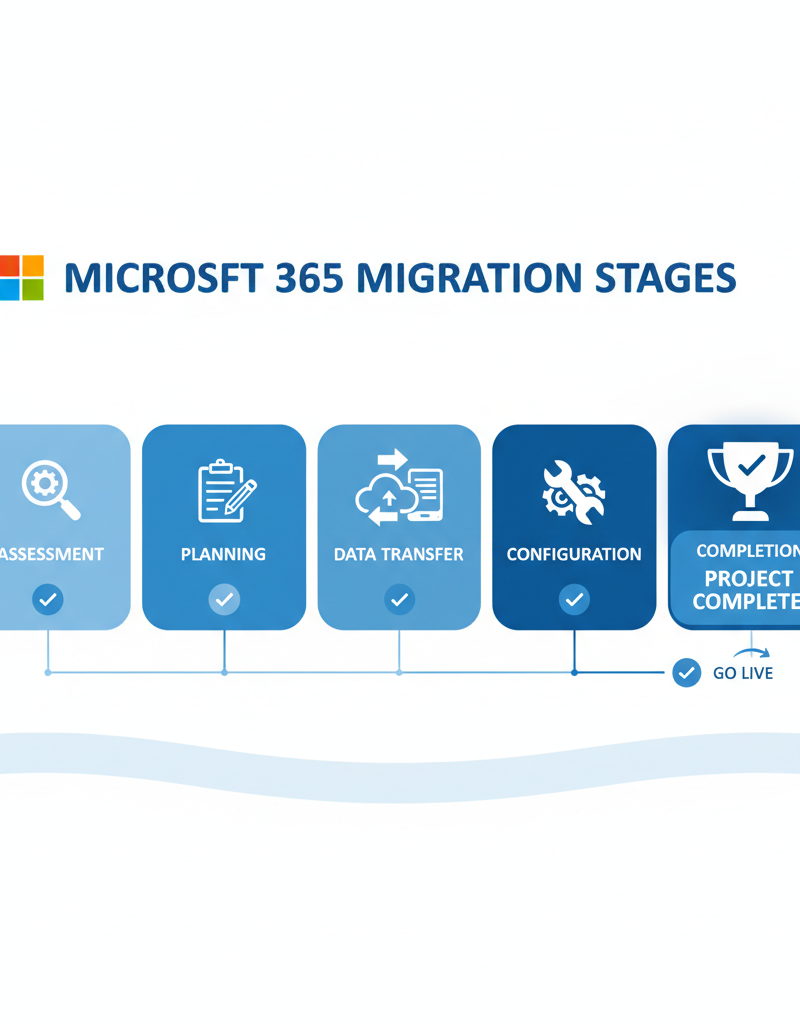
Microsoft 365 migration services involve expert assistance to transition an organisation's data, applications, and users to the Microsoft 365 cloud platform, ensuring a seamless and efficient process. These services guarantee a smooth transition by thoroughly assessing current IT infrastructure, developing a detailed migration plan, and then executing the secure transfer of data from existing systems to Microsoft 365. This includes meticulous configuration of user accounts, email services like Exchange Online, and collaboration tools such as SharePoint and Microsoft Teams, tailored to specific business needs. Following migration, reputable providers also offer comprehensive training and ongoing support to ensure employees can effectively utilise the new environment, minimise disruption, and maximise the benefits of the platform. For instance, a well-executed migration can often reduce typical post-migration support tickets by over 50% within the first month, particularly for businesses moving from on-premise servers.
- Assessment and Planning: Evaluating your current IT infrastructure and developing a detailed migration plan tailored to your specific needs. We can help you with [Migrating to Microsoft 365: A Comprehensive Guide](slug: migrating-to-microsoft-365-exchange-online).
- Data Migration: Transferring your data from your existing systems to Microsoft 365 with minimal disruption to your operations. We provide [Seamless Cloud Migration to Microsoft 365](slug: seamless-cloud-migration-microsoft-365).
- Configuration and Customisation: Configuring Microsoft 365 to meet your specific requirements, including setting up user accounts, email services, and collaboration tools. Optimize IT with [Microsoft 365 & Expert Support](slug: microsoft-365-helpdesk-it-support-sydney).
- Training and Support: Providing training and support to your team to ensure they can effectively use Microsoft 365 after the migration. We can help you to [Mastering the Modern Workplace with Microsoft 365](slug: modern-workplace-microsoft-365-intune-network-cloud).
How can leveraging Azure managed services enhance performance for Australian businesses?
Leveraging Azure managed services can significantly enhance performance for Australian businesses by optimising Microsoft 365 environments, offering improved scalability, robust security, and operational efficiency. These services streamline operations and proactively manage potential issues, transforming IT from a reactive cost centre into a strategic asset. For instance, utilising Azure Virtual Machines can boost the performance of Microsoft 365 applications, ensuring Australian businesses experience faster loading times and seamless user interactions, which is crucial for maintaining productivity in a competitive market. Furthermore, integrating Azure Backup provides robust disaster recovery capabilities, guaranteeing that critical business data is protected and recoverable, potentially reducing downtime by up to 80% in the event of a system failure. This comprehensive approach simplifies IT management, allowing businesses to focus on growth initiatives rather than operational complexities, ultimately leading to greater agility and a more secure digital footprint in the Australian market.
- Azure Active Directory (Azure AD): Managing user identities and access control across your Microsoft 365 environment. Consider [Entra ID: Your Business Continuity Lifeline](slug: entra-id-business-continuity-cybersecurity).
- Azure Virtual Machines: Hosting your Microsoft 365 applications on virtual machines in Azure for increased performance and scalability. Consider [Modernise Your Workplace with Azure & Virtual Desktops](slug: modernise-workplace-azure-virtual-desktops).
- Azure Backup: Backing up your Microsoft 365 data to Azure for disaster recovery purposes. [Secure Your Business with Azure Backup & Modern Workplace](slug: azure-backup-modern-workplace-business-continuity).
- Azure Security Center: Monitoring and managing the security of your Azure environment. [Intune, Cybersecurity & Managed IT: A Modern Approach](slug: intune-cybersecurity-managed-it-services).
By combining fixed price Microsoft 365 support with Azure managed services, you can create a robust and cost-effective IT infrastructure that supports your business goals. Microsoft continues to invest in innovation across its cloud platforms, as highlighted in the Microsoft 365 Roadmap.
How does cybersecurity work with Microsoft Defender?
Microsoft Defender effectively works with Microsoft 365 to provide a robust cybersecurity defence by offering advanced threat protection across email, files, and user identities. This comprehensive suite helps organisations detect, prevent, and respond to sophisticated cyber threats such as phishing, ransomware, and malware. For instance, Defender for Office 365 specifically scans email attachments and links in real-time, preventing malicious content from reaching end-users. Australian businesses can significantly bolster their protection as Defender leverages cloud-based intelligence and machine learning, continuously adapting to new threats. It includes features like Safe Attachments and Safe Links, proactively neutralising threats before they impact users. Experts commonly advise that integrating Microsoft Defender deeply into an organisation's security strategy is crucial for safeguarding sensitive data and maintaining operational continuity, helping to mitigate the estimated $33 billion annual cost of cybercrime in Australia.

How do I choose the right fixed-price support provider for Microsoft 365?
To choose the right fixed-price support provider for Microsoft 365, Australian businesses should carefully evaluate several key factors to ensure predictable IT costs and reliable service delivery. Prioritise providers with a proven track record and extensive expertise across Microsoft 365, Azure, and modern cybersecurity practices, often indicated by specific certifications or a minimum of five years operating within the local market. It's critical to scrutinise their Service Level Agreement (SLA) for guaranteed response times, aiming for provisions like a two-hour maximum for critical incidents, and to verify customer reviews and testimonials to gauge their reputation for quality and promptness. Comparing transparent pricing structures from various providers, like a flat monthly fee covering unlimited support for 50 users, will help identify the best value without hidden expenditures, enabling your organisation to focus on its core operations with comprehensive and robust IT support.
- Experience: Look for a provider with a proven track record of managing Microsoft 365 environments.
- Expertise: Ensure the provider has the necessary expertise in Microsoft 365, Azure, and cybersecurity.
- Service Level Agreement (SLA): Review the provider's SLA to understand their response times and uptime guarantees.
- Customer Reviews: Check online reviews and testimonials to gauge the provider's reputation.
- Pricing: Compare pricing plans from different providers to find the best value for your needs.
By partnering with a reputable fixed price Microsoft 365 support provider, you can gain predictable IT costs, ensure business continuity, and focus on growing your business. We can help you [Boost Efficiency with Managed IT & Cloud Migration](slug: managed-it-services-cloud-migration-guide).

Ultimately, investing in fixed price Microsoft 365 support provides peace of mind, allowing you to concentrate on your core business objectives while experts handle your IT needs. It's a strategic decision that can lead to increased efficiency, reduced costs, and improved business resilience. Consider the long-term benefits and choose a provider who can deliver the comprehensive support you need to thrive in today's competitive environment. Remember to check the Australian Cyber Security Centre (ACSC) for the latest security advice.