
Azure Virtual Desktop: Your Business Continuity Powerhouse
· By Paul Harvey
In today's dynamic business landscape, business continuity is no longer a luxury; it's a necessity. Unexpected events, from natural disasters to cyberattacks, can disrupt operations, leading to significant financial losses and reputational damage. One powerful tool that's emerging as a game-changer in ensuring business continuity is Azure Virtual Desktop (AVD).
This comprehensive guide explores how AVD can fortify your business against unforeseen disruptions and empower your workforce to stay productive, no matter the circumstances. We'll delve into its key features, benefits, and implementation strategies, all while keeping your business's resilience top of mind. For expert guidance on securing your business with cloud solutions, explore Secure Your Business with Azure Backup & Modern Workplace.

What is enterprise Azure virtual desktop?
Enterprise Azure Virtual Desktop (AVD) is a comprehensive desktop and application virtualisation service hosted within Microsoft's Azure cloud, providing businesses with a secure and flexible solution for modern work environments. This platform enables employees to securely access their personalised desktops, line-of-business applications, and critical data from virtually any internet-connected device, enhancing business continuity and operational resilience significantly. Unlike traditional on-premise Virtual Desktop Infrastructure (VDI), which demands substantial capital expenditure and ongoing maintenance, AVD operates as a fully managed service, drastically reducing the administrative burden on internal IT teams. For instance, Australian SMBs adopting AVD often experience up to a 30% reduction in desktop support tickets within the first year, attributed to the streamlined management and inherent reliability of the cloud infrastructure. This allows organisations to scale their virtual desktop infrastructure dynamically, adapting to changing business needs without a substantial upfront investment, while maintaining high levels of data security and access control as detailed in Microsoft's official documentation.
How does Azure virtual desktop provide business continuity benefits?
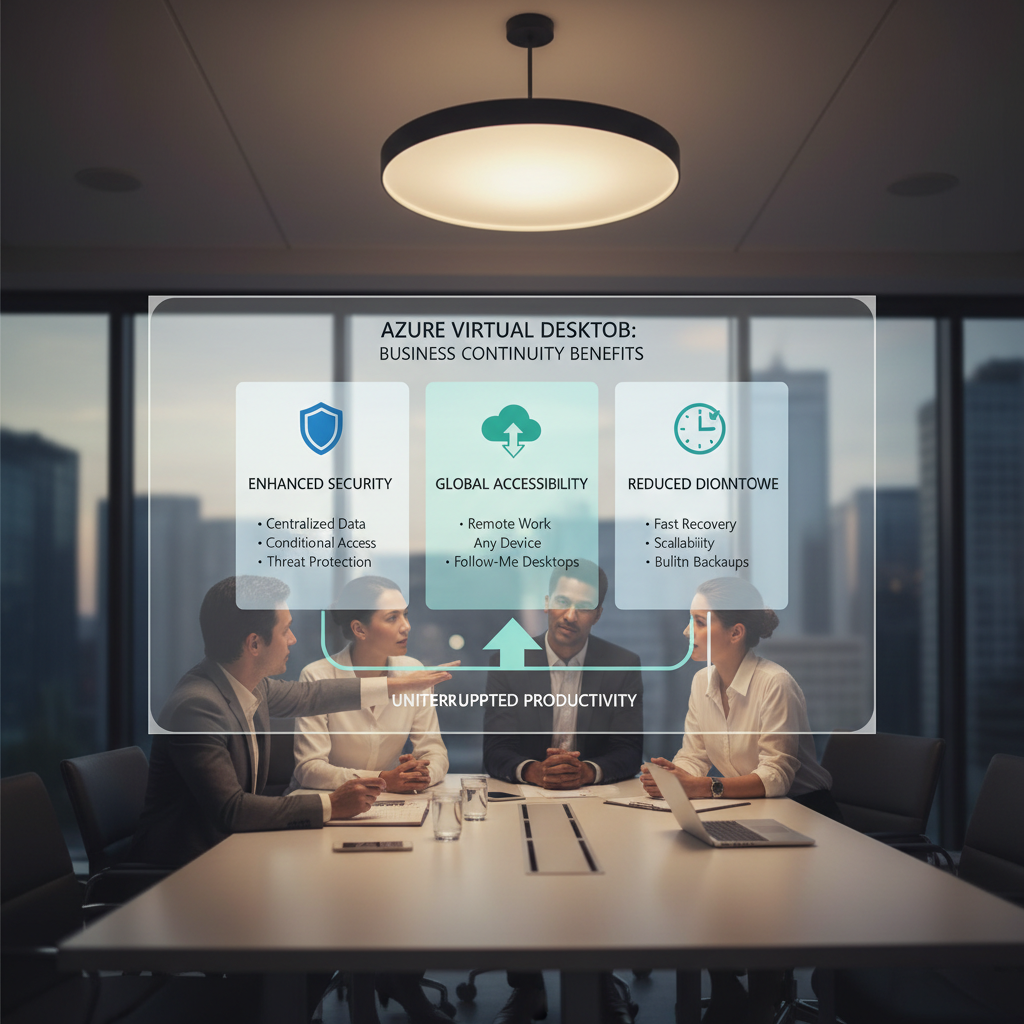
Azure Virtual Desktop (AVD) significantly enhances business continuity by providing accessible, secure, and scalable remote work environments, which allows businesses to maintain operations even during disruptions. With AVD, employees can access their complete work setup, including applications and data, from any device like a personal laptop or smartphone, regardless of their physical location or the accessibility of a primary office. For example, during an unexpected office closure due to a power outage, staff can seamlessly continue working from home. All data and applications reside securely in Azure data centres, protected against loss or theft, with IT administrators managing updates and security patches from a central console. This centralised control helps reduce downtime, ensures robust protection under various cyber threats, and enables rapid recovery, typically within hours, minimising financial losses and maintaining productivity.
- Accessibility and Flexibility: With AVD, employees can access their work environment from any device, including personal laptops, tablets, and smartphones. This ensures that even if the primary office is inaccessible, employees can continue working remotely. This aligns with the principles of a Modern Workplace.
- Data Security and Centralised Management: All data and applications are stored securely in Azure data centres, providing robust protection against data loss or theft. AVD also offers centralised management capabilities, allowing IT administrators to easily manage and update virtual desktops and applications from a single console. This centralised control is critical for maintaining security and compliance, especially when dealing with sensitive data. See how Modern Workplace Security: Intune & Defender can further enhance your security posture.
- Rapid Deployment and Scalability: AVD can be rapidly deployed and scaled to meet changing business needs. Whether you need to quickly onboard new employees or scale up resources during a crisis, AVD provides the flexibility and agility you need. This scalability is a key advantage of leveraging the Azure cloud. Discover the benefits of Microsoft 365 & Azure: Scaling Your Business in 2024.
- Reduced Downtime: In the event of a disaster, AVD can be quickly restored, minimising downtime and ensuring business operations can resume quickly. This resilience is crucial for maintaining productivity and minimising financial losses. Think of AVD as a key component of your comprehensive Microsoft 365: Disaster Recovery Essentials.
- Cost Savings: By eliminating the need for expensive on-premises infrastructure, AVD can significantly reduce IT costs. You only pay for the resources you use, making it a cost-effective solution for businesses of all sizes. To better understand the costs associated with cloud migration, see Seamless Cloud Migration to Microsoft 365.
How can Australian businesses implement Azure virtual desktop for business continuity?
Australian businesses can implement Azure Virtual Desktop (AVD) for business continuity by following several key steps, starting with a comprehensive assessment and planning phase. This involves evaluating existing IT infrastructure and identifying critical applications and data essential for uninterrupted operations, ensuring alignment with a broader business continuity strategy. The next crucial step is infrastructure setup, which includes configuring the Azure environment and deploying virtual machines, storage, and networking resources. Subsequently, creating and customising a master image for virtual desktops, complete with operating systems, applications, and security settings, is vital. Provisioning user accounts with appropriate access controls and multi-factor authentication (MFA) enhances security, a critical consideration given that 43% of cyber-attacks target small businesses. Finally, rigorous testing and validation, along with ongoing management and monitoring of the AVD environment, are essential to ensure its effectiveness and resilience during disruptions.
- Assessment and Planning: Conduct a thorough assessment of your current IT infrastructure and business requirements. Identify critical applications and data that need to be accessible during a disruption. It is also important to create a plan that aligns with your overall M365: Your Business Continuity Lifeline.
- Infrastructure Setup: Configure your Azure environment and deploy the necessary virtual machines, storage, and networking resources. Mycelium 365 offers expert Azure cloud services to streamline this process. We can assist with SharePoint & Azure: Streamline Your Cloud Migration.
- Image Creation and Customisation: Create a custom image for your virtual desktops, including the necessary operating system, applications, and security settings. Consider leveraging Intune for device management, as discussed in Intune, Cybersecurity & Managed IT: A Modern Approach.
- User Provisioning and Access Control: Provision user accounts and assign appropriate access permissions. Implement multi-factor authentication (MFA) to enhance security. Consider leveraging Entra ID: Your Business Continuity Lifeline.
- Testing and Validation: Thoroughly test the AVD environment to ensure it meets your business continuity requirements. Conduct regular disaster recovery drills to validate the effectiveness of your plan. Consider leveraging Azure Backup & Helpdesk: Disaster Recovery for M365.
- Ongoing Management and Monitoring: Continuously monitor the AVD environment to identify and address any potential issues. Regularly update the virtual desktops and applications to maintain security and performance. Our Optimise IT with Microsoft 365 & Expert Support service provides proactive monitoring and support.
How can Azure virtual desktop integrate with existing systems?
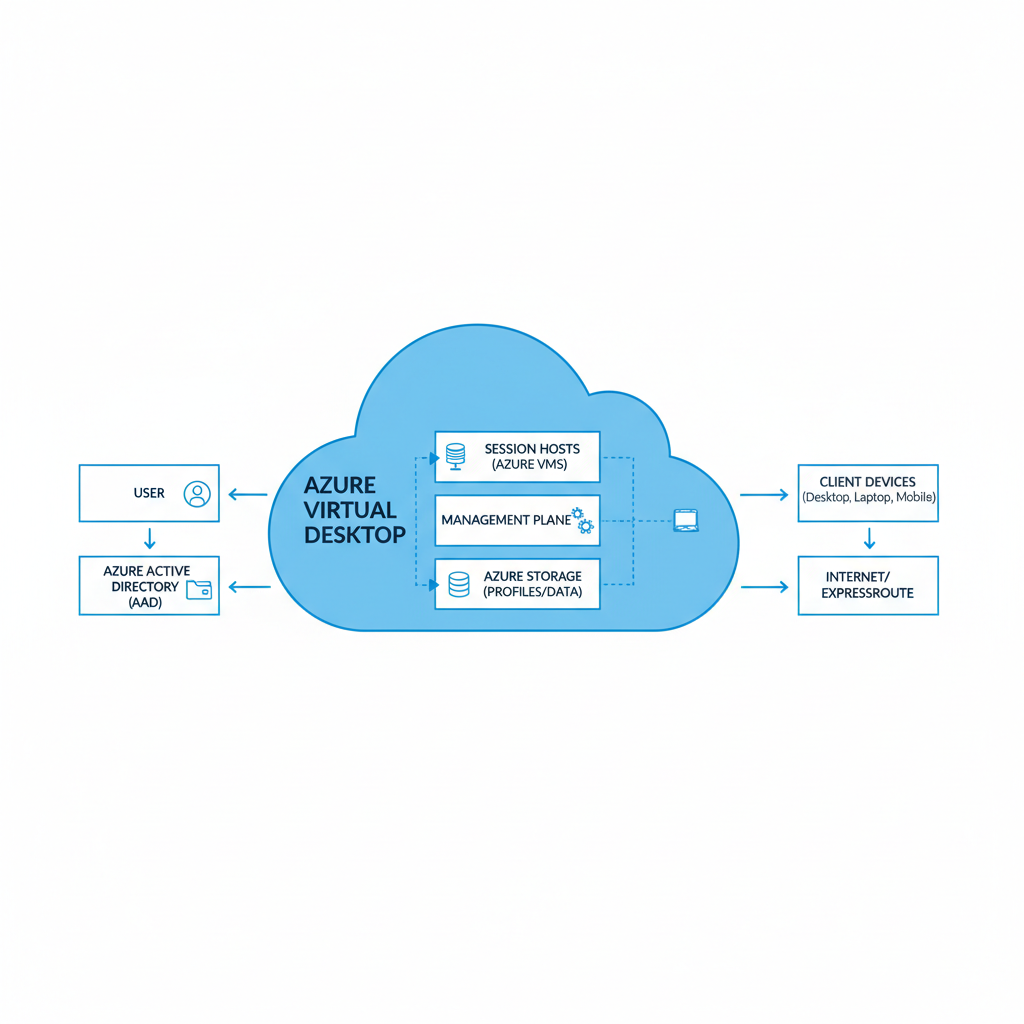
Azure Virtual Desktop (AVD) integrates effectively with existing systems primarily through its deep compatibility with other Microsoft services, enabling streamlined management and enhanced security for businesses. By leveraging components like Microsoft 365, Azure Active Directory (AAD), and Microsoft Defender, AVD simplifies IT administration. For instance, AAD can be utilised for unified identity and access management across both physical and virtual environments, ensuring consistent user experiences and robust security policies. This allows Australian businesses to maintain their current Microsoft ecosystem while migrating to a flexible, scalable virtual desktop infrastructure, often reducing deployment times by up to 30% compared to integrating disparate third-party solutions. The integration also extends to protecting virtual desktops from evolving cyber threats with Microsoft Defender, offering a cohesive and secure operational framework that minimises system silos and improves overall cyber resilience, crucial for businesses navigating the complex digital landscape.
What is the role of a managed IT provider for Azure virtual desktop?
A managed IT provider is essential for businesses implementing and maintaining Azure Virtual Desktop (AVD), particularly those with limited internal IT resources, by offering comprehensive guidance and support. These providers manage the entire AVD lifecycle, beginning with a thorough needs assessment to ensure the solution aligns with the organisation's specific operational requirements. They then design and deploy the AVD environment, configuring it for optimal performance, security, and accessibility. Ongoing support includes regular maintenance, troubleshooting, and ensuring the system remains updated and protected against emerging cyber threats, thereby minimising potential downtime. For example, a provider might proactively monitor 24/7 for security anomalies, reducing the risk of a breach by up to 80% compared to unmanaged environments. This expert oversight allows businesses in locations like Melbourne or Sydney to leverage AVD's benefits, such as enhanced business continuity and secure remote access for employees, without the burden of complex infrastructure management.

What are the future trends in virtual desktop technology?
Future trends in virtual desktop technology are significantly shaped by enhanced integration, advanced security, and AI-powered optimisation. Artificial intelligence is increasingly employed to refine virtual desktop performance, elevate user experience, and automate intricate management tasks, predicting resource needs to dynamically allocate them, a feature gaining traction in many Australian organisations. Security remains a critical focus, with continuous innovation aiming to protect virtual environments from evolving cyber threats, such as sophisticated ransomware or phishing attacks, ensuring data integrity and user safety. Moreover, the integration of virtual desktops with emerging technologies like augmented reality (AR) and virtual reality (VR) is creating more immersive and collaborative work environments. This enables richer remote work experiences, potentially reducing business travel by 30% for specific roles by 2028, and pushing the boundaries of what's possible for a distributed workforce.
- AI-powered Optimisation: Artificial intelligence is being used to optimise virtual desktop performance, improve user experience, and automate management tasks. Learn more about how AI is transforming IT.
- Enhanced Security: Security remains a top priority, with new technologies being developed to protect virtual desktops from advanced threats. Keeping up to date with the latest cybersecurity is important. Australian Cyber Security Centre
- Integration with Emerging Technologies: Virtual desktops are being integrated with emerging technologies such as augmented reality (AR) and virtual reality (VR) to create immersive and collaborative work environments. ZDNet on the future of work.
By embracing these trends, businesses can further enhance their business continuity and empower their workforce to thrive in the modern workplace.
What is the conclusion regarding Azure virtual desktop as a business continuity solution?
Azure Virtual Desktop (AVD) is a highly effective business continuity solution, enabling organisations to maintain operations and workforce productivity even amidst significant disruptions. AVD enhances accessibility, allowing employees to securely access their desktops and applications from any device or location, which is crucial during emergencies like natural disasters or power outages. For instance, an Australian company utilising AVD could maintain full operational capacity during a severe weather event, preventing an estimated loss of $20,000 per day in productivity that might occur with traditional on-premise systems. Furthermore, AVD integrates advanced security measures inherent to Microsoft Azure, offering a more resilient and secure environment than many conventional setups and significantly reducing potential downtime by up to 80% in disaster recovery scenarios. By leveraging AVD, businesses can ensure continuity and protect critical data with a scalable, cloud-based infrastructure.
Frequently asked questions
What is Azure Virtual Desktop (AVD)?
Azure Virtual Desktop (AVD) is a desktop and application virtualisation service running in the Azure cloud. It allows users to securely access their desktops and applications from virtually any device, anywhere with an internet connection, offering a flexible and scalable solution.
How does AVD help with business continuity?
AVD ensures business continuity by providing secure access to desktops and applications from any location, even during disruptions. This allows employees to remain productive, regardless of the circumstances, minimizing downtime and potential financial losses.
Is Azure Virtual Desktop secure?
Yes, AVD is highly secure. All data and applications are stored securely in Azure data centres, and AVD offers centralised management capabilities, allowing IT administrators to easily manage and update virtual desktops and applications from a single console, reducing risks.
Can Mycelium 365 help with AVD implementation?
Yes, Mycelium 365 offers expert guidance and support throughout the entire AVD implementation process. We can help you assess your needs, design and deploy the AVD environment, and provide ongoing management and support, ensuring a smooth and successful transition.
What are the benefits of using a managed IT provider for AVD?
Using a managed IT provider like Mycelium 365 for AVD implementation ensures you have expert support, reduces the burden on your internal IT team, and provides ongoing management and monitoring of your AVD environment, guaranteeing optimal performance and security.
How does AVD integrate with Microsoft 365?
AVD seamlessly integrates with Microsoft 365, allowing users to access their Microsoft 365 applications and data within the virtual desktop environment. This integration simplifies management, enhances security, and provides a consistent user experience across all devices and locations. [Microsoft 365 Blog](https://www.microsoft.com/en-us/microsoft-365/blog/)
