In today's digital landscape, business continuity is no longer a luxury; it's a necessity. Data loss, system failures, and unforeseen disasters can cripple operations and impact your bottom line. For organisations heavily reliant on email communication, Exchange Online, Microsoft's cloud-based email solution, plays a pivotal role. This article explores how to leverage Exchange Online for robust business continuity, covering strategies, best practices, and how a smooth cloud migration contributes to a resilient IT infrastructure.
Why is business continuity important for Exchange Online?
Business continuity is crucial for Exchange Online because email remains a central communication tool for most Australian businesses, and its unavailability can severely disrupt operations. Losing access to email, even for a few hours, can lead to significant issues like missed deadlines, delayed customer responses, and internal communication breakdowns, potentially costing a small to medium-sized enterprise (SME) an estimated $5,000-$10,000 per hour of downtime. A robust business continuity plan ensures that organisations can maintain essential communication channels and continue functioning effectively during unexpected disruptions. This proactive approach involves identifying potential threats, implementing preventative measures like Microsoft 365's built-in redundancy, and establishing clear recovery procedures to minimise the impact of outages. For instance, specific plans for data backup, replication, and failover mechanisms within Exchange Online are vital to maintaining operational stability and ensuring continuous access to critical communications, ultimately safeguarding reputation and revenue.
Business continuity planning isn't just about recovering from disasters; it's about proactive risk management. It involves identifying potential threats, implementing preventative measures, and establishing clear recovery procedures. For Exchange Online, this includes data backup, redundancy, and failover mechanisms.
What are key strategies for Exchange Online business continuity?
Key strategies for Exchange Online business continuity involve a multi-faceted approach focusing on data protection, system resilience, and proactive planning. Essential tactics include establishing robust data backup and recovery protocols, ideally utilising services like Azure Backup, to safeguard against data loss from accidental deletion, corruption, or large-scale outages, as Microsoft's built-in redundancy isn't a comprehensive backup solution if a file is intentionally deleted. Furthermore, leveraging Exchange Online's inherent redundancy and understanding its automatic failover mechanisms are critical for minimising downtime during service disruptions, such as when a server or data centre outage automatically switches services to a backup system. Developing a comprehensive Disaster Recovery Plan (DRP) that clearly outlines roles, responsibilities, and restoration procedures is also vital for an effective response, as approximately 60% of Australian businesses without a DRP fail within two years of a major data incident. Implement appropriate data retention policies and strong security measures like Multi-Factor Authentication (MFA) to complete a strong continuity posture.
-
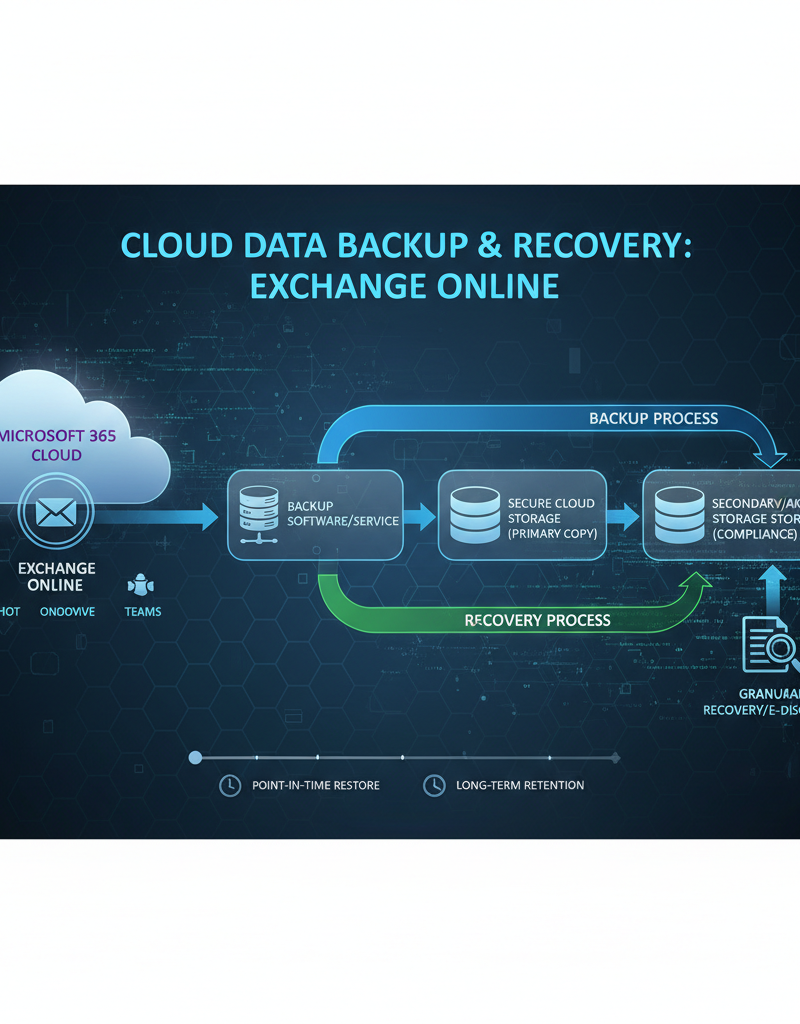
Data Backup and Recovery: Regularly backing up your Exchange Online data is paramount. While Microsoft provides built-in redundancy, having a separate backup ensures you can restore data in case of accidental deletion, corruption, or a large-scale outage. Consider using Azure Backup for a comprehensive backup solution. You can read more about it on the Microsoft Azure Backup documentation.
-
Redundancy and Failover: Exchange Online's architecture inherently includes redundancy, with multiple servers and data centres hosting your data. However, understanding how failover mechanisms work is crucial. In the event of a server or data centre outage, Exchange Online automatically switches to a backup system, minimising downtime. Explore our article on Azure Backup & Helpdesk: Disaster Recovery for M365 for more information.
-
Disaster Recovery Plan (DRP): A comprehensive DRP outlines the steps to take in the event of a major disruption. This plan should include roles and responsibilities, communication protocols, and procedures for restoring Exchange Online services. Check out our post on Microsoft 365: Disaster Recovery Essentials for further reading.
-
Retention Policies: Implement appropriate retention policies to ensure you meet compliance requirements and manage data storage effectively. Exchange Online allows you to define how long emails are retained and what happens to them after that period. Learn about retention policies on the Microsoft Purview documentation.
-
Multi-Factor Authentication (MFA): Enabling MFA adds an extra layer of security to your Exchange Online accounts, protecting against unauthorised access and data breaches. Explore our article on Entra ID: Your Business Continuity Lifeline for details.

How can cloud migration be a foundation for business continuity?
Cloud migration, particularly to platforms like Exchange Online, serves as a robust foundation for business continuity by significantly enhancing an organisation's resilience and reducing operational overhead. Shifting from on-premises infrastructure to the cloud eliminates the burden of managing and maintaining physical servers, thereby reducing IT costs and complexity for Australian businesses. For example, Exchange Online offers built-in redundancy and disaster recovery capabilities across geographically dispersed data centres, ensuring email services remain operational even during significant outages with an impressive 99.9% uptime Service Level Agreement. This level of protection is often unattainable for small to medium businesses with on-premises setups due to the prohibitive costs of replicating such infrastructure. Furthermore, cloud platforms provide superior scalability and reliability, capable of handling peak loads and unexpected events with ease, ensuring continuous access to critical communication channels and fostering uninterrupted business operations.
-
Reduced Infrastructure Management: Moving to Exchange Online eliminates the need to manage and maintain on-premises servers, reducing IT costs and complexity. Mycelium 365 specialises in [Microsoft 365 management](slug: modern-workplace-microsoft-365-intune-network-cloud).
-
Enhanced Scalability and Reliability: Exchange Online provides virtually unlimited scalability and high availability, ensuring your email services can handle peak loads and unexpected events. See how we can help you Scale Your Business in 2024.
-
Built-in Redundancy and Disaster Recovery: As mentioned earlier, Exchange Online's architecture includes built-in redundancy and disaster recovery capabilities, providing a higher level of protection than most on-premises deployments can offer. Learn how [Azure cloud services](slug: secure-modern-workplace-microsoft-defender-intune) can help.
-
Improved Security: Microsoft invests heavily in security measures to protect Exchange Online from threats, including malware, phishing, and data breaches. Mycelium 365 also offers [Cybersecurity with Microsoft Defender](slug: fortify-your-business-with-managed-it-services).
However, a successful cloud migration requires careful planning and execution. It's crucial to assess your current environment, define your migration strategy, and ensure a smooth transition with minimal disruption to users. Mycelium 365 can assist you with a Seamless Cloud Migration to Microsoft 365.
How can working with Mycelium 365 help with Exchange Online business continuity?
Working with Mycelium 365 significantly enhances Exchange Online business continuity by providing comprehensive managed IT services that ensure organisations can leverage the platform effectively, even during unexpected disruptions. This involves expert cloud migration services to facilitate a smooth, efficient transition to Exchange Online, thereby minimising initial downtime and preserving data integrity. Furthermore, Mycelium 365 offers ongoing managed Exchange Online services, encompassing continuous monitoring, robust security measures, and proactive troubleshooting to maintain optimal performance. A key aspect is tailored business continuity planning, such as developing a comprehensive Disaster Recovery strategy specifically for Microsoft 365, which can ensure critical email communications remain accessible, for example, during a server outage or cyber-attack. We also implement advanced security solutions, including multi-factor authentication (MFA) and data loss prevention (DLP), to protect sensitive Exchange Online data. This integrated approach, backed by a dedicated IT helpdesk resolving most issues within 30 minutes, ensures uninterrupted email services and fortified business resilience.
-
Cloud Migration Services: We can help you plan and execute a smooth and efficient migration to Exchange Online, minimising downtime and ensuring data integrity. Benefit from our [cloud migration](slug: managed-it-services-cloud-migration-guide).
-
Managed Exchange Online Services: We provide ongoing management and support for your Exchange Online environment, including monitoring, security, and troubleshooting. Check out our [Microsoft 365 helpdesk support](slug: microsoft-365-helpdesk-it-support-sydney).
-
Business Continuity Planning: We can help you develop a comprehensive business continuity plan tailored to your organisation's specific needs and risks. We'll help you build a Disaster Recovery for M365.
-
Security Solutions: We offer a range of security solutions to protect your Exchange Online data from threats, including MFA, anti-malware, and data loss prevention (DLP). We can help you implement [Intune device management](slug: intune-cybersecurity-managed-it-services).
-
IT Helpdesk Support: Our dedicated IT helpdesk is available to provide rapid support and resolve any issues that may arise, ensuring minimal disruption to your email services. Contact us for [expert support](slug: optimise-it-with-microsoft-365-expert-support).

What are best practices for ongoing business continuity management?
Effective ongoing business continuity management for Exchange Online involves a cyclical process of testing, updating, and monitoring to ensure resilience against disruptions. Regularly testing your disaster recovery plan (DRP), ideally quarterly, is paramount to confirm its effectiveness and your team's preparedness, simulating scenarios like data loss or service outages. It's equally important to update your DRP at least annually or whenever there are significant organisational or technological changes, such as adopting new cloud services or expanding user bases within Microsoft 365. Continuous monitoring of your Exchange Online environment for threats, utilising tools provided by Microsoft and reputable Australian cybersecurity bodies like the ACSC, further bolsters your defences. Finally, proactive employee training on security best practices and their roles within the DRP is critical for a robust and adaptive business continuity strategy.
-
Regularly Test Your DRP: Conduct regular disaster recovery drills to ensure your plan is effective and that your team knows how to respond in the event of a real disaster.
-
Update Your DRP: Review and update your DRP at least annually to reflect changes in your organisation's environment, technology, and business requirements.
-
Monitor Your Environment: Continuously monitor your Exchange Online environment for potential threats and vulnerabilities. Microsoft provides tools and dashboards for monitoring system health and security. You can also use [Microsoft 365](slug: secure-and-scale-with-managed-it-services-azure) for this.
-
Train Your Employees: Ensure your employees are aware of your business continuity plan and their roles in it. Provide regular training on security best practices and how to respond to potential threats.
-
Stay Informed: Stay up-to-date on the latest security threats and best practices for Exchange Online. Subscribe to Microsoft security advisories and industry publications. The Australian Cyber Security Centre (ACSC) is a great resource.
What is the conclusion regarding Exchange Online business continuity?
In conclusion, while Exchange Online provides a robust platform for email communication with significant built-in resilience, organisations must implement a comprehensive business continuity plan to truly safeguard their data and ensure minimal downtime during disruptions. This involves going beyond Microsoft's native redundancy to incorporate granular data backup solutions, proactive threat detection, and comprehensive disaster recovery protocols. For example, a well-structured plan, developed in consultation with managed IT experts, can reduce an organisation's recovery time objective (RTO) from an industry average of 24 hours down to just a few hours. This proactive approach significantly mitigates potential financial losses and reputational damage. By continuously testing these procedures and leveraging best practices, businesses can cultivate a highly resilient Exchange Online environment that securely supports their long-term operational success, ensuring email availability even amidst unforeseen challenges.
Ready to fortify your Exchange Online business continuity? Contact Mycelium 365 today for a consultation.