
Cloud Migration: Ensuring Business Continuity & Security with Microsoft
· By Paul Harvey
Cloud migration is no longer a question of if, but how. Businesses across Australia, from Melbourne to Perth, are recognising the agility, scalability, and cost-effectiveness of moving their IT infrastructure to the cloud. However, a poorly planned cloud migration can lead to significant disruptions, data loss, and security vulnerabilities. This guide will explore how to ensure your cloud migration journey prioritises business continuity and leverages the robust security features of Microsoft, including Microsoft Defender and Azure Backup.
How can Australian businesses plan for business continuity during cloud migration?
Australian businesses can ensure business continuity during cloud migration through meticulous planning and a phased approach that minimises disruption. A critical first step involves a thorough assessment of existing infrastructure, critical applications, and data to identify dependencies. For instance, businesses should establish a robust data backup and recovery solution, like Azure Backup, prior to any data migration. This safeguards against potential data loss and enables rapid restoration, potentially reducing recovery times for critical workloads by as much as 60% compared to traditional on-premises solutions, ensuring business operations can quickly resume. Additionally, ensuring application compatibility through thorough testing, guaranteeing stable network connectivity between on-premises and cloud environments, and conducting comprehensive testing in a staging environment are vital to confirm functionality and data integrity before going live. This proactive strategy ensures continuous operation, even if unforeseen issues arise during the transition to the cloud environment.
Key considerations include:
- Data Backup and Recovery: Implement a robust backup and recovery solution before migrating any data. This ensures that you can quickly restore your data in case of unexpected issues. Consider Azure Backup for its comprehensive protection capabilities, including long-term retention and offsite storage. Learn more about Azure Backup.
- Application Compatibility: Verify the compatibility of your applications with the cloud environment. Some applications may require modifications or upgrades to function optimally in the cloud. Consider containerisation or virtualisation to ensure compatibility.
- Network Connectivity: Ensure reliable network connectivity between your on-premises environment and the cloud. A stable and high-bandwidth connection is crucial for smooth data transfer and application performance.
- Testing and Validation: Thoroughly test and validate the migrated applications and data in the cloud environment before going live. This helps identify and resolve any issues before they impact your business operations.

How can Microsoft Defender be leveraged for enhanced security in cloud migration?
Microsoft Defender significantly enhances security during cloud migration by offering a comprehensive suite of threat protection and vulnerability management tools essential for safeguarding data and applications. It provides advanced threat detection, leveraging machine learning to identify and prevent cyber threats like ransomware and malware in real-time, which is crucial for protecting sensitive data as it moves to and resides in the cloud. Furthermore, Defender includes robust vulnerability management capabilities, allowing Australian businesses to proactively identify and prioritise weaknesses across their cloud infrastructure and endpoints, thereby reducing their attack surface before, during, and after migration. Seamless integration with Azure Security Center offers a unified view of an organisation's security posture, streamlining oversight during a complex migration process and typically reducing security incident response times by as much as 30% for small to medium enterprises.
Key benefits of Microsoft Defender during cloud migration include:
- Proactive Threat Detection: Microsoft Defender uses advanced analytics and machine learning to detect and prevent threats in real-time. This helps protect your data from malware, ransomware, and other cyberattacks.
- Vulnerability Management: Microsoft Defender identifies and assesses vulnerabilities in your systems and applications. This allows you to prioritise remediation efforts and reduce your attack surface.
- Endpoint Protection: Microsoft Defender protects your endpoints, such as laptops and desktops, from threats. This is crucial for maintaining a secure environment during and after the cloud migration.
- Integration with Azure Security Center: Microsoft Defender integrates seamlessly with Azure Security Center, providing a unified view of your security posture. Explore Microsoft Defender for Cloud.
Consider also integrating Microsoft Defender with Intune for comprehensive endpoint management and security. Read more about Modern Workplace Security: Intune & Defender.
How does Azure Backup contribute to data protection?
Azure Backup significantly contributes to data protection by offering a reliable, cost-effective, and comprehensive cloud-based solution for safeguarding critical business data against loss or corruption. It centralises backup management, enabling organisations to oversee all their backup operations from a single, intuitive console, which drastically simplifies administration and reduces the likelihood of human error for IT teams across Australia. Furthermore, Azure Backup facilitates long-term data retention, a crucial feature for meeting stringent regulatory compliance requirements, with many Australian businesses successfully retaining specific data sets for over seven years. Its robust offsite storage capabilities, leveraging geographically diverse data centres, diligently protect backups from localised disasters such as floods or fires, ensuring data recoverability even if the primary data centre becomes entirely unavailable. This integrated approach helps businesses maintain unwavering continuity and resilience, even during unforeseen events, providing peace of mind to stakeholders.
- Centralised Backup Management: Azure Backup allows you to manage all your backups from a single console. This simplifies backup administration and reduces the risk of errors.
- Long-Term Retention: Azure Backup provides long-term retention capabilities, allowing you to store your backups for years. This is crucial for meeting regulatory compliance requirements.
- Offsite Storage: Azure Backup stores your backups in a geographically diverse location, protecting them from natural disasters and other events. This ensures that you can recover your data even if your primary data centre is unavailable.
- Integration with Azure Recovery Services Vault: Azure Backup integrates with Azure Recovery Services Vault, providing a secure and reliable storage location for your backups. Discover Azure Recovery Services Vault.
For a deeper dive, review Secure Your Business with Azure Backup & Modern Workplace.
What does a holistic approach to business continuity planning involve?
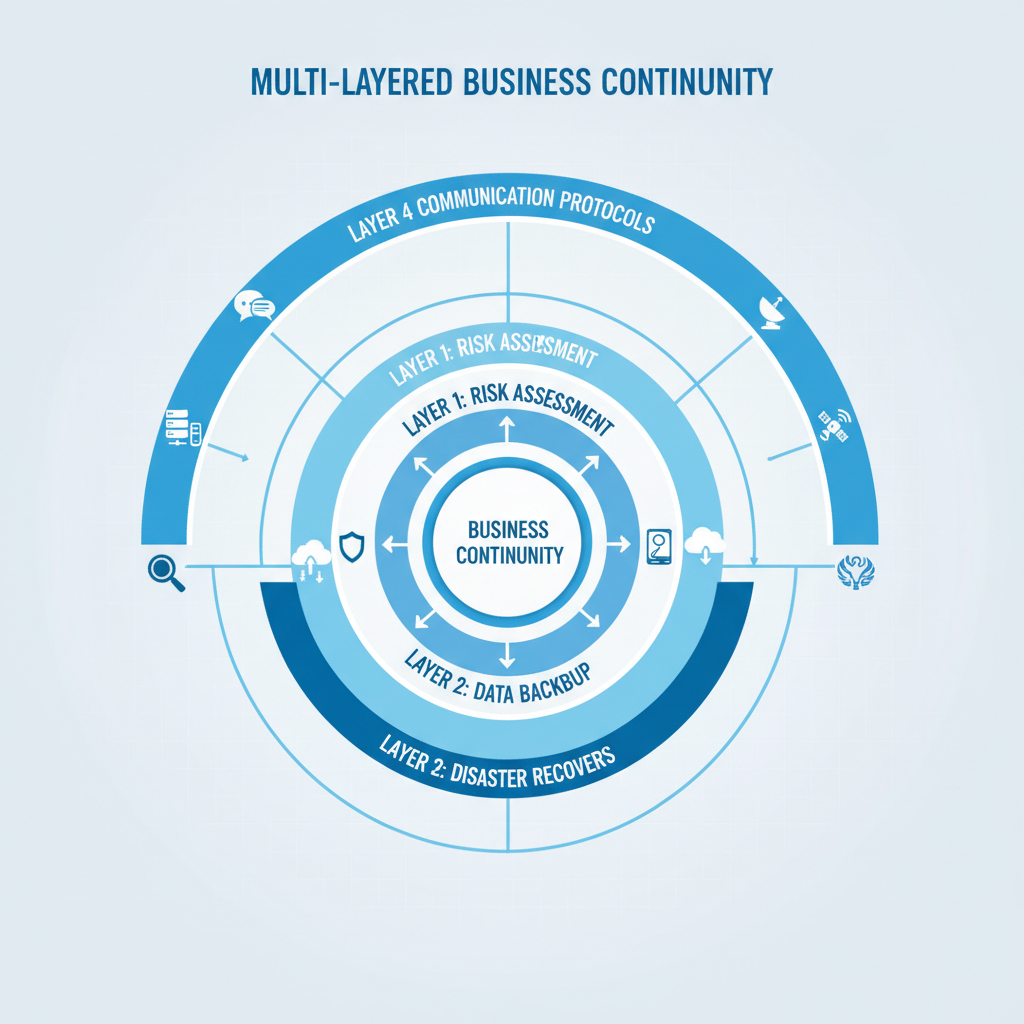
A holistic approach to business continuity planning involves a comprehensive strategy that extends beyond mere cybersecurity and data backup to encompass all facets of business operations, ensuring resilience against varied disruptions. This includes critical components like rigorous risk assessments to identify potential threats such as cyberattacks, natural disasters, or equipment failures, and thorough impact analyses to understand the potential consequences of each risk on critical business functions. Subsequently, organisations must develop robust recovery strategies, identifying alternative resources and procedures to minimise downtime and maintain essential services. For instance, an Australian small-to-medium enterprise (SME) should allocate a dedicated budget, perhaps 1-2% of its IT expenditure, to regularly test its business continuity plan at least twice annually. This ensures all employees are adequately trained on their roles and responsibilities to facilitate a smooth and effective recovery process should an incident, like a significant data breach requiring over two weeks of recovery, occur, thereby safeguarding operational resilience and market reputation.
Key elements of a business continuity plan include:
- Risk Assessment: Identify potential risks and threats that could disrupt your business operations. This includes natural disasters, cyberattacks, and equipment failures.
- Impact Analysis: Assess the impact of each risk on your business operations. This helps you prioritise your mitigation efforts.
- Recovery Strategies: Develop recovery strategies for each critical business process. This includes identifying alternative resources and procedures.
- Testing and Training: Regularly test your business continuity plan to ensure its effectiveness. Provide training to your employees on their roles and responsibilities.
How do Australian businesses choose the right cloud migration partner?
Australian businesses should choose a cloud migration partner that offers comprehensive support for business continuity and security throughout the complex migration process. A reliable partner will provide expert guidance, ensuring a seamless and secure transition, often specialising in platforms like Microsoft 365 and Azure, and associated security tools such as Microsoft Defender. For instance, a strong partner should clearly articulate their expertise in critical areas, including Microsoft 365 management, Azure cloud services design and deployment, and robust cybersecurity implementation. They must also demonstrate proven capability in managing specific services like SharePoint and Exchange Online migrations, with a track record of successfully transferring at least 50TB of data for previous clients. Furthermore, the ideal partner should offer proactive threat detection and 24/7 IT helpdesk support, ideally with a local presence in major Australian cities like Sydney or Melbourne, to ensure continuous assistance and prompt problem resolution.
- Microsoft 365 Management: Comprehensive management of your Microsoft 365 environment, including user administration, security configuration, and application support. We can assist with Optimising IT with Microsoft 365 & Expert Support.
- Azure Cloud Services: Design, deployment, and management of your Azure cloud infrastructure. We can help you leverage the full potential of Azure to improve your business agility and scalability. Consider Secure and Scale with Managed IT Services & Azure.
- Cybersecurity with Microsoft Defender: Implementation and management of Microsoft Defender to protect your data and applications from cyber threats. We offer proactive threat detection, vulnerability management, and incident response services.
- Intune Device Management: Management of your mobile devices and applications using Intune. This ensures that your devices are secure and compliant with your company policies. Explore Intune, Cybersecurity & Managed IT: A Modern Approach.
- SharePoint and Exchange Online: Migration and management of your SharePoint and Exchange Online environments. We can help you streamline your collaboration and communication processes. SharePoint & Azure: Streamline Your Cloud Migration.
- IT Helpdesk Support: 24/7 IT helpdesk support to resolve any issues that may arise during or after the cloud migration. We have offices in Melbourne, Sydney, Perth, and Brisbane, ready to assist.
What is the conclusion?
Ultimately, a successful cloud migration requires a steadfast commitment to business continuity and robust security. By strategically implementing Microsoft's comprehensive solutions, such as Microsoft Defender for advanced threat protection and Azure Backup for reliable data recovery, Australian businesses can ensure a seamless and protected transition. Partnering with an experienced managed IT provider, like Mycelium 365, further reinforces this, offering expert guidance and ongoing support throughout the migration process; this can significantly reduce the risk of data loss and system downtime, potentially saving an average-sized SME thousands of dollars per hour during a critical outage. A proactive and well-executed cloud strategy allows organisations to harness the full power of cloud computing securely, safeguarding their operations and valuable data against constantly evolving cyber threats and ensuring operational resilience for years to come.

By implementing a well-planned strategy and utilizing the right tools, you can unlock the full potential of the cloud while maintaining the highest levels of security and business continuity. Remember to regularly review and update your plan to adapt to evolving threats and business needs. For further reading, explore Boost Efficiency with Managed IT & Cloud Migration. Also, consider reviewing M365: Your Business Continuity Lifeline for more insights.
Frequently asked questions
What is the biggest risk during cloud migration?
One of the biggest risks is data loss or corruption during the migration process. Insufficient planning, inadequate testing, and a lack of robust backup and recovery mechanisms can lead to significant data loss. Careful planning and use of solutions like Azure Backup are essential to mitigate this risk.
How does Microsoft Defender help with cloud security?
Microsoft Defender provides comprehensive threat protection for cloud environments. It uses advanced analytics and machine learning to detect and prevent malware, ransomware, and other cyberattacks in real-time. This helps protect your data and applications from evolving threats.
Why is business continuity important during cloud migration?
Business continuity ensures that critical business operations can continue uninterrupted during and after the cloud migration. A well-planned business continuity strategy minimises downtime, protects data, and ensures that essential services remain available to customers and employees.
What are the key steps in a cloud migration plan?
Key steps include assessing your current infrastructure, defining migration goals, choosing a cloud provider (like Azure), developing a migration strategy, testing the migrated environment, and implementing a robust security plan. Post-migration, ongoing monitoring and optimisation are crucial.
How does Azure Backup contribute to business continuity?
Azure Backup provides a reliable solution for backing up your data in the cloud. It offers centralised management, long-term retention, and offsite storage, ensuring that you can quickly recover your data in the event of a disaster or data loss incident, a vital aspect of business continuity.
What is the role of a managed IT provider in cloud migration?
A managed IT provider offers expertise and support throughout the cloud migration process. They can help you assess your needs, develop a migration strategy, implement security measures, and provide ongoing support to ensure a smooth and successful transition, freeing you up to focus on core business functions.
