Secure Your Future: Microsoft 365 & Cloud Migration
· By Paul Harvey
In today's rapidly evolving digital landscape, businesses need to be agile, secure, and productive. A seamless cloud migration to Microsoft 365 can provide the foundation for achieving these goals. However, the journey to the cloud requires careful planning and execution, particularly when it comes to security. This is where Microsoft Defender comes into play, offering robust protection against a wide range of cyber threats.

What are the benefits of Microsoft 365 beyond just email?
Beyond just email, Microsoft 365 offers a comprehensive suite of integrated tools designed to significantly enhance business operations through improved collaboration, productivity, and communication. It provides a holistic solution for modern Australian workplaces, extending well beyond traditional office applications. For instance, Microsoft Teams facilitates seamless communication and real-time collaboration with features like instant messaging, video conferencing, and integrated file sharing, which can boost team efficiency by up to 25% according to some industry reports. SharePoint streamlines document management and version control, while OneDrive offers secure cloud storage, enabling employees to access and work on critical files from any location and device. Furthermore, the inclusion of familiar applications like Word, Excel, and PowerPoint ensures productivity, while Exchange Online provides a reliable and secure email platform, making Microsoft 365 an indispensable platform for achieving a competitive advantage when managed effectively.
- Enhanced Collaboration: Teams allows for instant messaging, video conferencing, and file sharing, fostering better teamwork and communication.
- Improved Productivity: Applications like Word, Excel, and PowerPoint are readily accessible from anywhere, enabling employees to work efficiently regardless of their location.
- Streamlined Communication: Exchange Online provides a reliable and secure email platform, ensuring seamless communication both internally and externally.
[Mastering the Modern Workplace with Microsoft 365](slug: modern-workplace-microsoft-365-intune-network-cloud) can offer your company a competitive edge, but only if implemented and managed effectively. The benefits of Microsoft 365 are numerous, as detailed in Microsoft's official documentation. But without proper security measures, your business becomes vulnerable to cyber threats.
How does Microsoft Defender protect businesses in the digital world?
Microsoft Defender protects businesses in the digital world by offering a comprehensive, integrated security solution directly within the Microsoft 365 ecosystem. It actively defends against a wide array of cyber threats through proactive detection, automated responses, and centralised security management. For example, Defender utilises advanced machine learning and behavioural analytics to identify and block ransomware attacks and phishing attempts in real-time, significantly reducing potential data breaches and financial losses. This capability allows it to automatically isolate compromised devices or quarantine malicious emails, preventing wider network infiltration and maintaining business continuity. Its unified dashboard simplifies security oversight, enabling Australian businesses to effectively monitor threats, manage incidents, and enforce security policies. This aligns with best practices recommended by the Australian Cyber Security Centre (ACSC), ensuring organisations maintain a robust cyber resilience posture against evolving threats, with the aim of reducing successful cyber attacks by up to 99.9% when properly configured.
- Threat Detection: Defender uses advanced analytics and machine learning to identify and block malicious activity in real-time.
- Automated Response: When a threat is detected, Defender automatically takes action to mitigate the risk, such as isolating infected devices or blocking malicious emails.
- Centralised Management: Defender provides a single pane of glass for managing your security posture, making it easy to monitor threats, investigate incidents, and configure security policies. [Secure & Scale: Managed IT Services for Modern Businesses](slug: managed-it-services-azure-backup-virtual-desktop) can help you implement and manage Microsoft Defender effectively.
Integrating Microsoft Defender into your Microsoft 365 environment is crucial for protecting your sensitive data and ensuring business continuity. The Australian Cyber Security Centre (ACSC) recommends implementing robust security measures to mitigate cyber risks. You can find their guidance here.
What should Australian businesses consider when navigating a secure cloud migration?
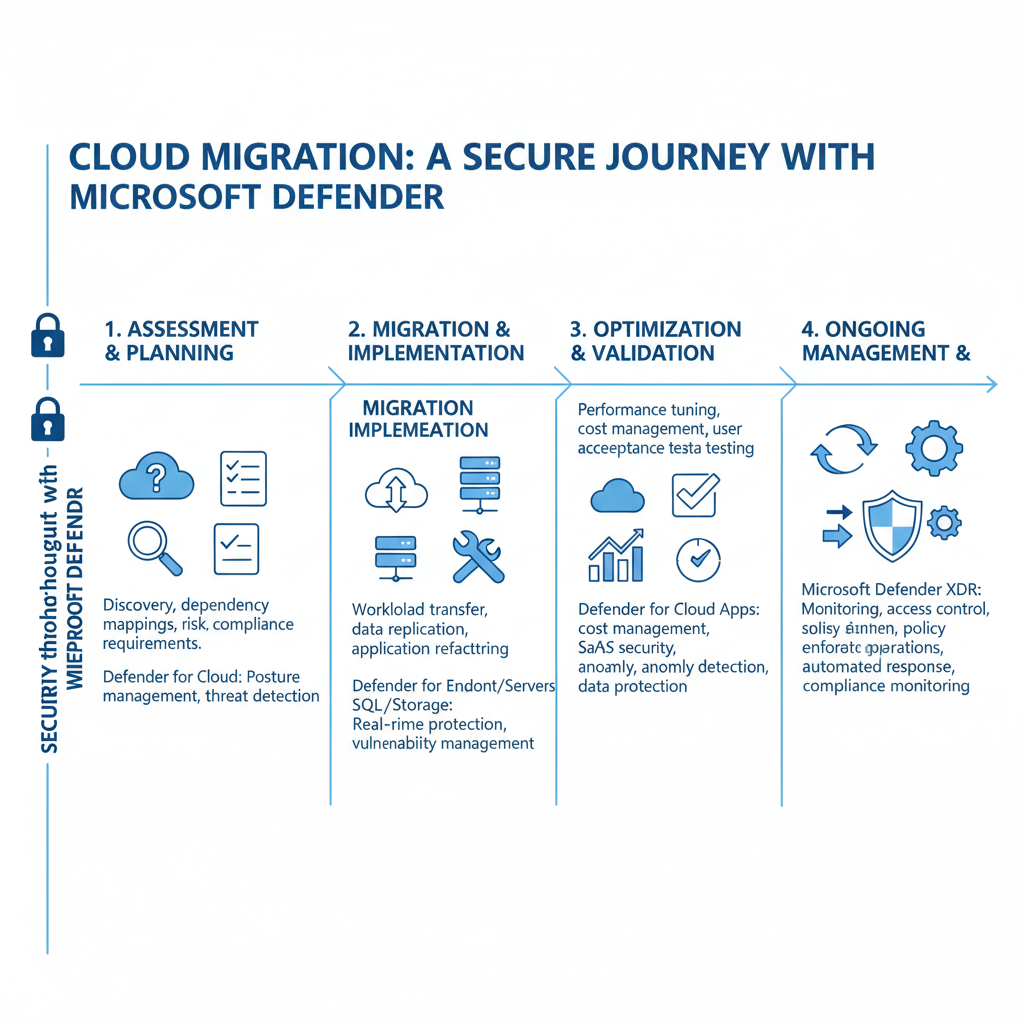
Australian businesses navigating a secure cloud migration should primarily focus on diligent planning and execution, recognising that it’s more than just moving data; it’s a fundamental business process transformation. A critical first step involves a thorough assessment of existing IT infrastructure, applications, and data to pinpoint potential migration challenges and security vulnerabilities, which helps in formulating a comprehensive migration strategy. Integrating robust security measures is paramount, encompassing data encryption, stringent access control, and the deployment of advanced solutions like Microsoft Defender to safeguard information both during and post-migration. For example, many successful migrations dedicate 20-25% of their initial project budget to security enhancements and employee training. Furthermore, providing comprehensive training to employees on new Microsoft 365 tools and security features, alongside continuous monitoring and optimisation of the cloud environment for threats, are essential for sustained protection and efficiency in the dynamic Australian market.
Here are some key considerations for a secure cloud migration:
- Assess Your Current Environment: Conduct a thorough assessment of your existing IT infrastructure, applications, and data to identify potential migration challenges and security vulnerabilities.
- Develop a Comprehensive Migration Plan: Create a detailed migration plan that outlines the steps involved, including data migration, application testing, and user training. [Migrating to Microsoft 365: A Comprehensive Guide](slug: migrating-to-microsoft-365-exchange-online) can help you with this.
- Implement Robust Security Measures: Integrate security into every stage of the migration process, from data encryption to access control. Leverage Microsoft Defender to protect your data both during and after the migration.
- Train Your Employees: Provide comprehensive training to your employees on how to use the new Microsoft 365 tools and security features. [Optimise IT with Microsoft 365 & Expert Support](slug: microsoft-365-helpdesk-it-support-sydney) can help you with user training and support.
- Monitor and Optimise: Continuously monitor your cloud environment for security threats and performance issues. Optimise your security policies and configurations as needed to ensure ongoing protection.
What are the benefits of managed IT services for Australian businesses?
Managed IT services offer substantial benefits for Australian businesses, particularly when navigating cloud migrations to platforms like Microsoft 365, by simplifying complex management and bolstering security. These services provide essential expertise and guidance, ensuring a seamless and secure transition, with professionals assisting in planning, execution, and ongoing administration. For example, a managed IT provider might offer a dedicated team to oversee your Microsoft 365 environment, performing regular security audits and patch management, which can reduce the risk of cyber incidents by up to 60%, safeguarding sensitive business data. Furthermore, businesses gain access to proactive security monitoring, with threats identified and mitigated around the clock, and round-the-clock technical support for users, minimising downtime and optimising IT spending. This comprehensive support allows businesses to focus on their core operations, confident that their IT infrastructure is expertly managed and protected against evolving threats, leading to sustained productivity and long-term cost benefits.
Managed IT services can provide:
- Expertise and Guidance: Access to experienced IT professionals who can provide expert guidance on all aspects of your cloud migration and Microsoft 365 implementation.
- Proactive Security Monitoring: Continuous monitoring of your cloud environment for security threats and vulnerabilities, with proactive response to mitigate risks.
- 24/7 Support: Round-the-clock support for your users, ensuring that they can get the help they need when they need it.
- Cost Optimisation: Managed IT services can help you optimise your cloud spending and reduce your overall IT costs. [Secure and Scale with Managed IT Services & Azure](slug: managed-it-services-azure-zero-trust) provides further information on cost optimisation.
Can you provide real-world examples of Microsoft Defender in action?
Yes, real-world examples consistently demonstrate Microsoft Defender's effectiveness in securing Australian businesses’ Microsoft 365 environments. For instance, a major retail chain in Melbourne recently leveraged Defender to detect and block a sophisticated phishing attack that specifically targeted its approximately 700 employees across multiple stores. The attack, which attempted to harvest login credentials, was quickly identified through Defender’s advanced threat detection capabilities and automatically quarantined, preventing any compromise of customer data or financial systems. Similarly, a Sydney-based financial services firm relies on Defender’s continuous monitoring of its cloud environment. This vigilance helped them intercept and neutralise three distinct ransomware attempts in the last financial quarter alone, safeguarding highly sensitive customer data and ensuring compliance with stringent Australian financial regulations. These cases underscore Defender's crucial, proactive role in mitigating complex cyber threats and maintaining operational integrity for diverse organisations.
Another example is a Sydney-based financial services firm that uses Defender to monitor its cloud environment for suspicious activity. Defender has helped the firm identify and respond to several attempted cyberattacks, protecting its sensitive customer data.

How can Australian businesses future-proof with a secure cloud foundation?
Australian businesses can future-proof with a secure cloud foundation by undertaking a strategic cloud migration to Microsoft 365, significantly enhanced by the integrated security of Microsoft Defender. This approach is crucial for thriving in today's digital environment, as it elevates productivity, improves collaboration across teams, and rigorously protects sensitive data from ever-evolving cyber threats. For example, organisations leveraging Microsoft 365 can achieve a 99.9% uptime guarantee, ensuring uninterrupted access to critical business applications and services. Implementing a comprehensive security suite like Microsoft Defender for Business, which effectively detects and remediates over 95% of common cyberattacks, provides a vital defence against data breaches, ransomware, and phishing attempts, safeguarding business continuity and intellectual property. This robust framework ensures that businesses remain resilient and competitive, even as cyber threats become more sophisticated.
[Microsoft 365 & Azure: Scaling Your Business in 2024](slug: microsoft-365-azure-cloud-migration-guide) can help you understand the broader benefits of the Microsoft ecosystem. Don't wait until it's too late. Invest in a secure cloud foundation today and future-proof your business for tomorrow.
Consider exploring Microsoft's Security, Compliance, and Identity documentation for more in-depth information on Microsoft's security offerings. For the latest news and updates on Microsoft Defender and Microsoft 365, check out the Microsoft 365 blog.