Secure Cloud Migration: Azure & Zero Trust for Microsoft 365
· By Paul Harvey
Embarking on a [Cloud Migration](slug: seamless-cloud-migration-microsoft-365) to Microsoft 365 can dramatically improve your business's efficiency and scalability. However, it's crucial to prioritise security throughout the process. A poorly planned migration can expose your organisation to significant cybersecurity risks. This is where Azure and Zero Trust security come into play. Mycelium 365 helps businesses across Melbourne, Sydney, Perth, and Brisbane navigate this complex landscape with confidence.

Why does secure cloud migration matter?
Secure cloud migration is paramount because it directly mitigates the substantial risks of data breaches, compliance violations, and significant business disruption. When Australian organisations transition their data and applications to cloud environments such as Microsoft 365, the traditional perimeter-based security models become insufficient, necessitating a comprehensive, layered approach. Neglecting security during this crucial migration phase can leave organisations highly vulnerable. For example, a poorly secured migration could expose sensitive customer data, potentially costing an Australian business not only extensive reputational damage but also millions in penalties, with figures for data breach fines exceeding $2.1 million in some recent cases. Proactively embedding robust security measures, from initial assessment through to ongoing management, is essential to successfully protect data integrity, ensure regulatory compliance, and maintain operational continuity in the interconnected cloud landscape.
- Data breaches: Sensitive information exposed due to misconfigured security settings or inadequate encryption.
- Compliance violations: Failure to meet regulatory requirements for data protection.
- Business disruption: Downtime and financial losses resulting from successful cyberattacks.
- Reputational damage: Loss of customer trust and brand value.
How does Azure provide a foundation for secure cloud migration?
Azure provides a strong and secure foundation for cloud migration, particularly to Microsoft 365, by offering an extensive array of security services designed to safeguard data, applications, and infrastructure from the outset. This comprehensive platform includes critical identity and access management through Azure Active Directory (now Entra ID), which enforces robust authentication policies to control who can access resources. Furthermore, Azure enhances security posture with tools like Azure Security Center for unified threat detection and vulnerability assessments, and Azure Sentinel for real-time security information and event management. These embedded features enable organisations to maintain a high level of security throughout their migration journey, helping to prevent unauthorized access and data breaches. For example, Azure Network Security Groups can be configured to block over 90% of common network-based attacks before they reach critical systems.
- Azure Active Directory (Azure AD): Identity and access management service that enforces strong authentication and authorisation policies. Azure AD, now known as [Entra ID](slug: entra-id-business-continuity-cybersecurity), is your business continuity lifeline.
- Azure Security Center: Unified security management system that provides threat detection, vulnerability assessment, and security recommendations.
- Azure Sentinel: Cloud-native SIEM (Security Information and Event Management) and SOAR (Security Orchestration, Automation, and Response) solution that helps you detect and respond to security threats in real-time.
- Azure Backup: Protect your data with [Azure Backup](slug: azure-backup-modern-workplace-business-continuity) and ensure modern workplace business continuity.
- Azure Key Vault: Securely store and manage cryptographic keys, passwords, and certificates.
- Azure Network Security Groups: Control network traffic and prevent unauthorised access to your resources.
Mycelium 365 leverages these Azure services to design and implement secure cloud migration strategies for businesses of all sizes. We understand the unique security challenges of migrating to Microsoft 365 and tailor our solutions to meet your specific needs.
How can you implement zero trust security during cloud migration?
To implement zero trust security during a cloud migration, particularly for platforms like Microsoft 365, businesses must adopt a "never trust, always verify" ethos, assuming all users and devices, whether internal or external, could be compromised. This requires rigorous identity verification, granting only least privilege access, and continuous monitoring throughout the migration process. For instance, organisations should enforce multi-factor authentication (MFA) for all user access and implement Azure AD Conditional Access policies to dynamically assess risk factors like location and device health before granting access. By applying these principles, such as ensuring comprehensive device enrolment in Microsoft Intune and mandating strong, unique passwords across all accounts, Australian businesses can significantly reduce their attack surface. Adopting zero trust during migration minimises cybersecurity risks and proactively protects sensitive business data, ensuring the new cloud environment is secured by design from its initial deployment.
The core principles of Zero Trust include:
- Verify explicitly: Always authenticate and authorise users and devices based on all available data points.
- Use least privileged access: Grant users only the minimum level of access they need to perform their job functions.
- Assume breach: Design your security controls to detect and respond to breaches quickly and effectively. For a modern approach, see [Intune, Cybersecurity & Managed IT](slug: intune-cybersecurity-managed-it-services).
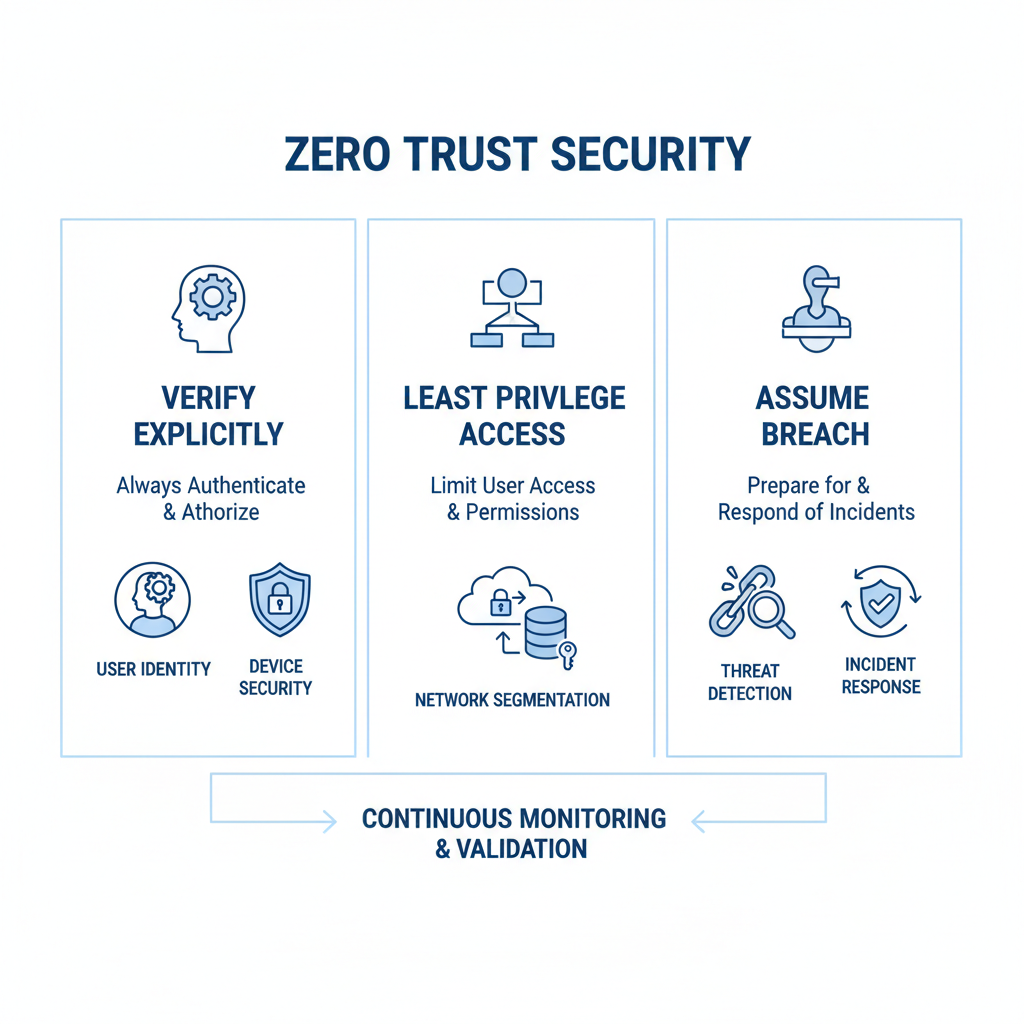
Here's how you can apply Zero Trust principles during your Microsoft 365 cloud migration:
- Identity and Access Management: Implement multi-factor authentication (MFA) for all users and enforce strong password policies. Use Azure AD Conditional Access to control access based on factors such as location, device, and user risk. See also [Entra ID: Your Business Continuity Lifeline](slug: entra-id-business-continuity-cybersecurity).
- Device Security: Enrol devices in Microsoft Intune and enforce security policies such as device encryption, password requirements, and app management. Regularly patch and update devices to address known vulnerabilities. Protect your business with [Modern Workplace Security: Intune & Defender](slug: secure-modern-workplace-microsoft-defender-intune).
- Data Protection: Classify and label sensitive data and implement data loss prevention (DLP) policies to prevent unauthorised access or exfiltration. Use Azure Information Protection to encrypt sensitive data both at rest and in transit.
- Network Segmentation: Segment your network to limit the impact of a potential breach. Use Azure Network Security Groups to control traffic between different segments. For robust IT infrastructure, see [Cloud & Disaster Recovery](slug: disaster-recovery-cloud-migration-network-management).
- Threat Detection and Response: Implement Azure Sentinel to monitor your environment for security threats and automate incident response. Regularly review security logs and alerts to identify and address potential issues.
What are the SharePoint security considerations during cloud migration?
Securing SharePoint during a cloud migration, especially within a Microsoft 365 environment, necessitates a comprehensive approach to prevent data breaches and maintain compliance from the outset. It is crucial to review and meticulously update all SharePoint permissions, ensuring users possess only the least privilege necessary for their roles, and promptly eliminating any excessive or outdated access rights. Configuring external sharing settings diligently is also paramount; implementing clear policies to govern when and how data can be shared externally, alongside continuous monitoring of these activities, is vital. For example, restricting external sharing to specific domains or requiring multi-factor authentication for external access significantly reduces risk. Furthermore, implementing Data Loss Prevention (DLP) policies, whether utilising SharePoint's built-in capabilities or integrating with Azure Information Protection, is essential for safeguarding sensitive information. Finally, enabling version control to track document changes and robust auditing features for user activities provides a critical trail for security incident investigations.
- Permissions Management: Review and update SharePoint permissions to ensure that users have only the necessary access. Remove any unnecessary or excessive permissions. Regularly review permissions, especially after the migration.
- External Sharing: Carefully configure external sharing settings to prevent unauthorised access to sensitive documents. Implement policies to govern external sharing and monitor activity. For a comprehensive guide, see [Migrating to Microsoft 365](slug: migrating-to-microsoft-365-exchange-online).
- Data Loss Prevention (DLP): Implement DLP policies to prevent sensitive data from being shared inappropriately. Use SharePoint's built-in DLP capabilities or integrate with Azure Information Protection.
- Version Control and Auditing: Enable version control to track changes to documents and allow for easy recovery of previous versions. Enable auditing to track user activity and identify potential security breaches. For disaster recovery, see [Microsoft 365: Disaster Recovery Essentials](slug: microsoft-365-disaster-recovery-plan).
Mycelium 365 offers comprehensive [Microsoft 365 management](slug: optimise-it-with-microsoft-365-expert-support) services, including SharePoint security assessments and configuration. We can help you ensure that your SharePoint environment is secure and compliant before, during, and after your cloud migration.
How do you choose the right partner for secure cloud migration?
Choosing the right partner for a secure cloud migration is paramount, requiring a provider with profound expertise and a proven history in safeguarding digital assets. Businesses should seek partners, such as Mycelium 365, that offer end-to-end services, beginning with comprehensive cloud migration planning that addresses specific business needs and security requirements. This includes conducting thorough security assessments of existing environments to identify vulnerabilities, potentially reducing security incidents by up to 40% during migration. An ideal partner will meticulously implement and configure robust Azure security services to protect data and applications throughout the transition, whether for a small startup in Perth or a large corporation in Melbourne. Moreover, the chosen partner must provide ongoing management and support to ensure the Microsoft 365 environment remains secure, compliant, and continuously protected against evolving cyber threats, guaranteeing a smooth and secure digital transformation.
- Cloud Migration Planning: We develop a comprehensive migration plan that addresses your specific business needs and security requirements.
- Security Assessment: We conduct a thorough security assessment of your existing environment to identify potential vulnerabilities.
- Implementation and Configuration: We implement and configure Azure security services to protect your data and applications during migration. Consider a [Managed IT Services & Azure](slug: secure-and-scale-with-managed-it-services-azure) approach.
- Ongoing Management and Support: We provide ongoing management and support to ensure that your Microsoft 365 environment remains secure and compliant. Our [IT helpdesk support](slug: microsoft-365-helpdesk-it-support-sydney) is always available.
Contact Mycelium 365 today to learn more about how we can help you with your secure cloud migration to Microsoft 365. We service Melbourne, Sydney, Perth, Brisbane and international locations. You can also [Boost Efficiency with Managed IT & Cloud Migration](slug: managed-it-services-cloud-migration-guide) with our expert services.

By prioritising security and partnering with a trusted provider like Mycelium 365, you can ensure a smooth and secure transition to the cloud. For more on scaling your business, see [Microsoft 365 & Azure](slug: microsoft-365-azure-cloud-migration-guide). This will allow you to reap the full benefits of Microsoft 365 without compromising your organisation's security.
To further enhance your understanding of cloud security best practices, consider exploring resources from the Australian Cyber Security Centre (ACSC). Additionally, Microsoft provides comprehensive documentation on Azure security features through Microsoft Learn.