
Microsoft 365: Your Foundation for Cloud Migration and Business Continuity
· By Paul Harvey
In today's dynamic business landscape, cloud migration is no longer a luxury but a necessity. Microsoft 365 offers a powerful platform for businesses to enhance collaboration, productivity, and security. However, a successful migration and ongoing operation require careful planning and execution, especially when considering business continuity. This article explores how to leverage Microsoft 365 for a seamless cloud transition while building a robust foundation for resilience.
Why is cloud migration strategically important?
Cloud migration is strategically important because it unlocks significant benefits like improved accessibility, enhanced collaboration, and scalable resources for businesses, transforming operational efficiency. A well-planned migration minimises critical risks such as data loss, security vulnerabilities, and operational disruptions often associated with a haphazard approach. For instance, successfully migrating to Microsoft 365 can reduce IT infrastructure costs by up to 30% within the first year for an average small to medium-sized Australian business, maximising the return on investment. This strategic move allows organisations to modernise their IT environment, ensuring business continuity and fostering agile operations in a competitive digital landscape. Proper strategy involves assessing current IT infrastructure, identifying specific business needs, and developing a comprehensive plan that includes workload prioritisation, migration methodology, and clear timelines, ultimately leading to a more robust and adaptable digital foundation.

Before embarking on your Microsoft 365 journey, it's crucial to assess your current IT infrastructure, identify business needs, and develop a comprehensive migration strategy. This includes determining which workloads to migrate, choosing the right migration method, and establishing clear timelines. We can help you with [Seamless Cloud Migration to Microsoft 365](slug: seamless-cloud-migration-microsoft-365).
How do you navigate a Gmail to Microsoft 365 migration?
Navigating a Gmail to Microsoft 365 migration requires a carefully planned, multi-stage process to ensure a smooth transition and prevent data loss for Australian organisations. Initially, a thorough assessment of your existing Gmail environment is crucial to determine its size and complexity, informing the most suitable migration strategy. Key steps involve detailed planning to select the appropriate migration method, such as a cutover, staged, or hybrid approach, followed by meticulous preparation of your Microsoft 365 environment and user accounts. The actual migration execution must prioritise data integrity and minimal downtime, typically aiming for completion within a specific window, such as a weekend, to reduce business impact. Post-migration verification confirms all data has successfully transferred, an essential step often overlooked. For instance, many businesses find engaging a managed IT service provider can significantly reduce migration downtime from several hours to under 30 minutes for smaller operations. Finally, comprehensive user training on the new Microsoft 365 interface is paramount for successful adoption and sustained productivity.
- Assessment: Evaluate the size and complexity of your Gmail environment.
- Planning: Determine the best migration method (e.g., cutover, staged, hybrid) based on your business requirements.
- Preparation: Configure your Microsoft 365 environment and prepare user accounts.
- Migration: Execute the migration process, ensuring data integrity and minimal downtime.
- Verification: Validate that all data has been migrated successfully.
- Training: Provide training to users on the new Microsoft 365 environment.
Microsoft provides tools and resources to facilitate the migration process. Consider using the Microsoft 365 Migration Tool or a third-party migration solution. For more guidance on this topic, check out [Migrating to Microsoft 365: A Comprehensive Guide](slug: migrating-to-microsoft-365-exchange-online).
How do you implement a Zero Trust Microsoft 365 environment?
To implement a Zero Trust Microsoft 365 environment, organisations must adopt a security model that intrinsically distrusts all users and devices, irrespective of their location. This approach necessitates stringent verification for every access attempt and continuous monitoring for potential threats. Key strategies include enforcing multi-factor authentication (MFA) across all user accounts, such as requiring biometrics or security keys beyond just a password, and implementing least privilege access principles to ensure users only have the bare minimum permissions necessary for their roles. For instance, a finance team member might have access to accounting software, but not to HR records. Device compliance is also critical, demanding that all endpoints meet specific security benchmarks like timely patching—often within 24 hours of a critical update disclosure. Additionally, integrating Microsoft's advanced threat protection tools, such as Microsoft Defender for Endpoint, is essential for proactive threat detection and response, alongside constant observation of user activities and system logs for any anomalous patterns, thereby significantly bolstering an organisation's cyber resilience against evolving threats.
Key components of a Zero Trust Microsoft 365 environment include:
- Strong Authentication: Implement multi-factor authentication (MFA) for all users.
- Least Privilege Access: Grant users only the minimum level of access required to perform their tasks.
- Device Compliance: Enforce device compliance policies to ensure devices meet security standards.
- Threat Protection: Deploy advanced threat protection solutions such as Microsoft Defender for Endpoint and Microsoft Defender for Office 365.
- Continuous Monitoring: Continuously monitor user activity and system logs for suspicious behaviour.
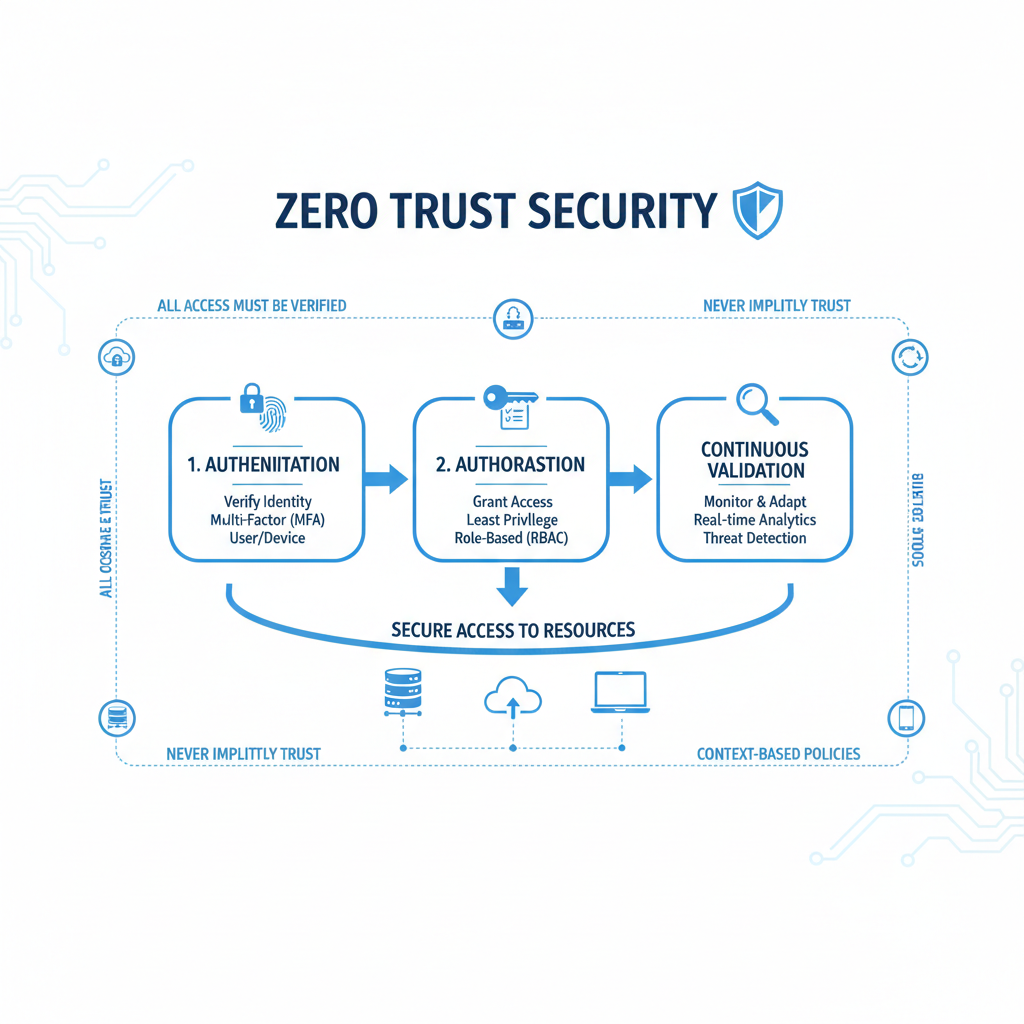
Microsoft offers a range of tools and services to implement a Zero Trust architecture, including Azure Active Directory (now Microsoft Entra ID), Microsoft Intune, and Microsoft Defender. Implementing Zero Trust significantly enhances your organisation's security posture and reduces the risk of data breaches. To learn more about securing your environment, read [Modern Workplace Security: Intune & Defender](slug: secure-modern-workplace-microsoft-defender-intune) and [Secure and Scale with Managed IT Services & Azure](slug: managed-it-services-azure-zero-trust).
How does Microsoft 365 support business continuity and disaster recovery?
Microsoft 365 significantly strengthens business continuity and disaster recovery by equipping organisations with robust features to maintain essential functions during and after disruptions. It provides inherent data redundancy across geographically dispersed data centres, automatic backups, and disaster recovery capabilities, ensuring high availability of data and services. For example, Microsoft guarantees 99.9% uptime for many of its Microsoft 365 services, drastically minimising service interruptions. Businesses can also develop comprehensive disaster recovery plans, leveraging integrations with tools like Azure Backup for enhanced data protection and swift restoration. A typical Australian business might reduce their recovery time objective (RTO) from days to hours by effectively utilising Microsoft 365's built-in redundancies and recovery tools. Regular testing of these plans is crucial to validate their effectiveness, ensuring critical business operations can be quickly restored in the event of unforeseen incidents.
Key considerations for business continuity with Microsoft 365:
- Data Backup and Recovery: Implement a robust data backup and recovery strategy to protect against data loss.
- Redundancy: Leverage Microsoft 365's built-in redundancy features to ensure data availability.
- Disaster Recovery Plan: Develop a comprehensive disaster recovery plan that outlines procedures for restoring business operations in the event of a disaster.
- Testing: Regularly test your disaster recovery plan to ensure its effectiveness.

Tools like Azure Backup can be integrated with Microsoft 365 to provide enhanced backup and recovery capabilities. Microsoft offers guidance on implementing disaster recovery for Microsoft 365. Don't forget to review [M365: Your Business Continuity Lifeline](slug: microsoft-365-business-continuity-helpdesk) for more information.
How do you choose the right partner for Microsoft 365 services?
Choosing the right partner for Microsoft 365 services involves seeking a managed IT provider with demonstrated expertise in cloud migration, business continuity, and comprehensive cybersecurity, specifically within the Australian context. A reputable partner simplifies complex processes, such as migrating from a legacy system like Gmail to Microsoft 365, by offering comprehensive assessments, tailored implementation plans, and robust security measures, including a Zero Trust architecture. For instance, an experienced provider will typically reduce migration-related downtime by up to 80% through meticulous planning and phased execution, ensuring business operations remain uninterrupted. They are also crucial in developing and testing disaster recovery plans, an essential safeguard for data integrity and operational continuity during unforeseen events. The ideal partner provides ongoing support and maintenance, ensuring your Microsoft 365 environment is optimised for performance, remains secure against evolving threats, and fully leverages all available features.
- Assessment and Planning: Evaluating your current IT environment and developing a tailored migration strategy.
- Implementation: Executing the migration process, ensuring data integrity and minimal downtime.
- Security: Implementing a Zero Trust architecture and providing ongoing security monitoring and support.
- Business Continuity: Developing and testing a comprehensive disaster recovery plan.
- Ongoing Support: Providing ongoing support and maintenance to ensure the smooth operation of your Microsoft 365 environment.
By partnering with a trusted managed IT provider like Mycelium 365, businesses can leverage the full potential of Microsoft 365 while mitigating the risks associated with cloud migration and ensuring business continuity. Consider [Optimise IT with Microsoft 365 & Expert Support](slug: microsoft-365-helpdesk-it-support-sydney) for additional information. You can also review the latest Microsoft 365 documentation.

By strategically embracing Microsoft 365, businesses can not only modernise their operations but also build a resilient foundation for long-term success. With the right planning, security measures, and support, you can confidently navigate the cloud and ensure your organisation remains operational, no matter what challenges arise. Contact us today to explore how Mycelium 365 can help you achieve your cloud migration and business continuity goals. You can also check out [Fortify Your Business with Managed IT Services](slug: managed-it-services-microsoft-defender-it-support) to learn more about how Mycelium can support your business's IT needs.
Frequently asked questions
What are the key benefits of migrating to Microsoft 365?
Migrating to Microsoft 365 offers improved collaboration, enhanced productivity, scalable resources, and robust security features. It enables businesses to access their data and applications from anywhere, fostering a more flexible and efficient work environment.
What is Zero Trust security and why is it important for Microsoft 365?
Zero Trust security is a security model that assumes no user or device is trusted by default. It's crucial for Microsoft 365 because it helps protect against data breaches by verifying every access request and continuously monitoring for threats, regardless of whether users are inside or outside the network.
How can Microsoft 365 help with business continuity?
Microsoft 365 provides data redundancy, automatic backups, and disaster recovery capabilities, ensuring that businesses can maintain essential functions during and after a disruption. Integrating Azure Backup and developing a comprehensive disaster recovery plan further strengthens business continuity efforts.
What are the key steps in a Gmail to Microsoft 365 migration?
The key steps include assessment, planning, preparation, migration, verification, and training. A thorough assessment of the Gmail environment and careful planning of the migration method are essential for a smooth transition without data loss.
Why should I consider a managed IT provider for my Microsoft 365 migration?
A managed IT provider offers expertise in Microsoft 365, simplifies the migration process, ensures data integrity, implements robust security measures, and provides ongoing support. They can tailor the migration to your specific business needs and ensure a successful outcome.
