
Strengthening Your Security Posture: Intune, Entra ID, and Zero Trust
· By Paul Harvey
In today's evolving threat landscape, a robust security strategy is paramount for every business, regardless of size. At Mycelium 365, we understand the challenges of protecting your data and infrastructure. That's why we advocate for a layered approach, leveraging powerful Microsoft technologies like Intune and Entra ID within a Zero Trust Security framework.
What are the core components of Intune, Entra ID, and Zero Trust?
The core components of a robust cybersecurity strategy leveraging Microsoft technologies include Microsoft Intune, Microsoft Entra ID, and the Zero Trust security framework. Microsoft Intune serves as a cloud-based mobile device and application management solution, enabling organisations to secure and manage all devices, from company-owned laptops to employee BYOD mobile phones, by enforcing security policies and protecting corporate data. Microsoft Entra ID (formerly Azure Active Directory) acts as the cloud-based identity and access management service, providing a unified platform for user authentication and authorisation across various applications and resources. Complementing these, the Zero Trust security framework operates on the principle of "never trust, always verify," implementing continuous authentication and authorisation for every user and device accessing an organisation's network, effectively reducing the risk of unauthorised access by an estimated 95% compared to traditional perimeter-based security models.
- Microsoft Intune: This is your cloud-based mobile device management (MDM) and mobile application management (MAM) solution. It allows you to control access to company resources, enforce security policies on devices (both company-owned and personal), and protect company data. Think of it as your centralised device security command centre. Learn more about Intune on Microsoft Learn.
- Microsoft Entra ID (formerly Azure Active Directory): This is Microsoft's cloud-based identity and access management service. It provides a single identity platform for users to access applications and resources, both on-premises and in the cloud. Entra ID is the foundation for secure access. Read more about Entra ID and its capabilities on the Microsoft Entra documentation.
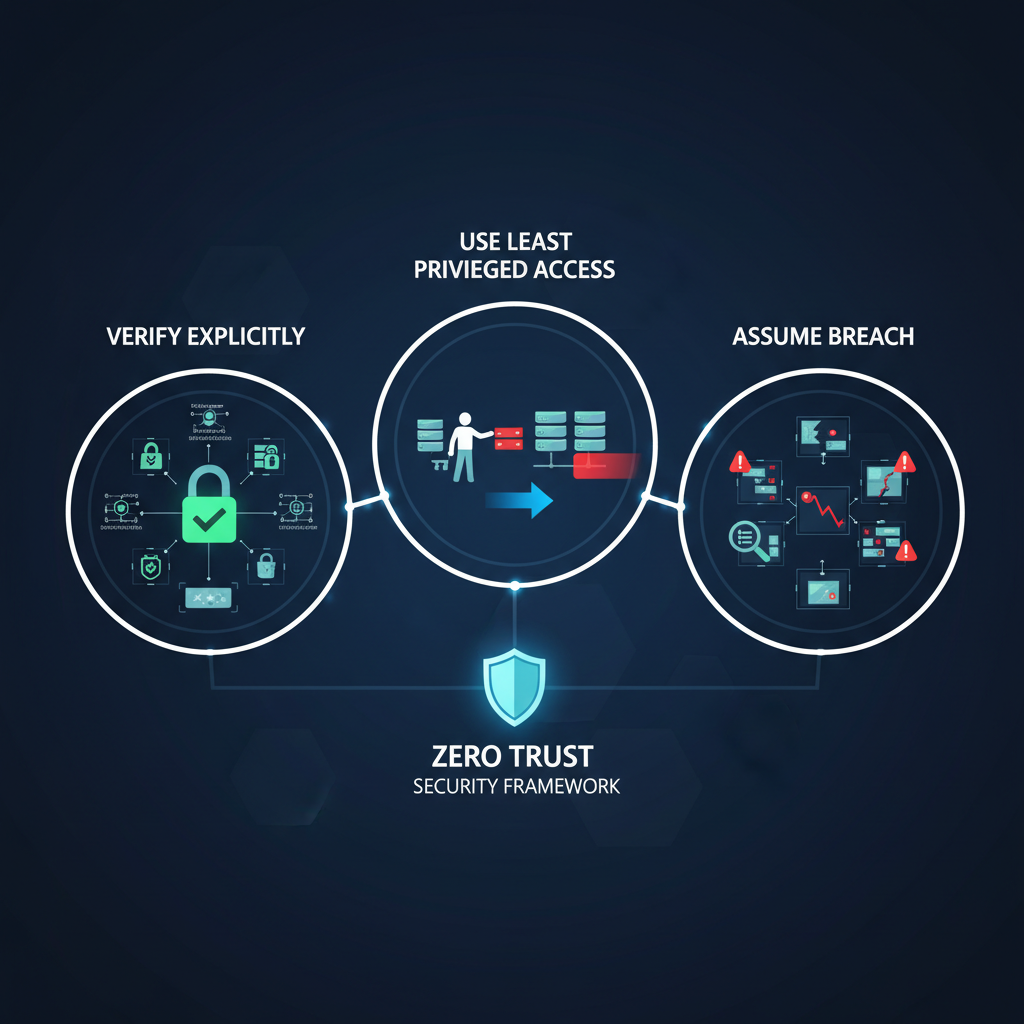
- Zero Trust Security: This is not a product, but a security framework. It operates on the principle of "never trust, always verify." Every user, device, and application is treated as potentially compromised, and access is granted only after rigorous authentication and authorisation. Zero Trust requires continuous verification and least privilege access. Dive deeper into Zero Trust principles on the Microsoft Zero Trust guidance.
Why should Australian businesses combine Intune, Entra ID, and Zero Trust technologies?
Australian businesses should combine Intune, Entra ID, and Zero Trust technologies to create a robust and comprehensive security solution that significantly enhances their resilience against evolving cyber threats. This powerful integration ensures that all users and devices, whether corporate or personal, are rigorously verified for compliance and identity before gaining access to organisational resources, effectively preventing unauthorised entry. For instance, Intune can enforce device health checks, such as requiring up-to-date antivirus and operating system patches, while Entra ID authenticates user identities with multi-factor authentication, ensuring only trusted entities interact with sensitive data. This approach not only streamlines security management for IT departments by centralising policy enforcement, but also directly aligns with stringent Australian cyber security recommendations, such as adhering to key components of the Australian Signals Directorate (ASD) Essential Eight. This strategic combination improves data protection and reduces the attack surface by limiting access to only what is strictly necessary, bolstering a business's overall security posture against the 60% of Australian businesses that experienced a cyber incident in the last year.
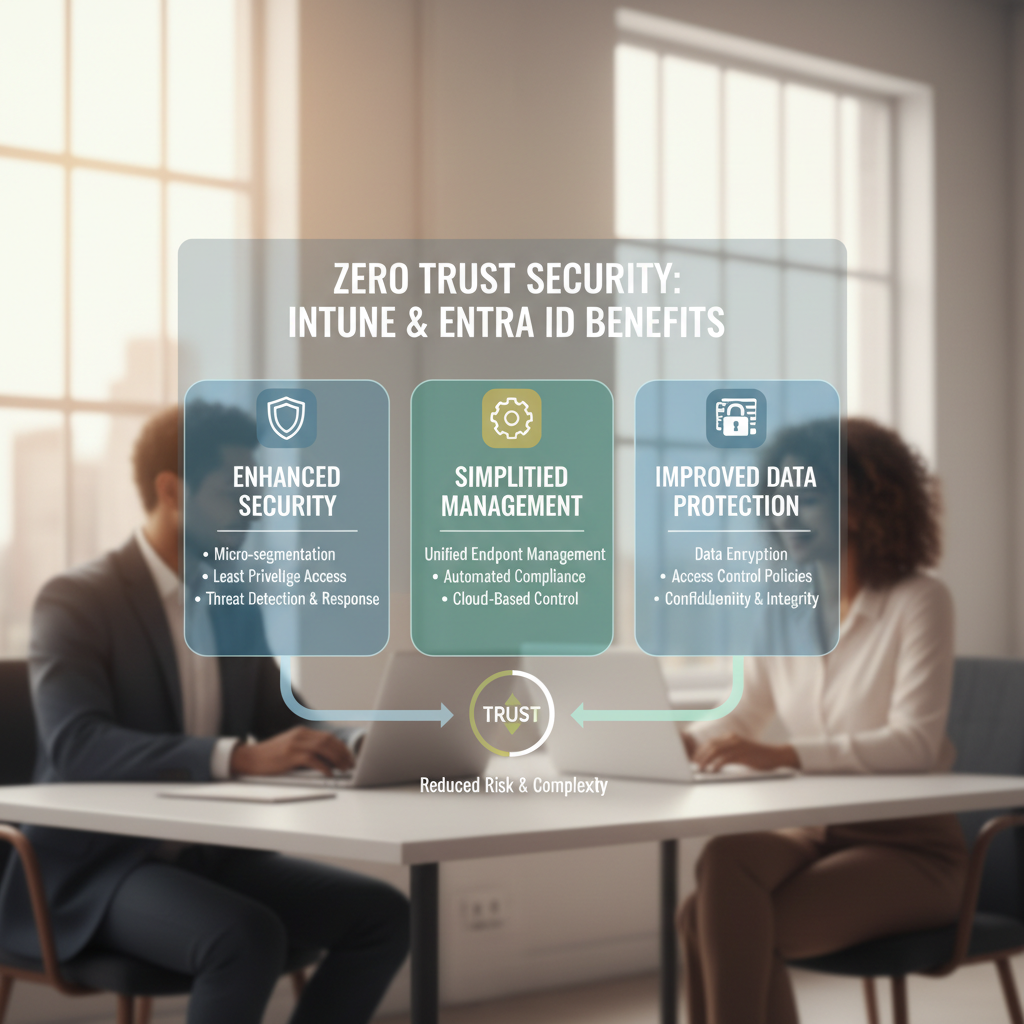
- Enhanced Access Control: Entra ID verifies user identities and Intune ensures device compliance before granting access to resources. This prevents unauthorised access from compromised devices or accounts.
- Simplified Management: Centralised management through Intune and Entra ID simplifies security policy enforcement and monitoring across all devices and applications.
- Improved Data Protection: Intune allows you to implement data loss prevention (DLP) policies, protecting sensitive information from leaving your organisation, even on personal devices. See how Mycelium 365 can help you Secure Your Business with Azure Backup & Modern Workplace.
- Reduced Attack Surface: By continuously verifying user and device identities, and limiting access to only what's necessary, you significantly reduce your organisation's attack surface. Learn more about Modern Workplace Security: Intune & Defender.
- Compliance: Using Intune and Entra ID helps meet compliance requirements such as ISO 27001 and the Australian Signals Directorate (ASD) Essential Eight. You can also read about Entra ID: Your Business Continuity Lifeline.
How can Australian businesses implement a Zero Trust strategy using Intune and Entra ID?
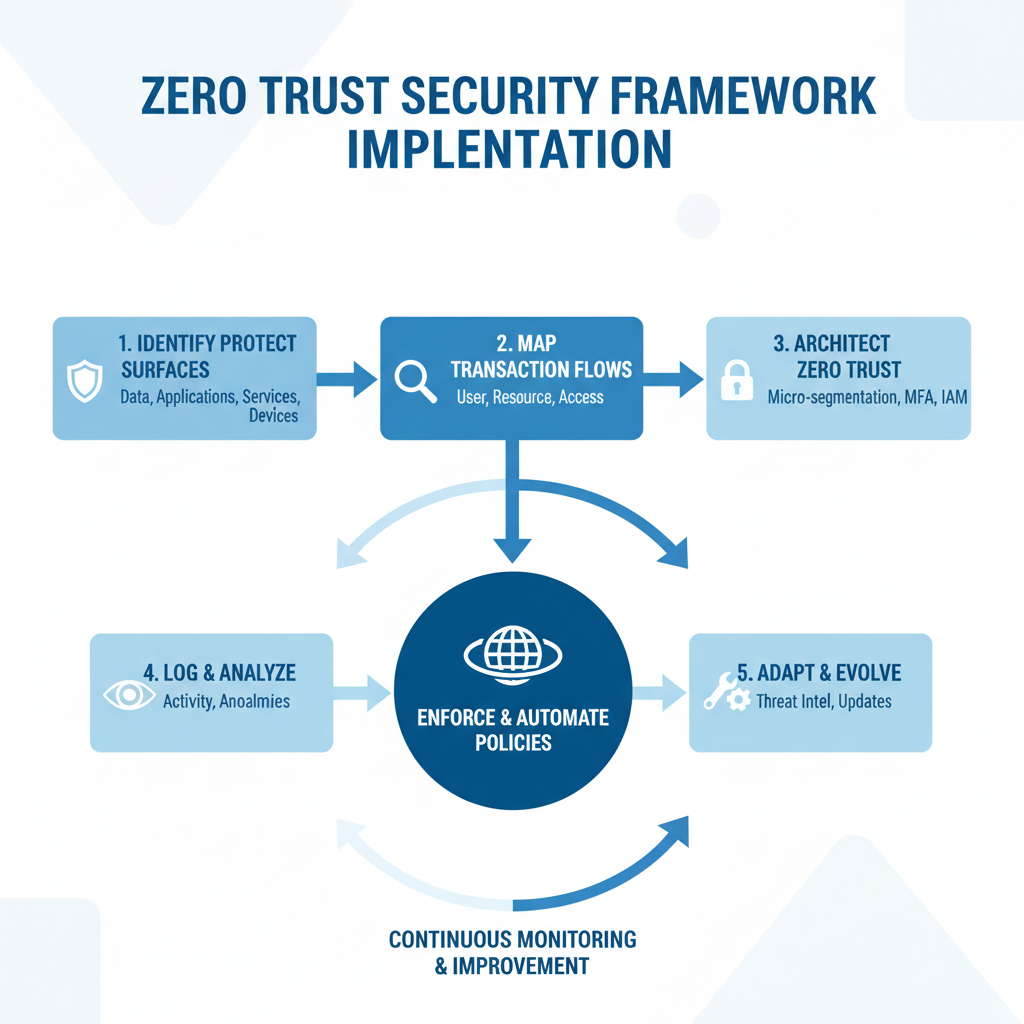
Australian businesses can implement a robust Zero Trust strategy by leveraging Microsoft Intune and Entra ID (formerly Azure Active Directory) to enforce granular access controls and continuously verify all access requests, rather than trusting anything by default. This involves first defining critical protect surfaces—the most vital data, applications, and services—and then meticulously mapping transaction flows to identify potential vulnerabilities. Through Intune, organisations can establish policies for device compliance, application management, and data protection, such as mandating multi-factor authentication (MFA) and deploying regular security updates across all endpoints within minutes of release. Simultaneously, Entra ID Conditional Access policies enable businesses to enforce stringent access based on user identity, device health, location, and application sensitivity, for instance, requiring MFA for users accessing sensitive financial data from unmanaged devices or outside normal business hours. This comprehensive approach ensures every access attempt is verified, significantly reducing the attack surface and enhancing overall cyber resilience for Australian enterprises.
- Define Your Protect Surface: Identify your most critical data, assets, applications, and services. These are the areas that require the highest level of protection.
- Map the Transaction Flow: Understand how users, devices, and applications interact with your protect surface. Identify potential vulnerabilities in the transaction flow.
- Architect a Zero Trust Environment: Implement security controls at each point in the transaction flow, based on the principles of Zero Trust.
- Implement Intune Policies: Configure Intune policies to enforce device compliance, manage applications, and protect data. This includes setting password requirements, enabling multi-factor authentication (MFA), and deploying security updates. Intune can also be used to implement conditional access policies, which grant access based on specific conditions such as device health, location, and user risk.
- Configure Entra ID Conditional Access: Use Entra ID Conditional Access policies to enforce granular access controls based on user identity, device compliance, location, and application sensitivity. For example, you can require MFA for users accessing sensitive applications from outside your corporate network. See how Microsoft 365 & Azure: Scaling Your Business in 2024.
- Continuously Monitor and Improve: Regularly monitor your security posture and identify areas for improvement. Use threat intelligence feeds and security analytics to detect and respond to potential threats. Consider Fortify Your Business with Managed IT Services.
What are some practical examples of Intune, Entra ID, and Zero Trust in action?
Intune, Entra ID, and Zero Trust work together to implement robust security measures, ensuring that every access request is verified before granting access to organisational resources. For example, Intune allows businesses to enforce crucial security policies on mobile devices, such as requiring device encryption and strong passwords, and even remotely wiping a lost or stolen company phone within minutes to prevent data compromise. When integrated with Entra ID, organisations can leverage Conditional Access policies to mandate multi-factor authentication (MFA) for users accessing sensitive applications like a CRM or financial systems, particularly from unfamiliar networks. This ensures that a higher level of verification is needed for critical resources. These practical applications significantly reduce the risk of unauthorised data access and cyber threats, protecting sensitive business information comprehensively across all devices and applications.
- Mobile Device Security: Use Intune to enforce encryption on mobile devices, require strong passwords, and remotely wipe devices that are lost or stolen.
- Application Access Control: Use Entra ID Conditional Access to require MFA for users accessing sensitive applications, such as your CRM or financial systems.
- Data Loss Prevention: Use Intune to implement DLP policies that prevent users from copying sensitive data to personal devices or cloud storage services. Learn more about SharePoint & Azure: Streamline Your Cloud Migration.
- Remote Access: Use Entra ID and Intune to provide secure remote access to corporate resources for employees working from home or on the road. Explore Modernise Your Workplace with Azure & Virtual Desktops.
What is the role of managed IT services in implementing Intune, Entra ID, and Zero Trust?
Managed IT services are instrumental in implementing Intune, Entra ID, and a Zero Trust security framework by supplying the specialised expertise and resources many businesses urgently require. Businesses often struggle with the complexity and time commitment involved, making external support essential. For instance, providers like Mycelium 365, operating across major Australian cities including Melbourne, Sydney, Perth, and Brisbane, deliver comprehensive services that encompass assessing a company's current security posture, crafting bespoke Zero Trust strategies, and expertly configuring Microsoft Intune for device management and Microsoft Entra ID (formerly Azure Active Directory) for identity and access management. These services also extend to providing persistent monitoring and support, ensuring these critical systems remain optimised, compliant with regulations like the Essential Eight, and resilient against the ever-evolving landscape of cyber threats, thereby significantly strengthening an organisation’s digital defences.
- Assess your current security posture.
- Develop a tailored Zero Trust security strategy.
- Implement and configure Intune and Entra ID.
- Provide ongoing monitoring and support.
- Ensure compliance with relevant regulations.
We have offices in Melbourne, Sydney, Perth, and Brisbane, and international offices, allowing us to provide on-the-ground support wherever you are. Our team of experienced IT professionals can help you navigate the complexities of modern security and ensure that your business is protected from evolving threats. Read about Secure and Scale with Managed IT Services & Azure.
What are the benefits of partnering with Mycelium 365 for Intune, Entra ID, and Zero Trust?
Partnering with Mycelium 365 for Intune, Entra ID, and Zero Trust provides businesses with expert IT security, proactive threat management, and significant cost efficiencies by leveraging our deep specialisation. Our certified team possesses extensive knowledge of Microsoft technologies and Zero Trust principles, ensuring a robust and adaptive defence against modern cyber threats. We proactively monitor your IT environment 24/7, detecting and neutralising potential risks before they can impact operations, often isolating a detected threat within just 15-30 minutes. This specialised outsourcing model can be substantially more cost-effective than developing and maintaining an in-house security team, potentially leading to savings of up to 40% on overall IT overheads within the first year. Furthermore, our scalable services readily adapt to the evolving needs of your business, offering peace of mind so you can concentrate on core business growth rather than complex cybersecurity challenges.
- Expertise: Our team possesses deep knowledge of Microsoft technologies and Zero Trust security principles.
- Proactive Security: We proactively monitor your environment and respond to potential threats before they can impact your business. Consider Intune, Cybersecurity & Managed IT: A Modern Approach.
- Cost-Effectiveness: Outsourcing your IT security to us can be more cost-effective than hiring and training an internal team.
- Scalability: Our services are scalable to meet the evolving needs of your business. See how you can Boost Efficiency with Managed IT & Cloud Migration.
- Peace of Mind: Knowing that your IT security is in the hands of experts allows you to focus on running your business. Read about Robust IT Infrastructure: Cloud & Disaster Recovery.
What are the key takeaways from this discussion on Intune, Entra ID, and Zero Trust?
Successfully implementing a Zero Trust security framework with Microsoft Intune and Entra ID is crucial for safeguarding your business against contemporary cyber threats. This powerful combination significantly enhances security by rigorously verifying every access attempt and device, regardless of location, rather than implicitly trusting entities once they are within a network perimeter. For instance, organisations that fully adopt a Zero Trust model can reduce the risk of data breaches by a significant margin, with some reports suggesting up to a 40% decrease compared to traditional security models. Partnering with specialised providers, such as Mycelium 365, can offer the necessary expertise and resources to deploy a comprehensive security solution tailored to specific business needs and budgets. This ensures robust protection of sensitive data and systems, aligning with best practices recommended by authorities like the Australian Cyber Security Centre (ACSC), thereby fortifying your overall cybersecurity posture.
Stay up-to-date with the latest cybersecurity threats and best practices by consulting resources like the Australian Cyber Security Centre (ACSC).
Frequently asked questions
What is Zero Trust Security?
Zero Trust Security is a security framework based on the principle of "never trust, always verify." It assumes that all users, devices, and applications are potentially compromised and requires continuous verification before granting access to resources.
How does Intune enhance security?
Intune enhances security by enforcing device compliance policies, managing applications, and protecting data on both company-owned and personal devices. It allows for remote wiping of devices, password enforcement, and conditional access based on device health.
What is the role of Entra ID in Zero Trust?
Entra ID plays a crucial role in Zero Trust by providing identity and access management. It verifies user identities, enforces multi-factor authentication (MFA), and enables conditional access policies to ensure that only authorized users and devices can access resources.
Is Zero Trust difficult to implement?
Implementing Zero Trust can be complex, requiring careful planning and execution. However, partnering with a managed IT provider like Mycelium 365 can simplify the process and ensure that you have the expertise and resources needed to implement a successful Zero Trust strategy.
How does Intune work with Entra ID?
Intune and Entra ID work together to provide a comprehensive security solution. Entra ID verifies user identities, and Intune ensures device compliance before granting access to resources. This integration provides enhanced access control and data protection within a Zero Trust framework.
What are the benefits of using a Managed IT provider for Zero Trust implementation?
A Managed IT provider like Mycelium 365 offers expertise, proactive security monitoring, cost-effectiveness, scalability, and peace of mind. They can help you assess your security posture, develop a tailored Zero Trust strategy, and provide ongoing support to ensure your business is protected.
