
Unlocking Modern Workplace Productivity: Exchange Online, Azure, and Cloud Migration
· By Paul Harvey
In today's dynamic business environment, staying competitive requires embracing modern workplace solutions. Microsoft's Exchange Online, coupled with the power of Azure and a well-executed cloud migration strategy, offers a compelling path to enhanced productivity, security, and scalability. At Mycelium 365, we specialise in helping businesses across Melbourne, Sydney, Perth, Brisbane, and beyond, leverage these technologies to achieve their full potential.
What is the power of Exchange Online?
Exchange Online offers significant power as a comprehensive cloud-based communication and collaboration platform, moving beyond traditional email to form the backbone of a modern workplace. It eliminates the need for expensive on-premises servers, substantially reducing IT infrastructure costs and simplifying overall management. For instance, Australian SMBs can achieve up to a 30% reduction in server maintenance expenses by migrating to Exchange Online, freeing up their IT teams to focus on strategic initiatives rather than routine upkeep. This service integrates seamlessly with other Microsoft 365 applications like Teams and SharePoint, fostering enhanced collaboration and information sharing. Furthermore, its robust built-in security features, including anti-malware and anti-spam protection, safeguard sensitive data against cyber threats 24/7, providing peace of mind. Exchange Online also ensures accessibility from anywhere, on any device, significantly boosting business continuity and employee flexibility.
- Enhanced Collaboration: Seamless integration with other Microsoft 365 applications like Teams, SharePoint, and OneDrive fosters teamwork and information sharing.
- Improved Accessibility: Access your email, calendar, and contacts from anywhere, on any device, ensuring business continuity and increased employee flexibility.
- Robust Security: Built-in security features, including anti-malware and anti-spam protection, safeguard your sensitive data and protect against cyber threats. You can further enhance security with [Modern Workplace Security: Intune & Defender](slug: secure-modern-workplace-microsoft-defender-intune).
- Simplified Management: Microsoft handles updates, maintenance, and backups, freeing up your IT team to focus on strategic initiatives. Mycelium 365 provides [Microsoft 365 management](slug: microsoft-365-helpdesk-it-support-sydney) to ensure optimal performance and security.
- Scalability: Easily scale your Exchange Online resources up or down to meet your changing business needs, without the hassle of hardware upgrades.

How does integrating with Azure enhance Exchange Online capabilities?
Integrating Exchange Online with Microsoft Azure significantly enhances its capabilities by leveraging Azure's extensive suite of cloud computing services, ultimately unlocking greater potential for Australian businesses through improved security, streamlined management, and robust data protection. For example, Azure Active Directory (Azure AD) centralises identity and access management, enabling secure single sign-on (SSO) across all cloud applications, including Exchange Online, which can significantly reduce password-related support tickets by an estimated 25%. Furthermore, Azure Backup ensures business continuity through comprehensive disaster recovery for Exchange Online data, critical for minimising downtime in the event of data loss. Meanwhile, Azure Information Protection (AIP) helps classify and protect sensitive information within Exchange Online emails and documents, proactively preventing data leaks and aiding compliance with strict regulatory requirements, such as the Privacy Act 1988, for Australian organisations. These integrations collectively streamline IT operations and bolster an organisation's digital infrastructure with a comprehensive, secure, and automated approach.
- Azure Active Directory (Azure AD): Azure AD provides a centralised identity and access management solution, enabling secure single sign-on (SSO) across all your cloud applications, including Exchange Online. This enhances security and simplifies user management. More on Azure AD can be found in our post [Entra ID: Your Business Continuity Lifeline](slug: entra-id-business-continuity-cybersecurity).
- Azure Backup: Protect your Exchange Online data with Azure Backup, ensuring business continuity in the event of data loss or disaster. Our article [Azure Backup & Helpdesk: Disaster Recovery for M365](slug: azure-backup-helpdesk-support-disaster-recovery) explains the benefits of cloud backup.
- Azure Information Protection (AIP): Classify and protect sensitive information within Exchange Online emails and documents, preventing data leaks and ensuring compliance with regulatory requirements. Learn more about data protection strategies by reading [Secure Your Business with Azure Backup & Modern Workplace](slug: azure-backup-modern-workplace-business-continuity).
- Azure Automation: Automate routine tasks related to Exchange Online management, such as user provisioning, mailbox creation, and security configuration, freeing up your IT team to focus on more strategic projects. https://learn.microsoft.com/en-us/azure/automation/
Why is a seamless cloud migration important for Exchange Online?
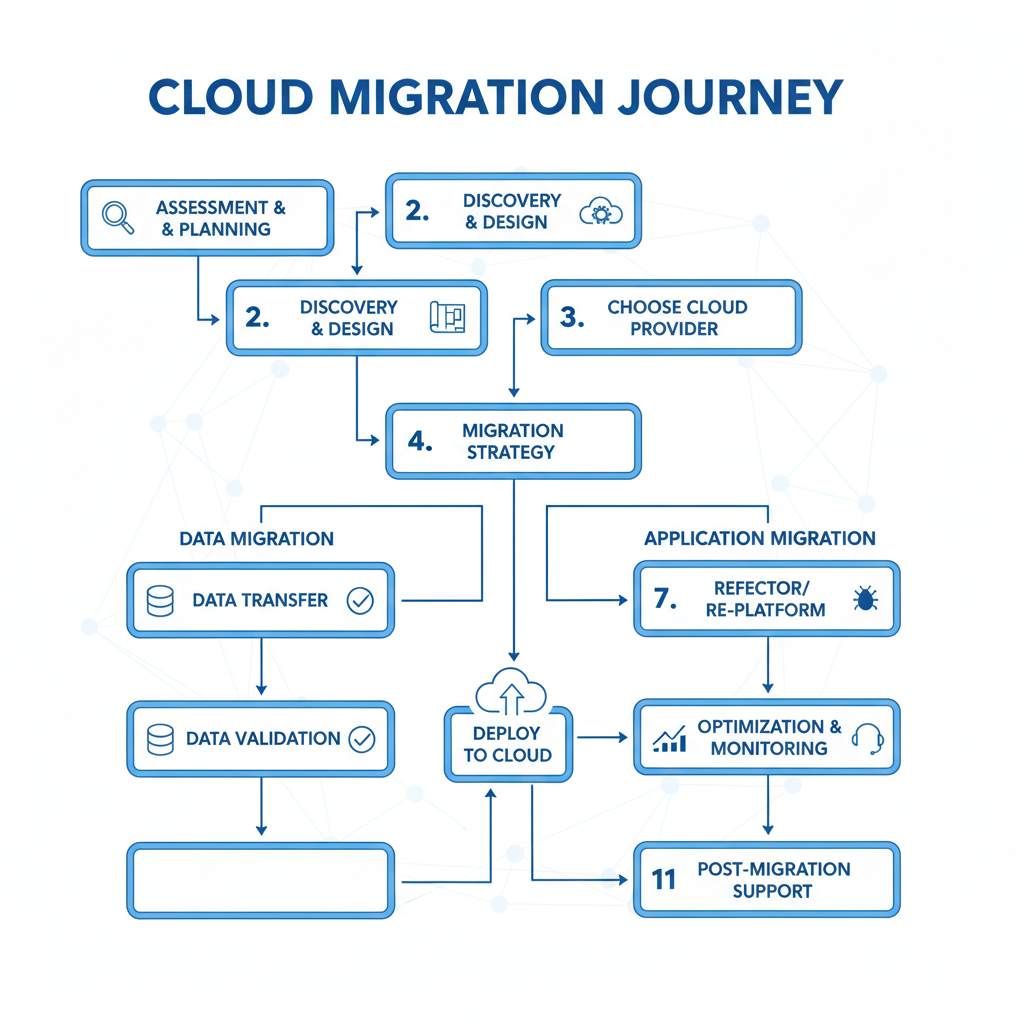
A seamless cloud migration is critical for Exchange Online to minimise disruption and ensure a successful transition for Australian businesses. Without meticulous planning and execution, organisations risk significant downtime, data integrity issues, and reduced user productivity, with some surveys indicating unplanned downtime can cost small to medium businesses over AUD $10,000 per hour. A well-orchestrated migration, including thorough infrastructure assessments that identify potential challenges and choosing appropriate data transfer methods like staged or hybrid migrations, can prevent common pitfalls. For instance, a detailed migration plan can reduce email service interruption from potential days to just a few hours during a cutover, ensuring business continuity. Furthermore, effective user training on new features and comprehensive post-migration support are vital for maximising the benefits of Exchange Online and securing a positive return on investment, which can include enhanced security and reduced operational costs.
- Assessment and Planning: Conduct a thorough assessment of your existing IT infrastructure, identify potential challenges, and develop a detailed migration plan. This should include timelines, resource allocation, and risk mitigation strategies.
- Data Migration: Choose the right migration method based on your specific needs and requirements. Options include cutover migration, staged migration, and hybrid migration. Mycelium 365 specialises in [Seamless Cloud Migration to Microsoft 365](slug: seamless-cloud-migration-microsoft-365).
- User Training: Provide comprehensive training to your employees on how to use Exchange Online and its features. This will help ensure a smooth transition and maximise user adoption. https://support.microsoft.com/en-us/office/exchange-online-training-guides-22291799-4311-4133-8016-a1e3f1869139
- Post-Migration Support: Provide ongoing support to your users after the migration is complete. This will help address any issues or questions that may arise and ensure a successful long-term transition. We offer [IT helpdesk support](slug: microsoft-365-helpdesk-it-support-sydney) to assist with any post-migration needs.
How can Mycelium 365 be your partner in modern workplace transformation for Australian businesses?
Mycelium 365 is an ideal partner for Australian businesses seeking modern workplace transformation, offering comprehensive expertise in migrating to Exchange Online and leveraging Azure. Our team of certified Microsoft experts provides end-to-end support, from initial assessment and meticulous planning to secure data migration, thorough user training, and ongoing managed IT services tailored specifically for the Australian market. We understand the unique operational challenges faced by local businesses, such as compliance with Australian data sovereignty regulations and regional latency concerns, and can configure solutions to specifically address these. For example, we often complete seamless Exchange Online migrations for medium-sized enterprises within a 12-week timeframe, significantly minimising business disruption. We also assist with Azure integration to enhance security, scalability, and performance, ensuring your cloud environment operates efficiently and securely, enabling businesses to scale effectively in the dynamic 2024 landscape.
We offer a range of services, including:
- Microsoft 365 Consulting: We help you choose the right Microsoft 365 plan and configure it to meet your specific business requirements. We can help you scale your business in 2024 with [Microsoft 365 & Azure: Scaling Your Business in 2024](slug: microsoft-365-azure-cloud-migration-guide).
- Exchange Online Migration: We provide a seamless and hassle-free migration to Exchange Online, minimising disruption to your business operations.
- Azure Integration: We help you integrate Exchange Online with Azure services to enhance security, scalability, and performance. https://azure.microsoft.com/en-au/services
- Managed IT Services: We provide ongoing managed IT services to ensure that your Exchange Online and Azure environment is always running smoothly and securely. Learn more about how we [Fortify Your Business with Managed IT Services](slug: managed-it-services-microsoft-defender-it-support).
By embracing Exchange Online, integrating it with Azure, and partnering with Mycelium 365 for a seamless [Cloud Migration](slug: sharepoint-azure-cloud-migration), you can unlock the full potential of the modern workplace and achieve your business goals. Contact us today to learn more about how we can help you transform your business.
For the latest cybersecurity advice, consult the Australian Cyber Security Centre (ACSC). To understand more about Microsoft's security commitment, review their Trust Center.

Frequently asked questions
What are the benefits of migrating to Exchange Online?
Migrating to Exchange Online offers several benefits, including reduced IT costs, improved accessibility, enhanced collaboration, robust security, and simplified management. It also allows for easy scalability to meet changing business needs.
How can Azure enhance my Exchange Online experience?
Azure provides a range of services that can complement and enhance Exchange Online functionality, such as Azure Active Directory for identity management, Azure Backup for data protection, and Azure Information Protection for data loss prevention. Integrating Azure with Exchange Online improves security, scalability, and automation.
What are the key steps in a cloud migration to Exchange Online?
The key steps in a cloud migration to Exchange Online include assessment and planning, data migration, user training, and post-migration support. Careful planning and execution are crucial for minimising disruption and ensuring a successful transition.
How can Mycelium 365 help with my Exchange Online migration?
Mycelium 365 provides end-to-end support for Exchange Online migration, from initial assessment and planning to data migration, user training, and ongoing support. Our team of certified Microsoft experts can tailor our solutions to meet your specific business needs and ensure a smooth and hassle-free transition.
Is Exchange Online secure?
Yes, Exchange Online is designed with robust security features, including anti-malware, anti-spam, and data loss prevention capabilities. Microsoft invests heavily in security infrastructure and compliance to protect user data. You can further enhance security by integrating it with Azure security services.
What happens to my existing email data during migration?
During migration, your existing email data is transferred securely to Exchange Online. Different migration methods (cutover, staged, hybrid) offer varying approaches to minimise downtime and ensure data integrity throughout the process. Mycelium 365 will work with you to choose the best migration method for your business.
