Strengthening Your Cybersecurity Posture with Microsoft Defender and Zero Trust
· By Paul Harvey
In today's digital landscape, cybersecurity is paramount. Businesses face increasingly sophisticated threats, demanding robust and proactive security measures. At Mycelium 365, we understand the critical importance of protecting your data and infrastructure. That's why we leverage the power of Microsoft Defender and Zero Trust Security principles, enhanced by the scalability and security of Azure, to provide comprehensive protection for our clients across Melbourne, Sydney, Perth, Brisbane, and beyond.
What is the evolving threat landscape in cybersecurity?
The evolving threat landscape in cybersecurity is marked by the relentless advancement of cybercriminal tactics, necessitating robust and proactive defence strategies for all organisations. These sophisticated threats encompass a wide array of dangerous activities, including pervasive ransomware attacks that encrypt critical data for extortion, cunning phishing campaigns designed to steal sensitive credentials, and damaging data breaches that expose private information. The consequences for businesses are severe and far-reaching, frequently resulting in significant financial losses, irreparable reputational damage, and substantial legal liabilities. For example, the Australian Cyber Security Centre (ACSC) consistently reports that Australian businesses, regardless of their size or sector, are prime targets, with over 76,000 cybercrime reports in the 2022-23 financial year, representing a significant increase and underscoring the urgent need for stringent cybersecurity measures to effectively mitigate these escalating risks. Organisations must contend with a dynamic threat environment where vulnerabilities are constantly exploited and attack methods rapidly evolve, making continuous vigilance and adaptive security solutions paramount for protection.

How is Microsoft Defender the first line of defence?
Microsoft Defender serves as the first line of defence by providing a comprehensive suite of security solutions designed to protect Australian organisations across endpoints, cloud workloads, and identities against evolving cyber threats. It delivers advanced capabilities for threat protection, detection, and automated response, crucial for identifying and mitigating malicious activities before they inflict significant damage. For example, its robust Endpoint Detection and Response (EDR) features continuously monitor devices for suspicious behaviour, allowing for lightning-fast containment and remediation within minutes of detection. This integrated suite seamlessly connects with other Microsoft 365 services like Intune and Azure Active Directory (now Entra ID), creating a unified security platform that significantly strengthens an organisation's overall cybersecurity posture, protecting critical assets from the initial stages of an attack and bolstering resilience against ransomware, which saw a 30% increase in attacks in Australia last year.
Key benefits of Microsoft Defender include:
- Endpoint Detection and Response (EDR): Continuously monitors endpoints for malicious activity and provides automated response actions to contain and remediate threats.
- Threat Intelligence: Leverages Microsoft's global threat intelligence network to identify and block emerging threats.
- Vulnerability Management: Identifies and prioritises vulnerabilities in your systems and applications, enabling you to proactively address security weaknesses.
- Attack Surface Reduction: Reduces your attack surface by hardening your systems and applications against potential exploits.
- Integration with Microsoft 365: Seamlessly integrates with other Microsoft 365 services, providing a unified security experience.
We can help you implement and manage Microsoft Defender to ensure your business is protected against the latest threats. Our team of experts can configure Defender to meet your specific security requirements and provide ongoing monitoring and support. Remember to check out our blog post on [Modern Workplace Security: Intune & Defender](slug: secure-modern-workplace-microsoft-defender-intune) for a deeper dive.
What is zero trust security and why is it a paradigm shift?
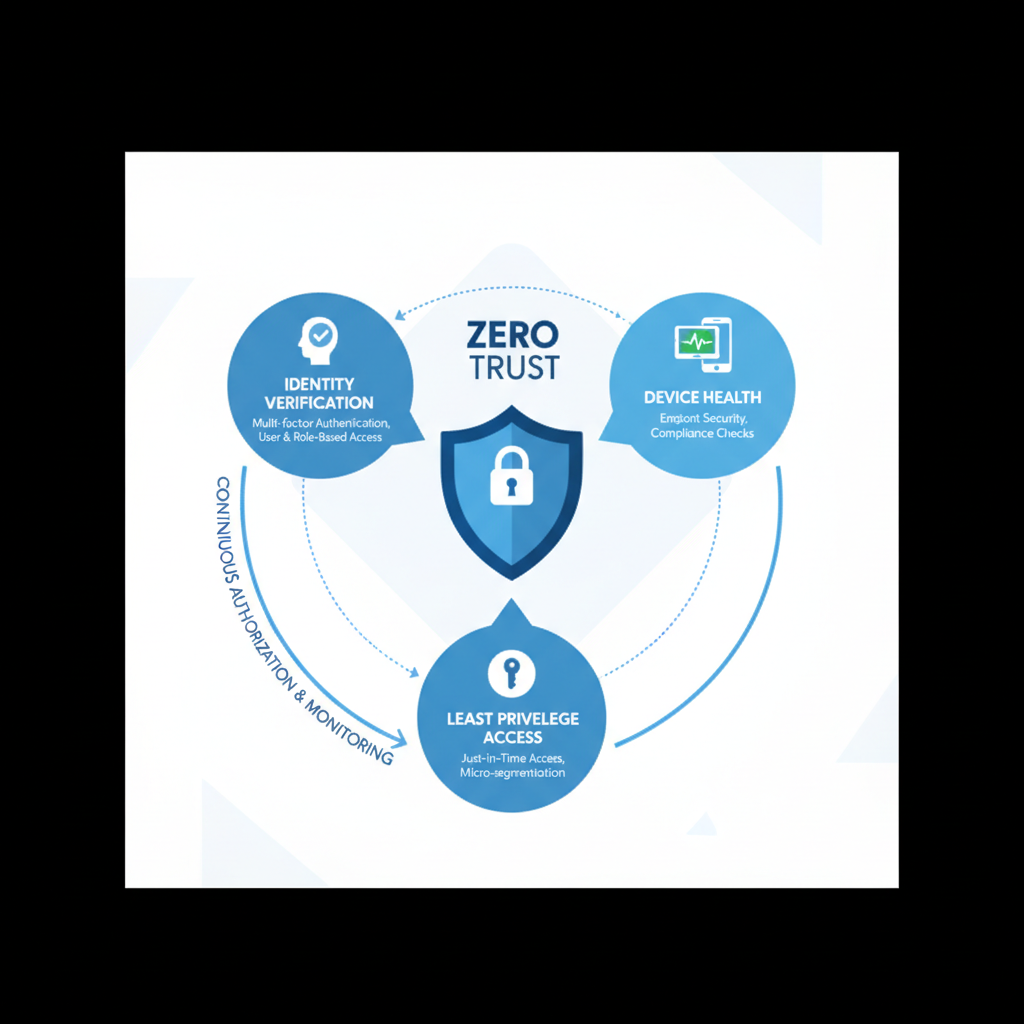
Zero Trust Security is a cybersecurity model that operates on the fundamental principle that no user or device, whether inside or outside an organisation's network, should be inherently trusted. Instead, every access attempt is rigorously authenticated and authorised, marking a significant paradigm shift from traditional security models that assume internal networks are secure. This approach mandates explicit verification based on all available data, including user identity and device health, unlike older methods that simply granted trust based on network location. For instance, an Australian SMB adopting Zero Trust might see a 60% reduction in successful phishing attacks within the first year as every login attempt, even from within the office, requires multi-factor authentication and device health checks. This ensures least privileged access and assumes a breach is inevitable, thereby limiting the potential damage of a successful cyberattack.
The core principles of Zero Trust Security are:
- Verify Explicitly: Always authenticate and authorise based on all available data points, including user identity, device health, location, and service.
- Use Least Privileged Access: Grant users only the minimum level of access required to perform their job functions. This limits the potential impact of a compromised account.
- Assume Breach: Design your security architecture with the assumption that a breach is inevitable. Implement controls to minimise the blast radius and contain the impact of an attack.
Implementing Zero Trust Security requires a holistic approach that encompasses identity and access management, endpoint security, network segmentation, and data protection. Mycelium 365 can help you design and implement a Zero Trust architecture that aligns with your business needs and risk tolerance. We also recommend reading our article on [Secure and Scale with Managed IT Services & Azure](slug: managed-it-services-azure-zero-trust) for a more in-depth look at how we implement Zero Trust principles.
How does Azure provide a secure foundation for cloud infrastructure?
Azure provides a secure foundation for cloud infrastructure through a comprehensive, scalable platform integrated with diverse security services essential for protecting cloud environments from sophisticated cyber threats. These services incorporate robust network security, advanced threat detection capabilities, and stringent data encryption protocols. For example, Azure’s built-in security features, such as Azure Security Center, continuously monitor for vulnerabilities and misconfigurations, delivering real-time alerts and actionable recommendations. Furthermore, Azure leverages machine learning to analyse billions of signals daily, helping to identify and mitigate over 80 million potential threats each day across its global infrastructure. This proactive approach, coupled with adherence to compliance certifications like ISO 27001 and Australian IRAP, ensures a highly resilient and secure environment for hosting critical applications and sensitive data, making it a cornerstone for modern business operations in Australia.
Integrating Azure with Microsoft Defender further strengthens your overall security posture. Defender for Cloud provides threat protection and security management for your Azure resources, while Azure Sentinel provides a cloud-native SIEM (Security Information and Event Management) solution for collecting, analysing, and responding to security events across your entire environment. For business continuity, explore [Azure Backup & Helpdesk: Disaster Recovery for M365](slug: azure-backup-helpdesk-support-disaster-recovery).
Why choose Mycelium 365 as a trusted cybersecurity partner?
Mycelium 365 stands out as a trusted cybersecurity partner due to its commitment to delivering comprehensive solutions that shield businesses from increasingly sophisticated threats, underpinned by a team of battle-tested security professionals. The company particularly excels in assessing an organisation's current security posture, pinpointing critical areas for enhancement, and architecting robust Zero Trust Security frameworks. For example, Mycelium 365 expertly configures and manages Microsoft Defender to secure endpoints, cloud workloads, and identities for diverse Australian businesses, often achieving a reduction in security incidents by 70-85% within the initial 12 months of engagement. Additionally, they facilitate secure infrastructure migration to Azure and provide continuous monitoring and proactive support, ensuring protection that is meticulously tailored to the unique requirements of each client, whether a nimble startup or a sprawling enterprise operating across multiple states.
- Assess your current security posture and identify areas for improvement.
- Develop and implement a Zero Trust Security architecture.
- Configure and manage Microsoft Defender to protect your endpoints, cloud workloads, and identities.
- Migrate your infrastructure to Azure and secure your cloud environment.
- Provide ongoing monitoring and support to ensure your business remains protected.
We understand that every business is unique, and we tailor our solutions to meet your specific needs and requirements. Whether you're a small business or a large enterprise, we can help you strengthen your cybersecurity posture and protect your valuable assets. Consider how this integrates with [Secure Your Business with Azure Backup & Modern Workplace](slug: azure-backup-modern-workplace-business-continuity).

Why are proactive security measures important?
Proactive security measures are crucial because traditional reactive approaches are no longer sufficient to protect against the sophisticated cyber threats prevalent today. Businesses must adopt a continuous, anticipatory approach to cybersecurity, actively monitoring their environment for potential threats and taking deliberate steps to mitigate risks before they materialise. For example, implementing regular security assessments and penetration testing, perhaps quarterly, can uncover vulnerabilities that attackers might exploit, allowing for remediation before a breach occurs. This preventive strategy significantly reduces the likelihood of costly incidents, as Australian businesses, on average, incur over $3.5 million in direct and indirect costs from a single data breach. Such foresight not only safeguards financial resources but also preserves brand reputation and customer trust by maintaining operational continuity and data integrity. Investing in proactive measures ensures a more resilient defence against evolving cybercriminal tactics.
- Regular security assessments and penetration testing.
- Employee security awareness training.
- Incident response planning and testing.
- Staying up-to-date on the latest threats and vulnerabilities.
Mycelium 365 can help you implement a proactive security program that aligns with your business goals and risk tolerance. We provide ongoing security monitoring, vulnerability scanning, and incident response services to ensure your business remains protected.
By combining the power of Microsoft Defender, Zero Trust Security principles, and Azure's secure infrastructure, Mycelium 365 provides a comprehensive cybersecurity solution that protects your business from evolving threats. Contact us today to learn more about how we can help you strengthen your security posture and protect your valuable assets. You might also benefit from [Fortify Your Business with Managed IT Services](slug: managed-it-services-microsoft-defender-it-support). For further reading, consider the Australian Signals Directorate's Information Security Manual: ASD ISM.