Future-Proof Your Business with Strategic Cloud Migration
· By Paul Harvey
In today's rapidly evolving business landscape, agility and resilience are paramount. A well-executed Cloud Migration strategy is no longer a luxury; it's a necessity for sustained growth and competitive advantage. This article explores how leveraging Managed IT Services, implementing robust Disaster Recovery plans, and embracing Zero Trust Security principles can transform your organisation.
Why does cloud migration matter for businesses?
Cloud migration is essential for businesses because it provides a foundation for scalability, significant cost optimisation, and enhanced security, enabling organisations to adapt swiftly to dynamic market conditions. Through migration, businesses can seamlessly adjust their IT resources to meet demand, eliminating the substantial capital expenditure tied to maintaining on-premise hardware. This flexibility not only streamlines operations but also translates into tangible financial benefits, with many Australian businesses, particularly in Melbourne and Sydney, experiencing a 20-30% reduction in IT infrastructure spend within the first year of a strategically planned cloud migration. Furthermore, cloud environments inherently foster improved collaboration among geographically dispersed teams and offer advanced security measures to safeguard sensitive data from evolving cyber threats, making it a critical strategy for maintaining a competitive advantage and a resilient operational posture in today's digital economy.
- Scalability and Flexibility: Easily adjust resources based on demand, avoiding costly over-provisioning.
- Cost Optimisation: Reduce capital expenditure on hardware and lower operational costs through streamlined management.
- Enhanced Collaboration: Facilitate seamless collaboration among teams, regardless of location.
- Improved Security: Implement advanced security measures to protect sensitive data and applications.
For businesses in Melbourne, Sydney, Perth, Brisbane, and beyond, the cloud offers a level playing field, empowering them to compete effectively in the global market. [Learn more about our cloud migration services](slug: seamless-cloud-migration-microsoft-365).

What is the role of managed IT services?
Managed IT services are crucial for businesses seeking expert guidance and comprehensive support to navigate complex technological shifts, such as cloud migration. These services ensure a seamless and successful transition by handling every stage, from initial planning and execution to ongoing maintenance and robust cybersecurity. For instance, a proficient Managed Service Provider (MSP) can significantly de-risk a cloud migration, potentially reducing project timelines by 20% through streamlined processes and pre-emptive problem-solving, preventing costly downtime. They offer continuous, proactive monitoring, rapid incident response, and strategic guidance aligned with business objectives. This allows businesses across Australia to concentrate on their core operations, confident in the knowledge that their IT infrastructure is expertly managed, secure, and performing optimally, ensuring sustained productivity and competitive advantage in a digital-first economy.
- Expert Guidance: Benefit from the knowledge and experience of seasoned cloud professionals.
- Seamless Transition: Minimise disruption to your business operations during the migration process.
- Proactive Monitoring and Support: Ensure optimal performance and uptime with proactive monitoring and rapid response to issues.
- Strategic Planning: Align your IT strategy with your business goals to maximise the value of your cloud investment.
Mycelium 365 offers comprehensive Managed IT Services tailored to Microsoft Modern Workplace solutions, including Microsoft 365, Azure, and more. We provide proactive support, strategic guidance, and expert management to help businesses thrive in the cloud. [Discover how Managed IT Services can transform your business](slug: managed-it-services-cloud-migration-guide).
How does disaster recovery work in the cloud?
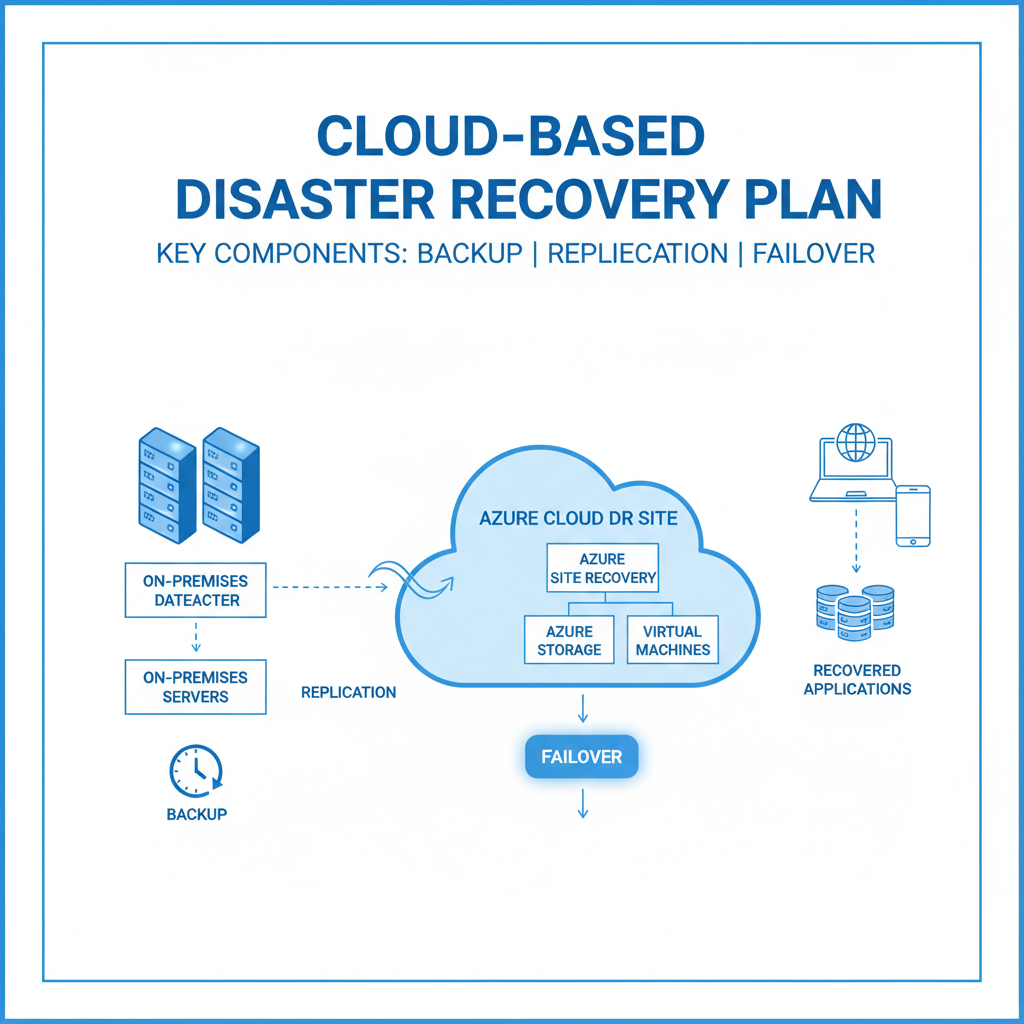
Disaster recovery (DR) in the cloud operates by replicating critical business data, applications, and infrastructure to a secure, off-site cloud platform, enabling organisations to swiftly restore operations after disruptions like cyberattacks, hardware failures, or natural disasters. This provides a cost-effective and reliable alternative to traditional on-premises DR sites, often reducing the total cost of ownership by 30% over five years for Australian businesses. By maintaining up-to-date copies of essential systems in the cloud, businesses can achieve significantly shorter Recovery Time Objectives (RTOs) and Recovery Point Objectives (RPOs). For example, cloud solutions like Azure Backup can reduce recovery times from days to just hours, ensuring minimal impact on business continuity. This proactive strategy not only protects valuable data through automated backups and replication but also aids in meeting stringent regulatory compliance for data protection, fortifying an organisation's resilience against unforeseen events.
- Reduced Downtime: Minimise the impact of disruptions with rapid recovery capabilities.
- Data Protection: Safeguard your valuable data with automated backups and replication.
- Cost-Effective Solution: Avoid the expense of maintaining a separate physical DR site.
- Compliance: Meet regulatory requirements for data protection and business continuity.
Leveraging Azure Backup ensures your data is safe and recoverable. [Explore Azure Backup & Modern Workplace for Business Continuity](slug: azure-backup-modern-workplace-business-continuity). Don't forget to check out [Microsoft 365: Disaster Recovery Essentials](slug: microsoft-365-disaster-recovery-plan) for essential tips. For a holistic plan, consider [Azure Backup & Helpdesk: Disaster Recovery for M365](slug: azure-backup-helpdesk-support-disaster-recovery).
What is zero trust security and how does it work?
Zero Trust Security is a modern cybersecurity framework that operates on the principle of "never trust, always verify," meaning no user or device is inherently trustworthy, irrespective of their location inside or outside the network perimeter. It functions by requiring strict identity verification for every access request, enforcing the principle of least privilege access, and continuously monitoring all network activity for anomalies. For example, an Australian business implementing Zero Trust might leverage tools like Microsoft Intune and Defender for Endpoint to verify every access attempt and ensure ongoing compliance with privacy regulations such as the Australian Privacy Principles, thereby significantly reducing the risk of data breaches. This proactive approach not only enhances the security posture by minimising potential attack surfaces but also provides greater visibility into user actions and potential threats, ultimately streamlining security management and improving regulatory adherence.
- Enhanced Security Posture: Reduce the risk of breaches and data loss with a proactive security approach.
- Improved Compliance: Meet regulatory requirements for data protection and privacy.
- Greater Visibility: Gain insights into user activity and potential threats.
- Simplified Management: Streamline security operations with centralised control and automation.
Microsoft Defender and Intune are key components of a Zero Trust Security strategy. [Learn more about securing your modern workplace with Intune & Defender](slug: secure-modern-workplace-microsoft-defender-intune). Embrace [Secure and Scale with Managed IT Services & Azure](slug: managed-it-services-azure-zero-trust) to fortify your business. You can also find more information on Zero Trust on Microsoft's website.
How can Microsoft 365 and Azure power your cloud journey?
Microsoft 365 and Azure extensively power your cloud journey by providing a robust and integrated platform for both productivity and infrastructure, crucial for Australian businesses transitioning to the cloud. Microsoft 365 offers a comprehensive suite of productivity tools, including email, collaboration via Microsoft Teams, and document management, which significantly streamlines workflows and enhances team efficiency. Concurrently, Azure provides a powerful cloud infrastructure for hosting demanding applications, securely storing petabytes of data, and running virtual machines with high availability. This tight integration allows businesses to seamlessly scale their IT resources, adapting quickly to changing demands without significant capital outlay. For instance, a small business could rapidly expand its cloud storage from 1TB to 10TB in just hours. Leveraging Microsoft's global network of data centres further ensures high availability, advanced security features, and compliance, making these platforms central to a successful and secure cloud migration strategy.
- Seamless Integration: Benefit from the tight integration between Microsoft 365 and Azure.
- Scalable Infrastructure: Easily scale your IT resources to meet changing business needs.
- Advanced Security Features: Protect your data and applications with built-in security features.
- Global Reach: Leverage Microsoft's global network of data centres to reach customers around the world.
Mycelium 365 specialises in Microsoft Modern Workplace solutions, helping businesses maximise the value of their Microsoft 365 and Azure investments. [Discover how Microsoft 365 & Azure can scale your business in 2024](slug: microsoft-365-azure-cloud-migration-guide).
What are the key considerations for cloud migration?
Key considerations for cloud migration involve a strategic assessment of several crucial factors to ensure a successful transition. Businesses must define their objectives for migrating to the cloud and meticulously align their IT strategy, determining which workloads are best suited for a cloud environment. Furthermore, robust security protocols are paramount to protect data and applications, alongside adherence to compliance requirements like ISO 27001, which are critical for many Australian businesses operating in regulated industries such as finance or healthcare. A realistic budget must be allocated for both the initial migration process and the ongoing management of cloud resources, which can often be underestimated by up to 15%. Finally, evaluating the internal team's skills and expertise is vital; if significant gaps exist, engaging experienced managed IT services providers can be a highly effective solution, often accelerating project timelines and ensuring best practices are followed from the outset.
- Business Goals: Define your objectives for cloud migration and align your IT strategy accordingly.
- Workload Assessment: Identify which workloads are best suited for the cloud and prioritise accordingly.
- Security Requirements: Implement robust security measures to protect your data and applications in the cloud.
- Compliance Requirements: Ensure compliance with relevant regulations and industry standards.
- Budget: Develop a realistic budget for cloud migration and ongoing management.
- Skills and Expertise: Assess your internal skills and expertise and consider engaging a Managed IT Services provider to fill any gaps.
Consult resources from reputable sources like Gartner for insights on cloud migration strategies.

What is the conclusion about cloud migration?
Cloud migration is a critical strategic imperative for Australian businesses aiming to secure their future operational resilience and enhance efficiency. Organisations can fully leverage cloud benefits by implementing robust Managed IT Services, comprehensive Disaster Recovery strategies, and modern Zero Trust Security frameworks. This integrated approach ensures not only a smoother transition but also sustained, agile, and scalable operations, allowing businesses to adapt dynamically to evolving market demands. For instance, businesses that successfully migrate core applications to platforms like Microsoft Azure often report up to a 30% reduction in IT operational costs and a 25% improvement in system uptime within the first year. Expert guidance is often essential to navigate the complexities involved, manage data sovereignty, and achieve these significant advantages while mitigating cyber security risks. This proactive stance ensures long-term operational viability in a rapidly changing digital landscape.
Further Reading & Resources:
- Microsoft Azure Documentation
- Australian Cyber Security Centre (ACSC)
- ZDNet Cloud News
- Microsoft Security Blog
- Forrester Research
- [Seamless Cloud Migration to Microsoft 365](slug: seamless-cloud-migration-microsoft-365)
- [Modern Workplace Security: Intune & Defender](slug: secure-modern-workplace-microsoft-defender-intune)