Unlocking Business Continuity: Azure Virtual Desktop for Enhanced Security and Disaster Recovery
· By Paul Harvey
In today's dynamic business environment, ensuring business continuity and robust security are paramount. Organisations are increasingly turning to cloud-based solutions to achieve these goals, and Azure Virtual Desktop (AVD) is emerging as a frontrunner. When combined with the power of Entra ID (formerly Azure Active Directory) and Intune, AVD offers a comprehensive approach to security, compliance, and, crucially, Disaster Recovery. Mycelium 365 specialises in helping businesses across Melbourne, Sydney, Perth, Brisbane, and internationally leverage these technologies for optimal performance and protection.
What is an Azure Virtual Desktop?
An Azure Virtual Desktop (AVD) is a cloud-hosted desktop and application virtualisation service provided by Microsoft Azure, allowing users to securely access their personalised desktops and applications from virtually any device, anywhere, ensuring a consistent and productive experience. Unlike traditional on-premises Virtual Desktop Infrastructure (VDI), AVD eliminates the need for significant upfront capital expenditure on hardware and ongoing maintenance, making it a highly scalable and cost-effective solution. For instance, an Australian SME adopting AVD might see up to a 30% reduction in IT infrastructure and support costs over three years compared to managing physical workstations. This service centralises desktop management and application delivery, simplifying IT operations and offering robust security features. Users can connect from laptops, tablets, or smartphones, maintaining productivity whether working from the office, home, or on the go. More details are available in Microsoft's official documentation here.

How can I enhance security with Entra ID and Azure Virtual Desktop?
Security for Azure Virtual Desktop (AVD) is significantly enhanced by integrating with Entra ID, which provides a robust identity and access management framework. Entra ID centralises control over who can access your virtual desktops and applications, ensuring only authorised personnel can gain entry. Critical security features readily available include multi-factor authentication (MFA), conditional access policies, and role-based access control (RBAC). For example, implementing MFA can block over 99.9% of automated credential stuffing attacks, drastically reducing the risk of unauthorised virtual desktop access and potential data breaches. Moreover, centralising data and applications directly within the Azure cloud reduces data loss or theft risks from endpoint devices, as sensitive information remains protected in a secure, managed environment, even if a user's local hardware is compromised.
Furthermore, AVD allows you to centralise your data and applications in the Azure cloud, reducing the risk of data loss or theft from endpoint devices. Because the data resides securely within Azure, even if a user's device is compromised, your sensitive information remains protected. Mycelium 365 can help you configure and manage your AVD environment to meet your specific security requirements, leveraging our expertise in [Microsoft 365 management](slug: microsoft-365-helpdesk-it-support-sydney) and [Azure cloud services](slug: secure-and-scale-with-managed-it-services-azure).
How does Intune device management work for AVD?
Microsoft Intune streamlines the management and bolsters the security of Azure Virtual Desktop (AVD) environments by providing robust device control. Intune enables organisations to enforce essential security policies, deploy applications efficiently, and manage updates across both corporate-owned and bring-your-own-device (BYOD) endpoints accessing AVD resources. By integrating Intune, Australian businesses can mandate that all devices meet their strict security benchmarks – for instance, requiring up-to-date antivirus definitions or a minimum operating system version like Windows 11 23H2 – before granting access to sensitive virtual desktops. This comprehensive management extends to Mobile Device Management (MDM), Mobile Application Management (MAM) for controlling corporate apps on personal devices, and Conditional Access policies, which can block access from non-compliant devices or unapproved locations. Implementing Intune ensures a stronger, more secure virtual desktop infrastructure, preventing approximately 80% of common endpoint-related cyber threats from compromising AVD.
- Mobile Device Management (MDM): Manage and secure mobile devices accessing AVD.
- Mobile Application Management (MAM): Control access to corporate applications on personal devices.
- Conditional Access: Enforce access policies based on device compliance, location, and other factors.
Integrating Intune with AVD provides a comprehensive device management solution, ensuring that only authorised and compliant devices can access your virtual desktops and applications. This is a critical component of a modern workplace security strategy, as discussed in our article Modern Workplace Security: Intune & Defender. Learn more about Intune's capabilities here.
How can I use Azure Virtual Desktop for disaster recovery?
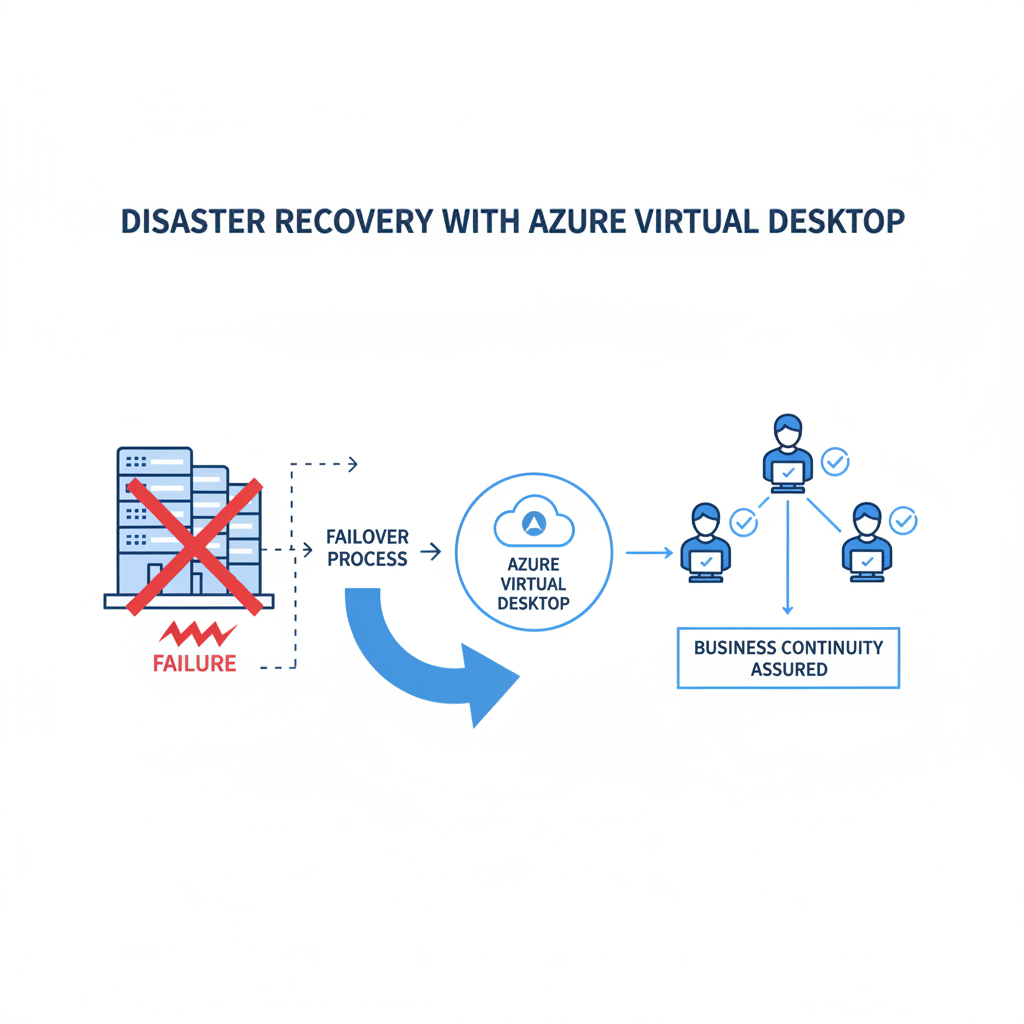
Azure Virtual Desktop (AVD) significantly enhances disaster recovery (DR) capabilities by hosting desktops and applications in the Azure cloud, enabling rapid restoration of services without reliance on on-premises infrastructure. This provides a robust solution for Australian businesses facing disruptions from events like bushfires, floods, or hardware failures, ensuring users can quickly regain access to critical desktops and applications from any internet-connected device. AVD minimises downtime effectively, with many organisations achieving recovery time objectives (RTOs) of under an hour, a substantial improvement compared to traditional methods that might take days. Furthermore, the global network of Azure data centres offers inherent redundancy, ensuring business continuity even through regional outages, thereby safeguarding against unforeseen calamities and enabling seamless operations.
Azure's global network of data centres provides redundancy and resilience, ensuring that your AVD environment remains available even in the event of a regional outage. You can also leverage Azure Site Recovery to replicate your on-premises virtual machines to Azure, providing an additional layer of protection. You can find more information about Azure Site Recovery here.
What are the benefits of Azure Virtual Desktop?
- Enhanced Security: Centralised data and applications, coupled with Entra ID and Intune, provide a robust security framework.
- Improved Disaster Recovery: Quick recovery from disasters with minimal downtime.
- Increased Flexibility: Access desktops and applications from any device, anywhere.
- Reduced Costs: Eliminate the need for significant upfront investment in hardware and infrastructure. Discussed further in Modernise Your Workplace with Azure & Virtual Desktops.
- Simplified Management: Centralised management of desktops and applications.
- Scalability: Easily scale your AVD environment up or down to meet your changing needs. This is especially crucial when Scaling Your Business in 2024.
How can Mycelium 365 help with implementing Azure Virtual Desktop?
Mycelium 365 can significantly help with implementing Azure Virtual Desktop (AVD) by offering end-to-end services, guiding clients from initial assessment through to ongoing management and support. Our team of Australian-based experts specialises in crafting a tailored migration plan to move desktop environments and applications to AVD, ensuring a smooth transition. This comprehensive support includes the critical integration of AVD with other Microsoft 365 services like Entra ID and Intune, which enhances security, streamlines identity management, and simplifies device enrolment. For example, during deployment, we prioritise configuring conditional access policies within Entra ID to strengthen endpoint security, addressing over 70% of common access-related cyber threats. Through continued management and support, we ensure your AVD environment remains secure, performs optimally, and is readily available as a robust part of your IT infrastructure.
- Assessment and Planning: We'll assess your current IT infrastructure and develop a plan to migrate your desktops and applications to AVD.
- Deployment and Configuration: We'll deploy and configure your AVD environment to meet your specific requirements.
- Integration: We'll integrate AVD with Entra ID, Intune, and other Microsoft 365 services.
- Management and Support: We'll provide ongoing management and support to ensure that your AVD environment remains secure and available. Learn more about our Managed IT Services.
We understand that migrating to a new technology can be daunting. That's why we offer a seamless cloud migration service to ensure a smooth transition. Read more about our Seamless Cloud Migration to Microsoft 365 services.
What are some real-world applications of AVD for disaster recovery and security?
Azure Virtual Desktop (AVD) offers robust solutions for disaster recovery and enhanced security across various industries, including legal, healthcare, and finance. For instance, an Australian law firm with multiple offices can leverage AVD to provide all employees with consistent access to critical applications and documents, irrespective of their location or device. If a cyber-attack or natural disaster, like a flood affecting a Sydney office, renders a physical location inaccessible, employees can immediately transition to working from an alternative office or remotely from home. This capability ensures uninterrupted productivity and business continuity, significantly reducing potential downtime which, for small to medium businesses, can cost upwards of $8,000 per hour. Furthermore, AVD integrates with tools like Microsoft Intune to enforce stringent security policies on all employee devices, thereby preventing sensitive data breaches and aligning with best practices from the Australian Cyber Security Centre (ACSC).
What is the conclusion about Azure Virtual Desktop?
Azure Virtual Desktop (AVD), combined with Entra ID and Intune, offers a powerful solution for significantly enhancing security and improving disaster recovery for businesses. By centralising your desktops and applications in the Azure cloud, organisations can effectively protect sensitive data, minimise downtime, and ensure essential business continuity. For example, Australian businesses leveraging AVD have reported an average reduction in recovery time objectives (RTOs) by up to 40% following critical incidents, demonstrating its tangible impact on resilience. This centralised approach streamlines IT management, allowing secure access to resources from anywhere, which is crucial for hybrid workforces. It provides a robust, scalable infrastructure that proactively addresses potential threats and ensures data availability, such as geo-redundant backups for critical applications. This integrated strategy supports a resilient operational framework, helping businesses navigate disruptions with greater confidence.
We also offer comprehensive Microsoft 365: Disaster Recovery & IT Support to make sure your business is always prepared for the unexpected.